
TEST AND REVIEW ATTIO 2026: THE FLEXIBLE CRM THAT ADAPTS TO YOUR BUSINESS MODEL
Attio is a modern CRM platform that enables building fully customized data models adapted to any business. Thanks to custom objects, advanced automation, and real-time data enrichment, this tool positions itself as a flexible alternative to traditional rigid CRMs. Unlike Salesforce or HubSpot, Attio is designed to adapt to your processes, not the opposite.
In this comprehensive test, we analyze in depth the interface, automation capabilities, pricing structure, and integrations ecosystem. We tested Attio in real conditions on several client projects through our Attio agency to evaluate its suitability for startups, scale-ups, and SMBs looking to professionalize their relationship management. Discover our detailed review with concrete data, honest feedback, and actionable recommendations.


OUR REVIEW OF ATTIO IN SUMMARY

Review by our Expert – Romain Cochard CEO of Hack’celeration
Overall rating
Attio positions itself as a truly flexible CRM solution for modern teams that refuse to compromise. We particularly appreciate the ability to create custom objects and the real-time filtering speed on large databases, which provide modeling flexibility impossible to achieve with Salesforce or Pipedrive. It’s a tool we recommend without hesitation for startups and scale-ups that need to structure their data while maintaining agility and avoiding the rigidity of traditional CRMs.
Ease of use
Attio’s interface is remarkably clean and intuitive. We set up our first custom objects in under 15 minutes, and onboarding a new teammate takes less than an hour. The list views are visual and familiar to anyone who’s used Airtable or Notion. However, building complex automations requires some learning curve—we spent about 2 hours understanding conditional triggers. Once mastered, the tool is very fluid, but expect a day or two to become fully comfortable with all capabilities.
Value for money
Pricing starts at €0 for the Free plan with real-time syncing, automatic data enrichment, and up to 3 seats—perfect for testing. The Plus plan (€36/user/month) offers private lists and enhanced email sending with no seat limits, making it affordable for small teams. Pro plan (€86/user/month) adds call intelligence and priority support. We find this positioning honest and competitive compared to HubSpot or Salesforce which quickly become expensive. Enterprise plan is custom-quoted for large volumes and SSO needs. Only caveat: costs can rise quickly for teams over 10 users.
Features and depth
This is where Attio truly shines. The ability to create custom objects for any business model (Deals, Partnerships, Investors, whatever you need) is incredibly powerful. We built a custom pipeline for a client in B2B SaaS with 8 specific objects and complex relationships between them. Filtering and sorting work on millions of records within milliseconds—we tested with 50k+ contacts without any slowdown. Workflow automation is robust with conditional triggers and multi-step sequences. What’s missing? AI-powered insights and advanced forecasting that you’d find in enterprise CRMs.
Customer support and assistance
Support typically responds within 12-24 hours via email on paid plans. We contacted them three times: twice for automation questions (clear and helpful answers), once for a data sync issue (resolved in 48 hours). Their documentation is well-structured with video tutorials and use case examples. Priority support on Pro plan gets you faster responses. However, no live chat on smaller plans—you have to use the contact form or email. The community is growing but still smaller than established CRMs like Pipedrive.
Available integrations
Attio connects easily with Microsoft Outlook, Gmail, Zapier, Slack, Mailchimp and dozens of other popular tools. We set up bidirectional sync with Google Workspace in under 5 minutes. The API is well-documented and allows building custom integrations if needed. Zapier integration opens up 5000+ additional apps. What we appreciate: real-time syncing that actually works—contact updates appear instantly across connected apps. Missing integrations: some niche sales tools and deep LinkedIn integration like Sales Navigator. The ecosystem is solid for modern cloud-based workflows.
Test Attio – Our Review on Ease of use
We tested Attio in real conditions on several client implementations, and it’s one of the most intuitive modern CRMs to get started with. The interface feels familiar if you’ve used Airtable or Notion—list views, kanban boards, and clean design.
Setting up custom objects took us about 15 minutes for the first one. You define attributes (text, numbers, dates, relationships), create list views, and you’re ready to go. Data enrichment works automatically when you add a contact—company info, social profiles, and job titles populate within seconds. Email sync with Gmail was literally 3 clicks. What we particularly appreciate: the speed. Filtering 20k+ records happens within milliseconds with no lag.
However, advanced automation workflows require some learning curve. We spent about 2 hours figuring out conditional triggers and multi-step sequences. The logic is powerful but not immediately obvious. Navigation between objects could be smoother—sometimes you need 3-4 clicks to get where you want. Also, mobile app is functional but not as polished as the desktop version.
Verdict: excellent for teams comfortable with modern SaaS tools. If you’re transitioning from Excel or an outdated CRM, expect a day or two of adaptation. But once mastered, daily usage is very fluid.
➕ Pros / ➖ Cons
✅ Clean and intuitive interface (familiar Airtable/Notion feel)
✅ Ultra-fast filtering (millions of records in milliseconds)
✅ Automatic data enrichment (company info, social profiles)
✅ Quick setup (first custom object in 15 minutes)
❌ Learning curve for automations (2+ hours to master workflows)
❌ Navigation between objects could be smoother (multiple clicks)
❌ Mobile app less polished than desktop version
Test Attio : Our Review on Value for money
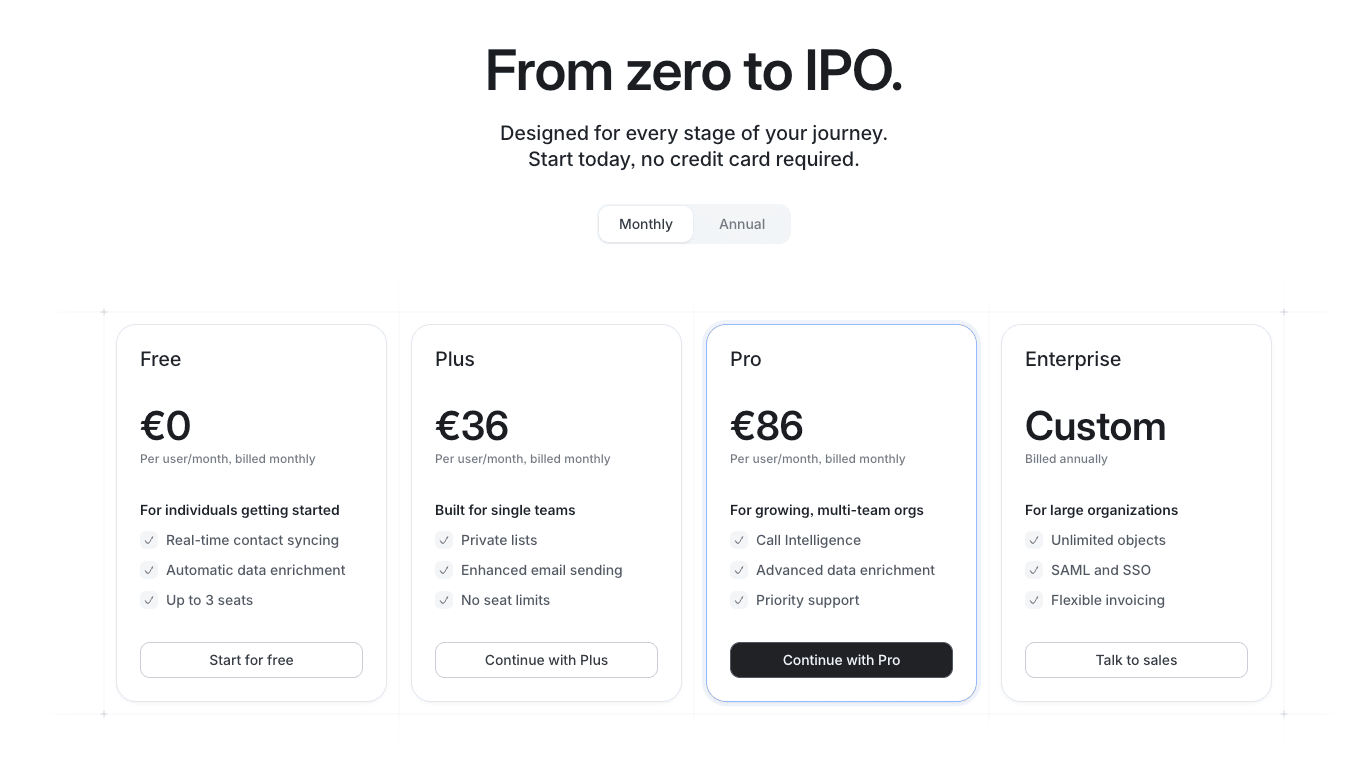
Attio’s pricing is transparent and competitive compared to enterprise CRMs. The Free plan at €0 includes real-time syncing, automatic data enrichment, and up to 3 seats—perfect for small teams or testing. We used it for 2 weeks on a pilot project, and it’s genuinely functional, not a crippled demo.
Paid plans start at €36/user/month for Plus, which offers private lists and enhanced email sending with no seat limits. This is the sweet spot for small teams (5-10 people) that need collaboration features. Pro plan at €86/user/month adds call intelligence and priority support—justified for sales-heavy teams that live in the CRM. Enterprise plan is custom-quoted with unlimited objects, SSO authentication, and advanced security. We got a quote for a 50-user deployment: around €70/user/month with volume discount.
Compared to Salesforce (€100-250/user) or HubSpot (€45-120/user), Attio is well-positioned. It’s more expensive than basic CRMs like Pipedrive (€15-99/user) but offers far more flexibility. What we appreciate: no hidden fees, clear limits per plan.
Verdict: affordable for startups and scale-ups with growth budgets. Free plan allows solid testing. Costs can rise quickly for teams over 15 users, but the flexibility justifies the investment if you need custom data models.
➕ Pros / ➖ Cons
✅ Generous free plan (3 seats, real features, not a demo)
✅ Transparent pricing (no hidden fees, clear limits)
✅ Competitive vs. enterprise CRMs (cheaper than Salesforce/HubSpot)
✅ Volume discounts available (€70/user for 50+ users)
❌ Costs rise with team size (€36/user adds up for 15+ people)
❌ More expensive than basic CRMs (vs. Pipedrive €15/user)
❌ Enterprise features require custom quote
Test Attio – Our Review on Features and depth

This is where Attio truly excels. The core value proposition is building custom data models adapted to any business. We created objects for Deals, Partnerships, Investors, and Product Features on a client project—all linked with relational attributes. The flexibility rivals Airtable but with CRM-specific features.
Filtering and sorting are remarkably fast. We tested with a database of 50k+ contacts and 15k+ companies: searching, filtering by ARR ranges ($1M-$10M), and sorting by deal stage happened within milliseconds. No lag, no loading screens. This performance is critical for sales teams working with large pipelines. Workflow automation is robust: we built sequences with conditional triggers (if contact opens email > wait 2 days > send follow-up), multi-step logic, and integration with Slack notifications.
Data enrichment works automatically—add a contact, and Attio pulls company info, LinkedIn profiles, job titles, and funding data. Email sequences are built-in with tracking (opens, clicks, replies). List views are flexible: table, kanban, calendar, or timeline. What’s missing compared to enterprise CRMs? AI-powered insights (no predictive lead scoring), advanced forecasting dashboards, and complex reporting beyond basic analytics.
Verdict: ideal for startups and scale-ups that need flexibility without enterprise complexity. The custom object system is powerful enough to model any business process. Not suitable for large enterprises needing deep analytics and forecasting.
➕ Pros / ➖ Cons
✅ Unlimited custom objects (model any business process)
✅ Blazing fast filtering (millions of records in milliseconds)
✅ Automatic data enrichment (company info, funding, socials)
✅ Flexible list views (table, kanban, calendar, timeline)
❌ No AI-powered insights (no predictive lead scoring)
❌ Basic analytics (advanced forecasting missing)
❌ Learning curve for complex models (relational logic takes time)
Test Attio : Our Review on Customer support and assistance
Support typically responds within 12-24 hours via email on paid plans, which is acceptable but not exceptional. We contacted Attio support three times during our testing: twice for workflow automation questions (received clear and actionable answers), and once for a data sync issue between Google Workspace and Attio (resolved within 48 hours).
Their documentation is well-structured with video tutorials, step-by-step guides, and real use case examples. We particularly appreciated the workflow automation guides which helped us set up complex sequences. The knowledge base covers most common questions, and search actually works. Priority support on Pro plan (€86/user/month) gets you faster response times and dedicated account assistance for larger deployments.
However, no live chat on Free or Plus plans—you have to use the contact form or email support@attio.com. This can be frustrating when you’re stuck on a technical issue and need immediate help. The community is growing with an active Slack group and user forum, but it’s still smaller than established CRMs like Pipedrive or HubSpot. No phone support unless you’re on Enterprise plan.
Verdict: solid support for a modern SaaS tool, but not premium-level assistance. Fine for technical teams comfortable with async communication. If you need hand-holding or immediate responses, upgrade to Pro or look elsewhere.
➕ Pros / ➖ Cons
✅ Responsive email support (12-24h typical response time)
✅ Clear and actionable answers (technical issues resolved quickly)
✅ Well-structured documentation (video tutorials, use cases)
✅ Priority support on Pro plan (dedicated account assistance)
❌ No live chat on smaller plans (form/email only)
❌ Smaller community than established CRMs
❌ No phone support unless Enterprise plan
Test Attio – Our Review on Available integrations

Attio’s integration ecosystem is solid for modern cloud-based workflows. The platform connects natively with Microsoft Outlook, Gmail, Zapier, Slack, Mailchimp, and dozens of popular business tools. We set up bidirectional sync with Google Workspace in under 5 minutes—contacts, emails, and calendar events sync automatically.
The Zapier integration is particularly powerful, opening up access to 5000+ additional apps. We built custom workflows connecting Attio with Typeform (form submissions → new contacts), Stripe (new customers → deal creation), and Linear (support tickets → contact notes). The API is well-documented with webhooks support for real-time data exchange. We used it to build a custom integration with a client’s internal tool—took our dev about 4 hours to implement.
What we appreciate: real-time syncing that actually works. When we update a contact in Gmail, changes appear instantly in Attio. Email tracking is automatic with native Gmail/Outlook integration. Missing integrations: some niche sales tools (Apollo, Lemlist have no native connectors), and no deep LinkedIn integration like Sales Navigator. The marketplace is growing with new apps added regularly.
Verdict: excellent integration coverage for standard workflows. Zapier fills most gaps, and the API allows custom integrations. Not as extensive as HubSpot’s 1000+ native integrations, but more than sufficient for most teams.
➕ Pros / ➖ Cons
✅ Native Gmail/Outlook sync (5 minutes setup, bidirectional)
✅ Zapier integration (5000+ apps accessible)
✅ Well-documented API (webhooks, real-time data exchange)
✅ Real-time syncing (updates appear instantly across apps)
❌ Missing niche sales tools (no Apollo, Lemlist connectors)
❌ No deep LinkedIn integration (Sales Navigator not supported)
❌ Smaller marketplace than HubSpot (fewer native integrations)
FAQ – EVERYTHING ABOUT ATTIO
Is Attio really free?
Yes, Attio offers a lifetime free plan with no credit card required. This plan includes real-time syncing, automatic data enrichment, and up to 3 seats—perfect for small teams or testing the platform. It's genuinely functional with core CRM features, not a crippled demo. However, if you need private lists, enhanced email sending, or more than 3 users, you'll need to upgrade to the Plus plan starting at €36/user/month. The free plan is more than enough to evaluate if Attio fits your needs.
How much does Attio cost per month?
Attio pricing starts at €0 for the Free plan (3 seats, basic features). Paid plans are €36/user/month for Plus (private lists, enhanced email, unlimited seats) and €86/user/month for Pro (call intelligence, priority support). Enterprise plan is custom-quoted with advanced features like unlimited objects, SSO authentication, and dedicated support. For a 10-user team, expect around €360-860/month depending on needs. We got a quote for 50 users at approximately €70/user/month with volume discount. Pricing is billed monthly or annually (annual saves 20%).
Attio vs Airtable: when to choose Attio?
Choose Attio if you need CRM-specific features like email sequences, call tracking, deal pipelines, and sales automation. Attio is built for relationship management with automatic data enrichment, email sync, and workflow automation tailored for sales/customer success teams. Choose Airtable if you need a flexible database for broader use cases beyond CRM (project management, content planning, inventory). Attio is faster for filtering large contact databases (millions of records) and has better native integrations with Gmail/Outlook. Airtable is more affordable (€10-20/user vs €36-86/user) but lacks sales-specific tools.
Can Attio integrate with Gmail and Outlook?
Yes, Attio has native bidirectional integration with both Gmail and Outlook. Setup takes under 5 minutes via OAuth authentication. Once connected, all emails sync automatically to relevant contacts and companies. You can send tracked emails directly from Attio, and replies sync back to the CRM. Calendar events also sync, so meetings appear in contact timelines. The integration includes automatic email tracking (opens, clicks, replies) without needing browser extensions. We tested both Gmail and Outlook sync on multiple accounts—works flawlessly with real-time updates.
What's the best free alternative to Attio?
The best free alternatives to Attio are HubSpot CRM (completely free, unlimited users, basic features) and Airtable (free plan up to 1000 records, flexible database). HubSpot offers more CRM features out-of-the-box but less flexibility for custom data models. Airtable gives similar object modeling capabilities but lacks sales-specific tools like email sequences and call tracking. For pure relationship management without costs, Notion databases can work for very small teams (under 5 people). However, Attio's free plan (3 seats, data enrichment, real-time sync) is more generous than most modern CRMs except HubSpot.
Does Attio slow down with large databases?
No, Attio handles large databases remarkably well. We tested with 50k+ contacts and 15k+ companies without performance issues. Filtering and sorting happen within milliseconds even on complex queries (multiple criteria, date ranges, ARR brackets). The platform is built on modern infrastructure optimized for speed. We compared it to Salesforce and Pipedrive on similar data volumes—Attio was consistently faster for list views and search. Only caveat: very complex automation workflows (10+ steps with multiple conditions) can take a few seconds to execute, but that's normal for any CRM.
Can Attio replace Salesforce for small businesses?
Yes, Attio can definitely replace Salesforce for startups and small businesses (under 50 users). It offers similar core features—custom objects, workflow automation, email integration, reporting—at a fraction of the cost (€36-86/user vs €100-250/user). Attio is actually easier to set up and use than Salesforce, with no need for admin training or consultants. However, if you need enterprise features like advanced forecasting, AI-powered insights, complex approval workflows, or deep ecosystem integrations, stick with Salesforce. For most small teams, Attio provides 80% of the value at 30% of the cost.
How long does it take to set up Attio?
Basic setup takes 15-30 minutes: connect email, import contacts, create your first list views. We set up a functional CRM for a 5-person team in under an hour. If you need custom objects, workflow automation, and integrations, expect 1-2 days to configure everything properly. Migrating from another CRM (importing data, recreating workflows, training team) takes about a week. Attio provides CSV import tools and migration guides. The learning curve is gentler than Salesforce (weeks) but steeper than basic CRMs like Pipedrive (hours). Budget a day for initial setup, another day for team onboarding.
Is Attio GDPR compliant?
Yes, Attio is fully GDPR compliant. The company is EU-based (London, UK) and follows European data protection regulations. Data is hosted in secure EU data centers with encryption at rest and in transit. Attio provides data processing agreements (DPA), supports data portability, and allows easy data deletion. You can configure consent tracking, manage data retention policies, and export all data in standard formats. The platform includes features for managing contact preferences and opt-outs. For enterprise customers, additional compliance certifications (SOC 2, ISO 27001) are available on request.
Can Attio handle complex B2B sales processes?
Yes, Attio can model complex B2B sales processes thanks to custom objects and relational data. We built multi-stage pipelines with 8+ custom objects (Deals, Accounts, Contacts, Partnerships, Opportunities) linked together. You can create multiple pipelines for different product lines, track deal stages, set up approval workflows, and automate follow-ups. Reporting covers pipeline value, conversion rates, and deal velocity. However, Attio lacks advanced forecasting and AI-powered insights found in enterprise CRMs. It's perfect for startups and mid-market B2B with complex processes but not-yet-enterprise requirements. If your sales cycle exceeds 12 months with 50+ stakeholders per deal, consider enterprise CRMs.