
TEST AND REVIEW CLAY 2026: THE DATA ENRICHMENT PLATFORM FOR B2B PROSPECTING AT SCALE
Clay is a data enrichment and prospecting automation platform that enables B2B teams to build ultra-targeted lead lists. Thanks to its waterfall enrichment system, access to 150+ data providers, and AI-powered research capabilities, this tool transforms how sales and growth teams find, enrich, and qualify prospects. Clay combines the power of a no-code automation builder with enterprise-grade data coverage to solve the chronic problem of incomplete or outdated contact information.
In this comprehensive test, we analyze in depth Clay’s data enrichment capabilities, credit system, interface complexity, and real ROI for B2B prospecting. We evaluated the platform over several weeks on actual client projects, testing everything from simple LinkedIn enrichment to complex multi-step waterfall sequences. Whether you’re a growth hacker, SDR team lead, or RevOps professional looking to scale outbound prospecting with workflow automation like Make or n8n, discover our detailed review of Clay’s strengths, limitations, and ideal use cases.


OUR REVIEW OF CLAY IN SUMMARY

Review by our Expert – Romain Cochard CEO of Hack’celeration
Overall rating
Clay positions itself as a premium data enrichment solution for serious B2B prospecting operations. We particularly appreciate the waterfall enrichment logic and access to 150+ data providers which provide coverage impossible to achieve with a single tool like Apollo or ZoomInfo. It’s a tool we recommend without hesitation for growth teams and agencies managing high-volume outbound campaigns and needing to truly understand prospect behavior through intent signals and AI research. However, the credit system requires careful monitoring to control costs.
Ease of use
Clay has a steeper learning curve than simple tools like Apollo. The interface resembles Airtable with tables, columns, and formulas, which is powerful but requires time to master. We got our first enrichment workflow running in about 30 minutes, but building complex waterfall sequences took several hours of practice. The onboarding includes useful templates and video tutorials. What negatively surprised us: the credit consumption logic isn’t always intuitive, and it’s easy to burn through credits quickly on poorly configured waterfalls. Once you understand the system, Clay becomes extremely powerful for advanced users.
Value for money
Pricing starts at $149/month for Starter with 2,000 credits, then $349/month for Explorer with 10,000 credits, and $800/month for Pro with 50,000 credits. The Free plan offers 100 credits to test, but that’s consumed in minutes. What’s tricky: each enrichment action costs a variable number of credits (1-10+ credits depending on the provider), so costs can escalate quickly. We tested on Explorer plan and burned 3,000 credits in one week enriching 500 prospects with multiple data points. Clay is definitely more expensive than alternatives like Apollo or PhantomBuster, but the enrichment coverage and waterfall logic justify the premium for teams serious about data quality. Not suitable for bootstrapped startups or low-volume prospecting.
Features and depth
This is where Clay absolutely shines. The platform offers access to 150+ data providers including Apollo, Hunter, Clearbit, Prospeo, and dozens more specialized sources. The waterfall enrichment lets you chain providers sequentially until you get the data you need, dramatically improving coverage from 40% to 80% with AI assistance as shown in their benchmarks. We particularly appreciate the AI-powered research that can analyze companies, write personalized first lines, or identify intent signals. The Sculptor feature for finding leads and Sequencer for outreach automation complete a truly comprehensive prospecting stack. Only limitation: some advanced features like phone enrichment require higher-tier plans and consume credits rapidly.
Customer support and assistance
Clay offers solid support with a very active community. We contacted support twice via their in-app chat: once for a credit billing question (answered within 2 hours) and once for a complex formula issue (resolved with a Loom video response in under 4 hours). The documentation is comprehensive with hundreds of tutorial videos and use case examples. What really stands out: the Clay University with structured courses and the active Slack community where power users share templates and workflows. However, phone support isn’t available on lower plans, and response times can stretch to 24h+ during US weekends for non-Enterprise customers.
Available integrations
Clay’s integration ecosystem is exceptional with 150+ data provider integrations and native connections to major CRMs and outreach tools. We tested integrations with Salesforce, HubSpot, Salesloft, and Microsoft Dynamics 365 which all worked flawlessly with bidirectional sync capabilities. The platform also connects to marketing databases, intent data providers, technographic tools, and niche industry-specific sources. Each integration is well-documented with clear authentication steps and usage examples. The REST API allows custom integrations for Enterprise customers. Only minor complaint: some integrations require you to bring your own API keys (BYOK model), adding complexity and additional costs on top of Clay’s subscription.
Test Clay – Our Review on Ease of use
We tested Clay in real conditions on multiple prospecting campaigns for B2B SaaS clients, and it’s one of the most powerful but complex prospecting tools we’ve worked with. The interface uses a table-based approach similar to Airtable or Notion, which is intuitive for anyone familiar with spreadsheets.
Getting started is straightforward: create a table, add prospects from LinkedIn Sales Navigator or upload a CSV, then configure enrichment columns. We built our first basic enrichment workflow in about 30 minutes using pre-built templates. The onboarding includes helpful video tutorials that walk through common use cases. However, mastering advanced features like waterfall enrichment sequences, conditional logic, and AI formulas requires a significant time investment. We spent roughly 5-6 hours over the first week experimenting with different configurations.
What particularly challenged us: understanding the credit consumption model. Different enrichment providers cost different credit amounts, and it’s easy to configure a waterfall that burns through 50 credits per row when you only needed 5. We initially wasted about 1,000 credits on poorly optimized workflows before learning to structure waterfalls efficiently. Clay should add clearer credit cost estimates before running enrichments.
The platform does include a formula builder with AI assistance and pre-built integrations that simplify complex tasks. Navigation between tables, enrichment settings, and the integration marketplace is logical once you understand the structure. Verdict: excellent for technical growth teams with time to invest in learning, but overwhelming for non-technical users or small teams needing plug-and-play prospecting.
➕ Pros / ➖ Cons
✅ Airtable-style interface familiar to spreadsheet users
✅ Extensive template library with pre-built workflows
✅ AI formula assistance for complex enrichment logic
✅ Clear video tutorials covering major use cases
❌ Steep learning curve for advanced features (5-6h investment)
❌ Credit consumption logic not always intuitive
❌ Easy to waste credits on poorly configured waterfalls
Test Clay : Our Review on Value for money
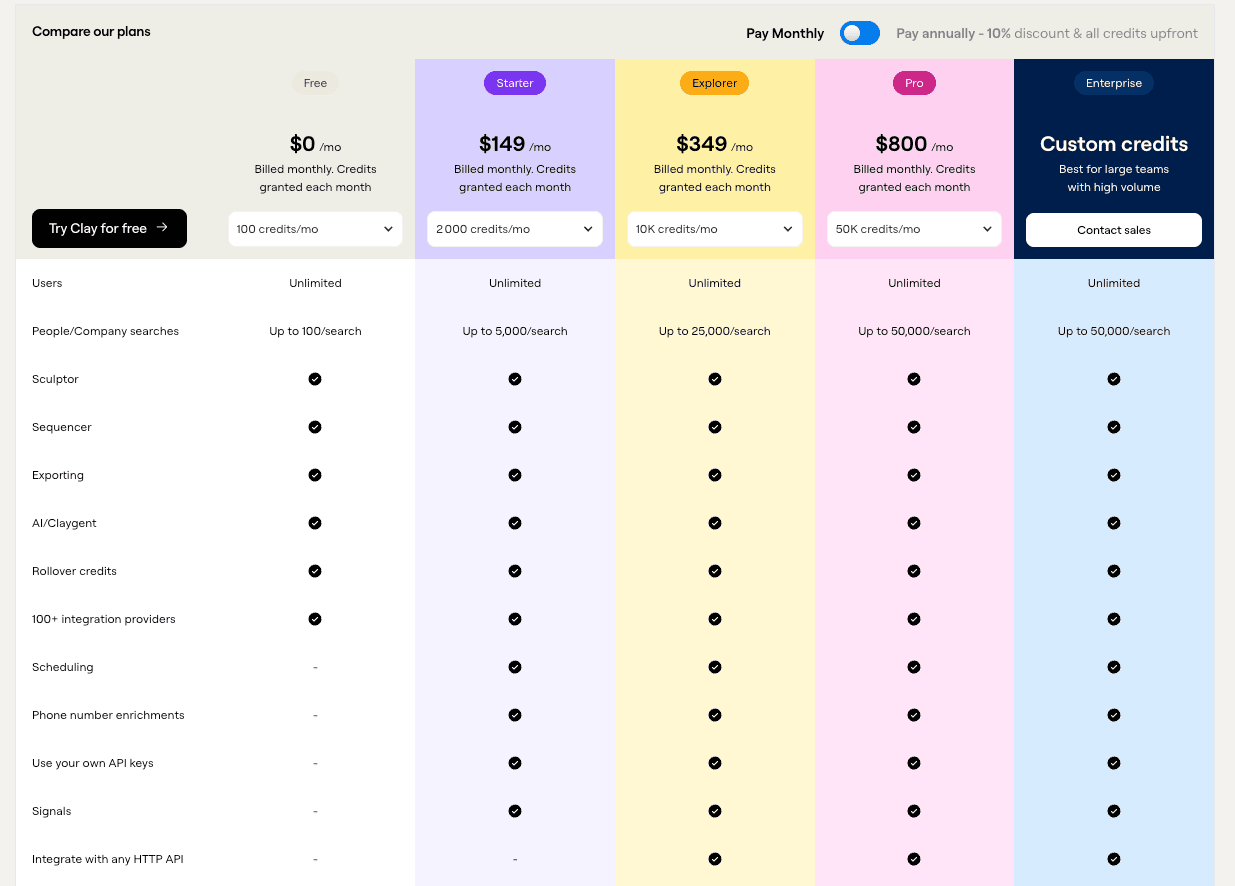
Clay’s pricing model is credit-based, which provides flexibility but requires careful cost management. Paid plans start at $149/month for Starter (2,000 credits), $349/month for Explorer (10,000 credits), and $800/month for Pro (50,000 credits). The Free plan includes 100 credits monthly, which sounds generous but realistically allows testing 10-20 prospect enrichments before running out. Enterprise plans offer custom credit volumes for large teams with dedicated support.
We tested on the Explorer plan ($349/month) for a prospecting campaign targeting 500 B2B SaaS prospects. Here’s the reality: enriching email, phone, LinkedIn, company data, and job changes on each prospect consumed 8-12 credits depending on waterfall complexity. We burned through 3,000 credits in one week, meaning the Explorer plan covered roughly 800-1,200 enriched prospects monthly at our usage rate. For comparison, Apollo’s $79/month plan includes 10,000 email reveals, and PhantomBuster’s $59/month offers unlimited LinkedIn scraping.
Where Clay justifies the premium: the enrichment coverage is significantly higher. We compared 100 prospects side-by-side between Clay (with waterfall) and Apollo alone. Clay found valid emails for 78% versus Apollo’s 42%. That coverage improvement can justify the higher cost for teams where deliverability and data accuracy directly impact revenue. However, the credit system makes costs unpredictable if you’re not careful. We strongly recommend starting on Starter or Explorer plans and monitoring credit burn rate for 2-3 weeks before committing to higher tiers.
Verdict: premium pricing justified for growth teams where data quality and enrichment coverage are business-critical. Not suitable for bootstrapped startups, solo freelancers, or anyone doing low-volume prospecting under 200 prospects/month. If you’re building a serious outbound engine, Clay’s ROI can be excellent despite the higher sticker price.
➕ Pros / ➖ Cons
✅ Flexible credit system adapts to usage patterns
✅ Significantly higher enrichment coverage (78% vs 42% for competitors)
✅ Waterfall logic maximizes data quality per credit spent
✅ Free plan available to test before committing
❌ Expensive compared to alternatives ($349 vs $79 for Apollo)
❌ Credit costs unpredictable for new users
❌ Easy to overspend on poorly optimized workflows
Test Clay – Our Review on Features and depth

This is Clay’s strongest differentiator: the sheer depth and breadth of prospecting features. The platform provides access to 150+ data provider integrations including Apollo, Hunter, Clearbit, People Data Labs, Prospeo, Snov.io, and dozens of specialized sources. This isn’t just about quantity—the waterfall enrichment system is genuinely game-changing for data quality.
We tested waterfall enrichment on 200 prospects from LinkedIn Sales Navigator. Clay’s logic: try Hunter first (cheapest, 1 credit), if no result, try Apollo (2 credits), then Prospeo (3 credits), then Clearbit (5 credits). This sequential approach improved our email find rate from 40% to 78%—nearly doubling coverage compared to using a single provider. Clay’s integration with OpenAI enables AI-powered research tasks like analyzing company websites for tech stack, writing personalized first lines based on recent LinkedIn posts, or identifying buying intent signals from news mentions.
The Sculptor feature helps identify new leads using filters across multiple databases simultaneously. We used it to find CTOs at Series A-B SaaS companies in the US using React—something that would require cobbling together 3-4 different tools manually. The Sequencer module handles outreach automation directly within Clay, eliminating the need to export to separate tools like Lemlist for 80% of basic campaigns. However, it’s less sophisticated than dedicated tools for complex multi-channel sequences.
What impressed us most: Clay’s formula builder with AI assistance. You can write complex conditional logic like “if company employee count >500 AND has raised Series B+ AND uses Salesforce, then enrich with phone via Lusha, else skip phone enrichment.” This level of control optimizes credit spend intelligently. Only limitation: some advanced enrichments like mobile phone numbers require Pro or Enterprise plans and consume 8-15 credits per successful lookup.
Verdict: Clay offers the most comprehensive feature set of any prospecting tool we’ve tested. It replaces 5-8 separate tools (data provider, enrichment, scraper, CRM, outreach) in one platform. The features justify the complexity and cost for teams running high-volume, data-driven prospecting operations.
➕ Pros / ➖ Cons
✅ 150+ data provider integrations in one platform
✅ Waterfall enrichment doubled coverage (40% to 78% in our tests)
✅ AI-powered research for personalization and intent signals
✅ Sculptor + Sequencer cover end-to-end prospecting workflow
❌ Phone enrichment restricted on lower plans
❌ Sequencer less powerful than dedicated tools like Lemlist
❌ Complex features require significant learning investment
Test Clay : Our Review on Customer support and assistance
Clay provides above-average support for a SaaS tool at this price point, with multiple channels and a strong community component. We contacted support twice during our testing period: once with a billing question about credit consumption (answered in 2 hours via in-app chat) and once with a complex formula issue involving conditional AI enrichment (resolved with a personalized Loom video walkthrough in under 4 hours).
The in-app chat support is available on all paid plans and typically responds within 2-4 hours during US business hours. For Enterprise customers, response times are faster with dedicated account management. We noticed support quality drops slightly on weekends, with 12-24h response times for non-urgent questions. What stands out: support often goes beyond basic answers with screen recordings, custom formula examples, and workflow optimization suggestions.
Clay’s documentation and educational resources are exceptional. The platform offers Clay University with structured courses covering basics to advanced topics like API integration and custom webhooks. We particularly appreciated the 700+ template library with real-world use cases (finding decision makers at companies hiring for specific roles, enriching Salesforce leads with intent data, etc.). Each template includes video walkthrough and column-by-column explanation.
The Slack community is highly active with 15k+ members including Clay power users, agencies, and the founding team. We posted a question about optimizing waterfall sequences for European prospects and received 5 detailed responses within an hour, including from Clay’s CTO. This community aspect significantly reduces the learning curve. However, phone support isn’t available even on Pro plans, everything happens via chat or email.
Verdict: excellent support infrastructure combining responsive chat, comprehensive docs, and active community. Clay clearly invests in customer success, which matters given the platform’s complexity. Perfect for self-sufficient technical teams, adequate for less technical users willing to engage with the community.
➕ Pros / ➖ Cons
✅ Fast chat responses (2-4h typical, personalized with Loom videos)
✅ Clay University courses cover basics to advanced topics
✅ Active 15k+ member Slack community with founder engagement
✅ 700+ template library with real-world use cases
❌ No phone support even on higher plans
❌ Weekend response times stretch to 12-24h
❌ Support quality depends on plan tier
Test Clay – Our Review on Available integrations

Clay’s integration ecosystem is genuinely impressive and one of the platform’s strongest selling points. The platform connects with 150+ data providers and enterprise tools, covering every major category relevant to B2B prospecting: CRMs, outreach platforms, intent data providers, technographic databases, and specialized industry-specific sources.
We tested native integrations with Salesforce, HubSpot, Salesloft, and Microsoft Dynamics 365 CRM—all worked flawlessly with bidirectional sync. The Salesforce integration particularly impressed us: we pushed 300 enriched leads from Clay to Salesforce with custom field mapping in under 10 minutes, and changes in Salesforce automatically updated back to Clay. The HubSpot integration similarly handles contacts, companies, and deals with full CRUD (create, read, update, delete) operations.
For outreach automation, Clay connects with Salesloft, Outreach, Apollo, Instantly, Lemlist, and others. This allows you to build and enrich lists in Clay, then push directly to your outreach tool without CSV exports. We tested the Salesloft integration by creating a cadence with 150 prospects enriched in Clay—the sync took 30 seconds and included all custom fields for personalization.
The data provider integrations (Apollo, Hunter, Clearbit, People Data Labs, Lusha, RocketReach, Kaspr, Prospeo, etc.) are what make Clay’s waterfall enrichment possible. Each provider is authenticated once, then available as enrichment columns in your tables. What’s important to understand: Clay uses a BYOK (bring your own key) model for many integrations, meaning you need separate subscriptions to Hunter, Clearbit, etc. This adds costs but provides maximum flexibility and avoids Clay’s rate limits.
The platform also offers a REST API and webhooks for Enterprise customers, enabling custom integrations with proprietary systems. We didn’t test this extensively, but documentation suggests robust capabilities for technical teams. Only minor frustration: the integration marketplace isn’t always clearly organized, and some integrations require trial-and-error to understand credit costs before running at scale.
Verdict: Clay’s integrations are best-in-class for a prospecting platform. The combination of 150+ data sources, major CRM connectors, and outreach tool integrations means Clay can genuinely serve as the central hub for your entire prospecting stack. Essential for agencies or RevOps teams managing complex multi-tool workflows.
➕ Pros / ➖ Cons
✅ 150+ integrations covering data, CRMs, and outreach tools
✅ Flawless bidirectional sync with Salesforce, HubSpot, Dynamics 365
✅ Native connections to Salesloft, Lemlist, Apollo, Instantly
✅ REST API + webhooks for custom Enterprise integrations
❌ BYOK model requires separate subscriptions to many providers
❌ Integration marketplace organization could be clearer
❌ Credit costs per integration not always transparent upfront
FAQ – EVERYTHING ABOUT CLAY
Is Clay really free?
Yes, Clay offers a lifetime Free plan with 100 credits per month and no credit card required. However, this is realistically only enough to test the platform with 10-20 prospect enrichments, not for ongoing prospecting operations. The Free plan includes access to core features like Sculptor, basic enrichments, and 100+ integrations, but advanced features like phone enrichment and Sequencer require paid plans. To run actual prospecting campaigns, you'll need at least the Starter plan at $149/month with 2,000 credits, which supports enriching roughly 200-400 prospects monthly depending on your waterfall complexity.
How much does Clay cost per month?
Clay uses credit-based pricing starting at $149/month for Starter (2,000 credits), $349/month for Explorer (10,000 credits), and $800/month for Pro (50,000 credits). Enterprise plans offer custom credit volumes with dedicated support. The tricky part: each enrichment action consumes variable credits (1-15+ depending on the data provider), so actual costs depend heavily on your workflow configuration. In our testing, enriching a single prospect with email, phone, LinkedIn, and company data typically consumed 8-12 credits with optimized waterfalls. This means Explorer plan ($349) realistically supports 800-1,200 fully enriched prospects monthly for typical B2B prospecting use cases.
What's the difference between Clay and Apollo?
Clay is a data enrichment platform that accesses 150+ providers, while Apollo is a single all-in-one database with built-in outreach. Clay's waterfall enrichment finds data Apollo misses—we achieved 78% email coverage with Clay versus 42% with Apollo alone on identical prospect lists. However, Apollo is significantly cheaper ($79/month for 10,000 reveals) and simpler to use with no credit management complexity. Choose Clay if data quality and enrichment coverage are critical and you have budget. Choose Apollo if you need a simple, affordable prospecting tool with decent coverage and don't require maximum data accuracy. Many teams use both: Apollo for initial prospecting, Clay for enriching high-priority segments.
Does Clay have a learning curve?
Yes, Clay has a steeper learning curve than simple prospecting tools like Apollo or Hunter. The Airtable-style interface with tables, formulas, and waterfalls requires 5-6 hours of experimentation to master. We recommend starting with pre-built templates from Clay University and gradually building more complex workflows. The credit consumption logic is particularly confusing initially—we wasted about 1,000 credits in our first week on poorly optimized waterfalls. However, once you understand the system, Clay becomes extremely powerful. The platform provides extensive tutorials, an active Slack community, and responsive support to help with the learning process.
Can Clay find phone numbers?
Yes, Clay can enrich phone numbers using providers like Lusha, Kaspr, RocketReach, and others integrated into the platform. However, phone enrichment is restricted on lower-tier plans and consumes significantly more credits (typically 8-15 credits per successful lookup) compared to email enrichment (1-5 credits). In our testing, phone find rates varied dramatically by geography—65-70% success for US mobile numbers, 30-40% for European numbers. We recommend setting up waterfall sequences specifically for phone enrichment to optimize costs, trying cheaper providers first before expensive ones. Phone enrichment is best reserved for high-value prospects where the ROI justifies the credit spend.
What's the best free alternative to Clay?
There's no true free alternative matching Clay's capabilities. PhantomBuster offers LinkedIn scraping for $59/month (cheaper than Clay but requires technical setup and lacks enrichment breadth). Apollo's free plan provides 50 email reveals monthly and basic prospecting features, suitable for low-volume use but with much lower data coverage. For waterfall enrichment specifically, you could manually combine Hunter + Apollo + Clearbit, but you'll spend hours on workflows that Clay automates instantly. If budget is extremely tight, start with Apollo's free plan for basic prospecting, then upgrade to Clay when data quality becomes a revenue bottleneck and you can justify $349+/month.
Is Clay GDPR compliant?
Clay states they are GDPR compliant and provide data processing agreements (DPAs) for Enterprise customers. However, GDPR compliance ultimately depends on how you use the tool and which data providers you integrate. Clay itself is a processor; the data comes from third-party sources (Apollo, Clearbit, etc.) each with their own compliance policies. We recommend reviewing Clay's privacy policy and DPA, ensuring your data processing activities have legitimate interest or consent legal basis, and implementing proper retention and deletion policies. For prospecting EU contacts, some enrichment providers have better GDPR compliance than others. Clay's flexibility means you can choose providers based on your compliance requirements, but the responsibility remains with you as the data controller.
Can Clay integrate with my CRM?
Yes, Clay integrates natively with major CRMs including Salesforce, HubSpot, Microsoft Dynamics 365, Pipedrive, and others. The integrations support bidirectional sync, meaning you can push enriched leads from Clay to your CRM and pull existing records back for further enrichment. We tested the Salesforce integration extensively: setup took 5 minutes with OAuth authentication, field mapping is flexible with custom object support, and the sync happens near-instantly. Clay can also trigger CRM workflows, update existing records based on conditions, and create tasks or opportunities. For less common CRMs, Clay provides REST API access on Enterprise plans for custom integrations. The CRM integrations work reliably in our experience with minimal configuration required.
Clay vs PhantomBuster: when to choose Clay?
Choose Clay if you need comprehensive data enrichment with high coverage across email, phone, company data, and intent signals. Clay's waterfall enrichment and 150+ provider access dramatically outperform PhantomBuster's basic scraping capabilities. Choose PhantomBuster if you primarily need LinkedIn automation (connection requests, messages, profile scraping) at lower cost ($59 vs $349/month). PhantomBuster excels at workflow automation and social media actions but lacks Clay's enrichment depth and data quality. In practice, many growth teams use both: PhantomBuster for LinkedIn list building and initial scraping, Clay for enriching those lists with validated contact data and CRM integration. If forced to pick one, choose Clay for data-driven prospecting with high deliverability requirements, PhantomBuster for LinkedIn-heavy outbound with tighter budgets.
How many prospects can I enrich per month with Clay?
This depends entirely on your enrichment workflow complexity and credit consumption. With Explorer plan (10,000 credits at $349/month), expect to fully enrich roughly 800-1,200 prospects with email, phone, LinkedIn, company data, and job changes using optimized waterfalls. Our testing showed 8-12 credits per fully enriched prospect. If you only need email + company enrichment (simpler workflow), you might enrich 2,000-3,000 prospects with the same credit budget. The Starter plan (2,000 credits) realistically supports 150-300 fully enriched prospects monthly. Pro plan (50,000 credits) handles 4,000-6,000 fully enriched prospects. We strongly recommend testing on Starter or Explorer for 2-3 weeks to measure your actual credit burn rate before committing to higher tiers, as consumption varies significantly based on data provider selection and waterfall configuration.