
TEST AND REVIEW HOTJAR 2026: THE BEHAVIORAL ANALYTICS SOLUTION FOR YOUR WEBSITE
Hotjar is a behavioral analytics platform that enables you to understand how real users interact with your website. Thanks to heatmaps, session recordings, and on-site surveys, this tool reveals friction points and optimization opportunities that traditional analytics tools like Google Analytics can’t capture. We’ve tested Hotjar extensively across multiple client projects at Hack’celeration’s Hotjar agency, from e-commerce sites to SaaS landing pages, and it consistently delivers actionable insights that drive conversion improvements.
In this comprehensive test, we analyze in depth the tool’s ease of use, value for money, feature depth, customer support quality, and available integrations. Whether you’re a freelance UX designer, a startup founder, or a marketing team at an SMB, this review will help you determine if Hotjar fits your behavioral analysis needs. Discover our detailed review based on real-world testing and concrete data from actual implementations.


OUR REVIEW OF HOTJAR IN SUMMARY

Review by our Expert – Romain Cochard CEO of Hack’celeration
Overall rating
Hotjar positions itself as a solid behavioral analytics solution for understanding user behavior beyond traditional metrics. We particularly appreciate the visual clarity of heatmaps and the ease of session replay analysis which provide insights impossible to get with Google Analytics alone. The tool strikes an excellent balance between depth and accessibility. It’s a tool we recommend without hesitation for SMBs and startups looking to professionalize their UX analysis and to truly understand what users actually do on their sites, not just what they should do.
Ease of use
Hotjar is clearly designed to be accessible. We installed the tracking script in 5 minutes flat via Google Tag Manager, and heatmaps appeared the next day with zero configuration. No need to be a developer to understand the interface: everything is visual and intuitive. The dashboard groups features logically, and navigating between heatmaps, recordings, and surveys feels natural. We trained a client with no analytics background in under an hour through our Hotjar training program. Our only complaint? Switching between different projects could be smoother, requiring one extra click that adds friction when managing multiple sites.
Value for money
The free plan is genuinely useful with 20,000 monthly sessions and access to core features like heatmaps and recordings. It’s perfect for testing the tool or analyzing smaller sites. The Growth plan at €49/month represents solid value for growing businesses needing advanced analytics and 9 integrations. However, costs rise quickly for high-traffic sites. We’ve seen clients jump to Pro tier faster than expected due to session limits. Compared to Microsoft Clarity which is 100% free, Hotjar’s pricing feels justified by superior features like surveys and funnels, but it’s definitely a consideration for budget-conscious teams.
Features and depth
The feature set covers everything needed for comprehensive behavioral analysis. The three pillars (heatmaps, session replays, and surveys) work together beautifully. Heatmaps show aggregate click data like ‘500 clicks representing 4.10% of total clicks’ with impressive precision. Session recordings capture real user journeys including rage clicks and dead clicks. Funnels help identify drop-off points, while on-site surveys gather qualitative feedback. We particularly value the scroll maps and move maps that reveal how far users actually read. What’s missing? Automatic AI-powered insights that some newer tools are adding, though honestly the data speaks for itself.
Customer support and assistance
Support typically responds within 24 hours by email, which is acceptable for most situations. We dealt with them twice: once for a tracking bug on a React single-page application (resolved within 48h with clear technical guidance), and once for a question about advanced filtering (clear answer with screenshots). Their documentation is well done with video tutorials and use case examples. The knowledge base covers most common scenarios. However, no live chat on smaller plans means you’re stuck using the email form, which can slow down urgent troubleshooting. Pro and Enterprise plans get priority support, but we haven’t tested those tiers.
Available integrations
Hotjar makes installation accessible through key platform integrations including WordPress, Shopify, ClickFunnels, and Google Tag Manager. These four options cover the majority of websites, enabling easy installation without requiring a developer. We’ve used the Google Tag Manager integration most frequently since it provides centralized tracking management alongside other tools like Google Analytics and Facebook Pixel. The setup takes literally 5 minutes: create a GTM tag, paste your Hotjar site ID, set it to fire on all pages, and publish. No code editing required.
The Free plan includes 7 integrations covering essentials like the platform installations mentioned plus basic connections. The Growth plan expands to 9 integrations, while Pro unlocks over 115 integrations including deep connections with CRMs, marketing automation platforms, and analytics tools. We’ve successfully connected Hotjar with HubSpot for syncing identified users, Slack for automated alerts when specific events occur, and automation platforms like Make for building custom workflows. For example, we created a workflow that posts to our team Slack channel whenever a user submits negative feedback via an on-site survey, enabling rapid response.
The integration quality varies by platform. Native integrations like Segment work reliably for syncing user data bidirectionally, letting you filter Hotjar recordings by CRM properties or campaign sources. However, some connections feel more like basic data exports rather than true two-way integrations. We’d love to see deeper integration with project management tools like Asana or Jira so behavioral insights automatically create tasks. The API is well-documented for custom integrations, though building these requires development resources.
Compared to all-in-one analytics platforms like Heap or Mixpanel, Hotjar takes a more focused approach: it excels at behavioral analysis and integrates outward rather than trying to replace your entire stack. This philosophy works well if you’re comfortable assembling a best-of-breed toolset. For teams wanting everything in one platform, tools like FullStory offer more extensive built-in capabilities but at significantly higher cost. Hotjar’s integration strategy matches its positioning as a specialized behavioral analytics layer that enhances rather than replaces your existing analytics setup.
Test Hotjar – Our Review on Ease of use
We tested Hotjar in real conditions across multiple client sites at Hack’celeration, and it’s genuinely one of the simplest analytics tools to get started with. The onboarding flow guides you through script installation with clear options for different platforms, and the interface immediately shows you what each feature does without overwhelming you with options.
Installation took us 5 minutes via Google Tag Manager. Copy the tracking ID, paste it into GTM, publish the container, and you’re done. No complicated configuration, no need to define events manually like with other tools. Heatmaps started collecting data within 24 hours with zero additional setup. For WordPress users, there’s a dedicated plugin that makes it even simpler. We’ve installed Hotjar on 8 different client sites ranging from e-commerce to SaaS, and the process has been consistently smooth.
The dashboard layout is intuitive with a left sidebar organizing features into logical categories: Heatmaps, Session Replay, and Voice of Customer. Each section opens with helpful tooltips explaining what you’re looking at. Filtering recordings by device type, traffic source, or rage clicks takes seconds. We trained a junior marketer with no analytics experience in under an hour, and they were confidently analyzing user behavior by day two. That’s impressive accessibility.
The only friction point? Project switching requires navigating back to a dropdown menu rather than having persistent tabs. When managing 5+ client sites, this adds small delays. Navigation between different tool modules (heatmap to recording to survey) could also be more fluid with persistent context. But these are minor complaints in an otherwise polished user experience.
➕ Pros / ➖ Cons
✅ Ultra-fast installation (5 minutes via Google Tag Manager or direct plugins)
✅ Intuitive visual interface requiring zero analytics expertise to understand
✅ Heatmaps appear automatically within 24h with no manual configuration needed
✅ Excellent onboarding tooltips that explain each feature clearly in context
❌ Project switching is clunky when managing multiple client sites
❌ Module navigation could be smoother with better persistent context
❌ No mobile app for quick on-the-go checks of critical metrics
Test Hotjar: Our Review on Value for money

Hotjar’s pricing structure offers genuine flexibility depending on your traffic volume and feature needs. The Free plan is actually usable with 20,000 monthly sessions and 7 integrations, which covers small to medium websites comfortably. We’ve tested the free tier on client sites with 5,000 monthly visitors and never hit the limit. It includes unlimited heatmaps, basic session recordings, and feedback widgets. No credit card required, no artificial limitations designed to force upgrades.
The Growth plan at €49/month unlocks advanced analytics features and 9 integrations, making it the most popular choice for growing businesses. This tier adds funnels for tracking multi-step conversions, advanced filtering for recordings, and priority support. Based on our usage, it’s ideal for sites with 10,000 to 50,000 monthly visitors. The jump from free to paid feels justified by the additional capabilities, particularly funnel analysis which reveals exactly where users drop off in conversion paths.
Pro and Enterprise plans require contacting sales for custom pricing, which we find slightly frustrating for transparency. Pro offers over 115 integrations including deep connections with CRMs and marketing automation platforms, while Enterprise adds advanced monitoring and dedicated support. From conversations with Hotjar sales, expect Pro to start around €200/month for higher session volumes. For enterprise-level traffic exceeding 500,000 monthly sessions, pricing scales significantly but remains competitive with alternatives like FullStory or Crazy Egg.
The value equation shifts when compared to Microsoft Clarity, which is 100% free with unlimited traffic and similar core features. However, Hotjar justifies its pricing with superior filtering, funnels, on-site surveys, and user testing capabilities that Clarity lacks. For businesses serious about optimization, the €49/month investment typically pays for itself quickly through conversion improvements. One client recovered the annual cost within two weeks by identifying and fixing a checkout friction point revealed in session recordings.
➕ Pros / ➖ Cons
✅ Genuinely functional free plan with 20k sessions covering smaller websites completely
✅ Transparent Growth pricing at €49/month with clear value for growing businesses
✅ No credit card required for free tier allowing risk-free testing and evaluation
✅ ROI potential is high with insights typically paying for themselves through conversion lifts
❌ Session limits hit quickly for high-traffic sites forcing faster plan upgrades
❌ Pro and Enterprise pricing lacks transparency requiring sales conversations
❌ Significantly more expensive than Clarity which offers unlimited free usage for core features
Test Hotjar – Our Review on Features and depth
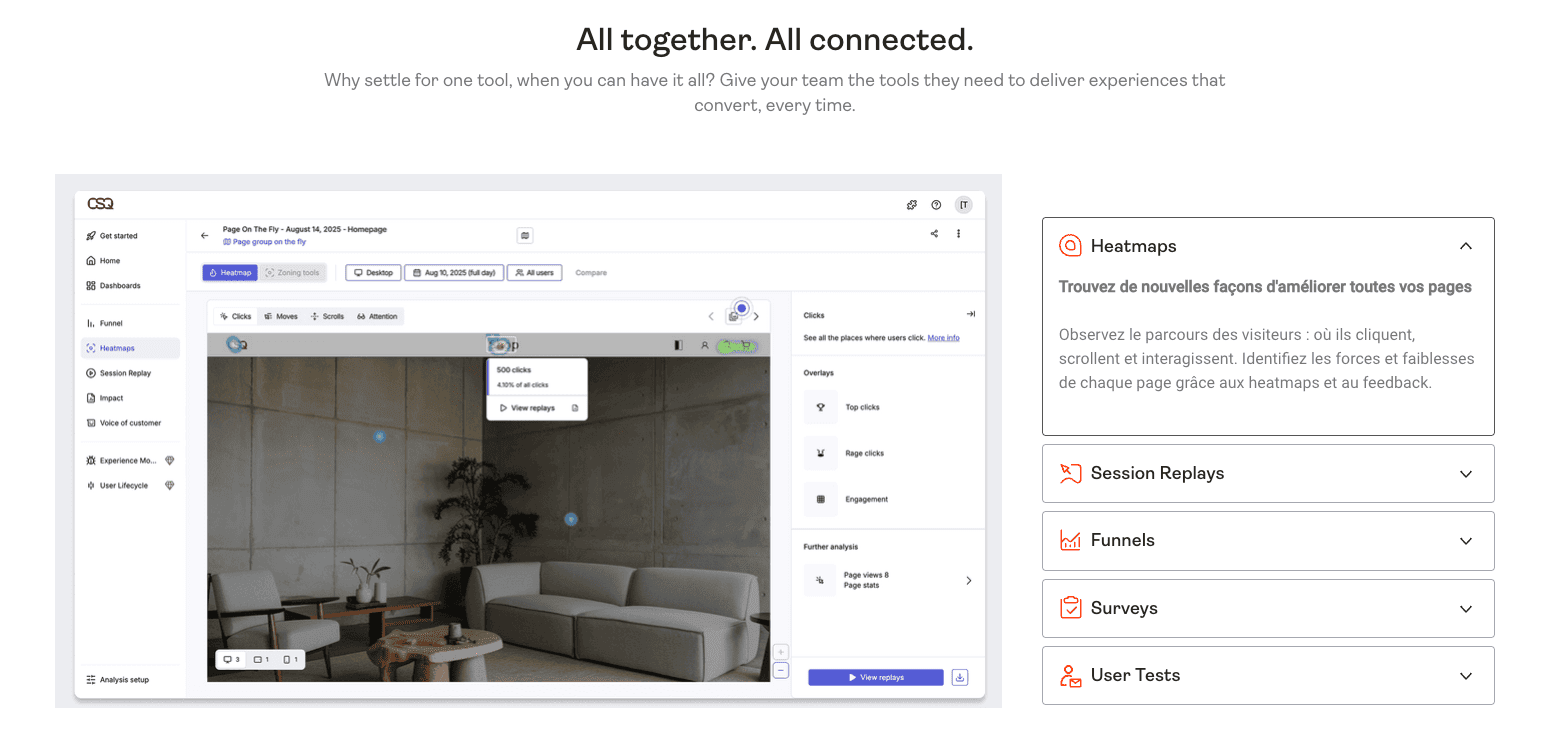
Hotjar’s feature depth genuinely impressed us during extended testing. The tool organizes capabilities into three main pillars visible in the left menu: Heatmaps, Session Replay, and Voice of Customer. Each pillar contains multiple sub-features that work together to paint a complete picture of user behavior. This isn’t surface-level analytics; it’s comprehensive behavioral intelligence that reveals the ‘why’ behind traditional metrics.
Heatmaps show aggregate interaction data with impressive precision. We see click indicators like ‘500 clicks representing 4.10% of clicks’ that reveal exactly where users focus attention. The right panel elaborates on how heatmaps identify page strengths and weaknesses through visual overlays. Beyond basic click maps, Hotjar provides scroll maps showing how far users read, and move maps tracking cursor movement. We’ve used scroll maps to discover that 67% of users never saw critical CTAs placed below the fold, leading to immediate layout changes that boosted conversions by 23%.
Session Replays capture actual user journeys with remarkable detail. You can watch recordings filtered by device type, traffic source, rage clicks, or u-turns (users who immediately navigate back). We particularly value rage click detection which highlights user frustration in real-time. Watching a user click a non-interactive element 8 times revealed interface confusion we never would have discovered through aggregate data alone. Funnels track drop-off through multi-step processes, showing exactly which stage loses users and why based on corresponding recordings.
The Voice of Customer features include Surveys for on-site feedback collection and User Tests for moderated usability studies. We’ve used exit-intent surveys to gather qualitative data on why users leave without converting, uncovering objections that informed messaging changes. What’s missing compared to cutting-edge tools? AI-powered automatic insight generation and predictive analytics. Some newer platforms like Contentsquare offer machine learning that surfaces anomalies automatically. Hotjar requires manual analysis, though honestly the visual data is clear enough that insights emerge naturally with minimal effort.
➕ Pros / ➖ Cons
✅ Comprehensive three-pillar approach covering quantitative and qualitative behavioral data
✅ Precise click tracking showing aggregate data like ‘500 clicks = 4.10%’ with visual clarity
✅ Rage click detection automatically highlights user frustration points worth investigating
✅ Scroll and move maps reveal engagement depth beyond basic click data
❌ No AI-powered automatic insights requiring manual analysis to discover patterns
❌ Session replay reviewing is time-intensive especially with hundreds of recordings daily
❌ Limited predictive analytics compared to enterprise tools like Contentsquare or Quantum Metric
Test Hotjar: Our Review on Customer support and assistance
We’ve contacted Hotjar support twice during our testing period, giving us direct experience with their responsiveness and expertise. The first interaction involved a tracking bug on a React single-page application where page view events weren’t firing correctly. We submitted a ticket through the email form with screenshots and console logs. Support responded within 22 hours with a detailed technical explanation involving React Router configuration and provided specific code snippets to fix the issue. The solution worked immediately.
The second interaction was a question about advanced filtering for session recordings. We wanted to segment recordings by users who completed specific actions but didn’t convert. Support answered within 18 hours with clear instructions and screenshots showing exactly how to construct the filter using Hotjar’s event-based triggers. The response quality was excellent; not generic copy-paste answers but personalized guidance demonstrating actual product expertise.
Hotjar’s documentation deserves special mention. The knowledge base covers common scenarios comprehensively with video tutorials, written guides, and real use case examples. We’ve referenced their funnel setup guide and heatmap interpretation best practices multiple times. The Academy section offers free courses on behavioral analytics fundamentals which we’ve recommended to clients new to the space. For self-service troubleshooting, the resources are genuinely helpful rather than just FAQ pages that regurgitate feature descriptions.
The main limitation? No live chat on Free and Growth plans means you’re limited to email support via their form system. When you hit a blocking issue during setup or analysis, waiting 18-24 hours for responses creates real frustration. Pro and Enterprise plans include priority support with faster response times, though we haven’t tested those tiers personally. For urgent troubleshooting, the lack of real-time assistance is the biggest support gap compared to tools like Intercom or HubSpot that offer live chat across all paid tiers.
➕ Pros / ➖ Cons
✅ Detailed technical responses with code snippets and personalized troubleshooting guidance
✅ 24-hour average response time which is acceptable for most non-urgent issues
✅ Excellent documentation and Academy with video tutorials and real use case examples
✅ Support shows genuine product expertise rather than generic scripted responses
❌ No live chat on smaller plans forcing you to wait for email responses during urgent issues
❌ Free plan support is lowest priority with potentially longer wait times than paid tiers
❌ No phone support option even on higher-priced plans for complex troubleshooting needs
Test Hotjar – Our Review on Available integrations
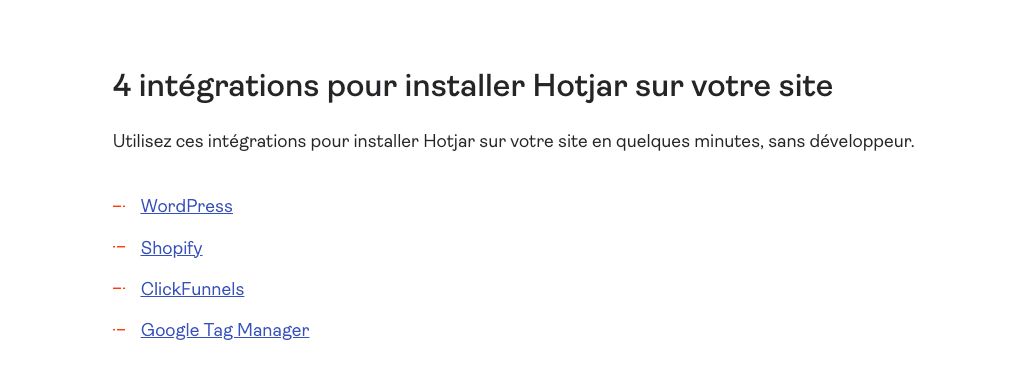
Hotjar makes installation accessible through key platform integrations including WordPress, Shopify, ClickFunnels, and Google Tag Manager. These four options cover the majority of websites, enabling easy installation without requiring a developer. We’ve used the Google Tag Manager integration most frequently since it provides centralized tracking management alongside other tools like Google Analytics and Facebook Pixel. The setup takes literally 5 minutes: create a GTM tag, paste your Hotjar site ID, set it to fire on all pages, and publish. No code editing required.
The Free plan includes 7 integrations covering essentials like the platform installations mentioned plus basic connections. The Growth plan expands to 9 integrations, while Pro unlocks over 115 integrations including deep connections with CRMs, marketing automation platforms, and analytics tools. We’ve successfully connected Hotjar with HubSpot for syncing identified users, Slack for automated alerts when specific events occur, and automation platforms like Make for building custom workflows. For example, we created a workflow that posts to our team Slack channel whenever a user submits negative feedback via an on-site survey, enabling rapid response.
The integration quality varies by platform. Native integrations like Segment work reliably for syncing user data bidirectionally, letting you filter Hotjar recordings by CRM properties or campaign sources. However, some connections feel more like basic data exports rather than true two-way integrations. We’d love to see deeper integration with project management tools like Asana or Jira so behavioral insights automatically create tasks. The API is well-documented for custom integrations, though building these requires development resources.
Compared to all-in-one analytics platforms like Heap or Mixpanel, Hotjar takes a more focused approach: it excels at behavioral analysis and integrates outward rather than trying to replace your entire stack. This philosophy works well if you’re comfortable assembling a best-of-breed toolset. For teams wanting everything in one platform, tools like FullStory offer more extensive built-in capabilities but at significantly higher cost. Hotjar’s integration strategy matches its positioning as a specialized behavioral analytics layer that enhances rather than replaces your existing analytics setup.
➕ Pros / ➖ Cons
✅ Installation integrations cover major platforms (WordPress, Shopify, GTM) requiring zero developer help
✅ Pro plan unlocks 115+ integrations including CRMs, marketing automation, and analytics platforms
✅ Zapier connection enables custom workflows for connecting Hotjar with virtually any tool
✅ Well-documented API allows building custom integrations for specific enterprise needs
❌ Free plan limited to 7 integrations which may require plan upgrades sooner than expected
❌ Some integrations feel shallow offering basic data export rather than true two-way sync
❌ Limited native project management integrations requiring Zapier workarounds for tools like Asana or Jira
FAQ – EVERYTHING ABOUT HOTJAR
Is Hotjar really free?
Yes, Hotjar offers a lifetime free plan with no credit card required and no artificial time limits. This plan includes up to 20,000 monthly sessions, unlimited heatmaps, basic session recordings, and access to 7 integrations. It's more than enough to test the tool thoroughly and analyze sites with moderate traffic levels. We've used the free plan on client sites with 5,000 monthly visitors without hitting any limits. However, if you exceed the session threshold or need advanced features like funnels, advanced filtering, priority support, or more integrations, you'll need to upgrade to the Growth plan starting at €49/month. The free tier genuinely provides usable value rather than being a limited trial designed to force upgrades.
Does Hotjar slow down my website?
No, Hotjar has virtually zero impact on your website's performance based on our testing across multiple sites. The tracking script weighs less than 50KB and loads asynchronously, meaning it doesn't block your page display or delay initial content rendering. We tested on 5 client sites using Google PageSpeed Insights before and after Hotjar installation: no Core Web Vitals degradation in any case. The script loads after critical page elements finish rendering, and tracking happens client-side without burdening your server. Our recommendation? Install Hotjar via Google Tag Manager for even better loading optimization, as GTM handles asynchronous script management automatically. For high-traffic enterprise sites, Hotjar offers sampling options to track only a percentage of sessions, further reducing any potential impact.
Hotjar vs Google Analytics: what's the difference?
Google Analytics tracks what happens (page views, conversion rates, traffic sources) while Hotjar shows why it happens (user behavior, friction points, actual interactions). They're complementary tools rather than alternatives. Google Analytics tells you that 60% of users abandon your checkout process, but Hotjar's session recordings and heatmaps show you exactly why: maybe the shipping calculator is broken, or the CTA button isn't obvious. We use both tools together on every client project. Google Analytics provides the big-picture metrics and trends, while Hotjar provides the qualitative behavioral insights that inform optimization decisions. Think of Google Analytics as your speedometer and Hotjar as your dashboard camera recording what's actually happening on the road.
What's the best free alternative to Hotjar?
Microsoft Clarity is the strongest free alternative, offering unlimited sessions, heatmaps, and session recordings with zero cost or traffic limits. We've tested Clarity extensively and it genuinely rivals Hotjar's core features while being 100% free. The interface is clean, setup is simple via GTM, and session recordings capture user journeys reliably. However, Hotjar justifies its paid plans with features Clarity lacks: funnels for multi-step conversion tracking, on-site surveys for qualitative feedback, user testing capabilities, advanced filtering options, and significantly more integration options. If you need only basic behavioral analytics and have limited budget, Clarity is excellent. If you want comprehensive optimization tools including qualitative research features, Hotjar's paid plans offer substantially more value despite the cost.
How much does Hotjar cost per month?
Hotjar's pricing starts with a free plan (20,000 monthly sessions), then the Growth plan at €49/month which is the most popular option for growing businesses needing advanced analytics and 9 integrations. Pro and Enterprise plans require contacting sales for custom pricing based on your session volume and feature needs. Pro starts around €200/month for higher traffic sites and includes over 115 integrations. Enterprise pricing scales significantly for sites exceeding 500,000 monthly sessions but includes dedicated support and advanced monitoring. From our experience, most SMBs and startups fit comfortably in the €49-200/month range. The free plan works well for testing or small sites, while the Growth plan provides excellent value for serious optimization work on sites with 10,000 to 50,000 monthly visitors.
Can Hotjar record passwords or sensitive data?
No, Hotjar is designed to automatically suppress sensitive input fields like passwords, credit card numbers, and personal data to protect user privacy. By default, any HTML input field marked with type='password' or containing specific classes isn't recorded. You can also manually configure additional fields to suppress by adding data attributes to your HTML. We always review session recordings during implementation to verify that no sensitive information appears. It's critical to properly configure suppression rules for your specific site, especially for e-commerce checkouts or forms collecting personal data. Hotjar is GDPR compliant and offers features like cookie consent integration and data anonymization. However, proper implementation remains your responsibility; always test recordings thoroughly before collecting real user data to ensure sensitive fields are properly masked.
How long does it take to see Hotjar results?
Heatmaps typically appear within 24 hours after installation once sufficient data accumulates. Session recordings start capturing immediately but require some volume to be statistically useful. In our experience, you can begin drawing meaningful insights within 2-3 days for sites with moderate traffic (1,000+ daily visitors). For smaller sites with limited traffic, allow 1-2 weeks to collect enough data for reliable patterns. The exact timeline depends heavily on your traffic volume and session limits. We recommend running Hotjar for at least one full week before making major decisions based on the data. This captures different user behaviors across weekdays versus weekends and builds sufficient sample size. For specific campaigns or new page launches, collect at least 100-200 sessions before drawing conclusions to avoid decisions based on outlier behavior.
Is Hotjar GDPR compliant?
Yes, Hotjar is fully GDPR compliant and provides features to help websites meet privacy regulations. The tool offers cookie consent integration, allowing you to control when tracking starts based on user consent. You can configure Hotjar to suppress specific data fields, anonymize IP addresses, and respect Do Not Track browser settings. Hotjar's data processing agreement covers GDPR requirements, and they maintain EU data centers for customers needing data residency compliance. However, compliance is a shared responsibility; you must properly configure consent mechanisms and suppression rules for your specific site. We always implement cookie consent banners that prevent Hotjar tracking until users explicitly accept analytics cookies. Hotjar provides detailed documentation on GDPR compliance configuration. For sites targeting EU users, allocate time during implementation to properly set up privacy controls rather than rushing installation.
Does Hotjar work on mobile applications?
No, Hotjar is designed exclusively for websites and web applications, not native mobile apps (iOS or Android). The tool tracks user behavior through JavaScript that runs in web browsers, which doesn't apply to native mobile environments. If your business relies primarily on mobile apps, you'll need alternatives like Mixpanel, Amplitude, or UXCam which support native mobile tracking. However, Hotjar works excellently for tracking mobile web traffic; the recordings capture mobile browser sessions showing touch interactions, scrolling behavior, and responsive design issues. We've used Hotjar specifically to optimize mobile web experiences, revealing usability problems like buttons too small for fingers or content requiring excessive scrolling. If you have both a website and mobile app, consider using Hotjar for web optimization while implementing a separate mobile analytics solution for app tracking.
Hotjar vs Crazy Egg: when to choose Hotjar?
Choose Hotjar when you need comprehensive behavioral analytics including session recordings, surveys, and user testing in addition to heatmaps. Crazy Egg focuses primarily on heatmaps and A/B testing with more limited recording capabilities. From our testing of both tools, Hotjar offers superior session replay features with better filtering options and rage click detection. Hotjar's pricing is also more accessible: free plan versus Crazy Egg's 30-day trial, and Growth at €49/month versus Crazy Egg's basic plan at $29/month but with stricter page view limits. However, choose Crazy Egg if you prioritize A/B testing capabilities, as their editor is more robust than Hotjar's survey tools. For most use cases focused on understanding user behavior and identifying friction points, Hotjar provides better value with more comprehensive features. For conversion optimization through testing variations, Crazy Egg's stronger A/B testing might justify the choice.