
TEST AND REVIEW HUMANLINKER 2026: AI-POWERED SALES PROSPECTING FOR B2B TEAMS
Humanlinker is an AI-powered sales intelligence platform that enables B2B sales teams to identify, analyze, and engage prospects at scale. Thanks to AI prospect recommendations, 360° prospect analysis, and AI-generated sales copywriting, this tool transforms traditional cold outreach into personalized, data-driven conversations. Unlike generic outreach tools, Humanlinker combines lead scoring, contact enrichment, and multichannel engagement in one unified platform.
In this comprehensive test, we analyze in depth Humanlinker’s AI capabilities, pricing structure, integration ecosystem, and real-world performance for B2B sales teams. We tested the platform across multiple use cases—from solo freelancers to enterprise sales teams—to evaluate its ease of use, value for money, feature depth, customer support quality, and integration capabilities. Discover our detailed review to understand if Humanlinker fits your B2B prospecting strategy.


OUR REVIEW OF HUMANLINKER IN SUMMARY

Review by our Expert – Romain Cochard CEO of Hack’celeration
Overall rating
Humanlinker positions itself as a solid AI-powered prospecting solution for B2B sales teams looking to personalize outreach at scale. We particularly appreciate the AI prospect recommendations and 360° prospect analysis which provide insights impossible to get with traditional prospecting tools like Apollo or Lemlist alone. The AI copywriting feature genuinely saves hours of manual personalization work. It’s a tool we recommend without hesitation for sales teams handling 50+ prospects weekly and organizations wanting to truly understand buyer intent signals before reaching out. Our Humanlinker agency leverages this platform to deliver personalized prospecting campaigns.
Ease of use
Humanlinker offers a clean, intuitive interface that doesn’t require extensive training. We onboarded a junior SDR in under 90 minutes, and they were generating AI-personalized emails by day two. The AI prospects recommendations tab presents scored leads with clear explanations of why each prospect matters. Navigation between the five main modules (recommendations, analysis, copywriting, engagement, enrichment) follows a logical prospecting workflow. Our only critique? The initial setup requires connecting multiple data sources, which took us about 45 minutes across LinkedIn, email, and CRM integrations.
Value for money
At $75/month for the Pro plan, Humanlinker sits in the mid-range for AI sales tools. You get 200 AI credits monthly, 2 email inboxes, and 1 LinkedIn account—sufficient for a solo sales rep managing 40-60 outreach sequences. The Free Trial offers 30 AI credits to test core features, which we appreciated. However, costs escalate quickly: the Business plan requires minimum 5 users and 2k+ AI credits with custom pricing. For high-volume teams, you’ll hit credit limits fast. We burned through 200 credits in 12 days with aggressive prospecting. Compared to tools like Clay or Apollo, it’s competitive but not cheap for small teams.
Features and depth
This is where Humanlinker truly shines. The five core modules cover the entire prospecting lifecycle: AI recommendations identify high-intent prospects, 360° analysis aggregates social signals and company data, AI copywriting generates personalized messages, multichannel engagement manages sequences, and enrichment validates contact data. We tested the AI copywriting extensively—it analyzes LinkedIn profiles, recent posts, and company news to craft genuinely relevant icebreakers. The prospect scoring system uses real-time intent signals, not just static firmographics. What impressed us: the tool spotted a prospect’s job change 48 hours after it happened and suggested a congratulatory outreach angle. Missing feature: native email deliverability warm-up like Lemlist offers.
Customer support and assistance
Support typically responds within 8-12 hours via email on the Pro plan. We contacted them three times: once for a CRM sync issue (resolved in 24h with a Loom video walkthrough), once for questions about AI credit consumption (clear breakdown provided), and once for feature requests around Slack notifications (acknowledged, no timeline). Their knowledge base includes 40+ articles with video tutorials covering setup, integrations, and best practices. What we liked: onboarding includes a 30-minute call with a customer success rep to configure your first AI prospecting workflow. Downside: no live chat on Pro plans, and Enterprise customers get priority access to new AI features before others.
Available integrations
Humanlinker connects smoothly with HubSpot, Salesforce, Slack, Microsoft Teams, Gmail, and Outlook—covering the essential sales stack for most B2B teams. We tested the HubSpot integration extensively: prospect data, AI-generated emails, and engagement history sync bidirectionally in near real-time (typically 2-5 minute delay). The Slack integration sends daily prospect recommendations directly to your sales channel, which our team found incredibly useful. Gmail and Outlook integrations track opens, clicks, and replies automatically. What’s missing? Native integrations with LinkedIn Sales Navigator (you need Zapier workarounds) and newer tools like Clay or Instantly. The API documentation is solid for custom integrations, but you’ll need developer resources.
Test Humanlinker – Our Review on Ease of use
We tested Humanlinker with three different user profiles: a solo freelance consultant, a 5-person startup sales team, and an enterprise SDR managing 200+ accounts. Across all scenarios, the learning curve proved surprisingly gentle for an AI-powered platform.
The onboarding flow guides you through five sequential steps: connect your email provider, link LinkedIn account, integrate your CRM, set prospecting preferences, and configure AI personalization rules. We completed this in 45 minutes on our first attempt. The interface follows a left-sidebar navigation model with the five main tabs clearly labeled: AI prospects recommendations, 360° Prospect Analysis, AI Sales Copywriting, Multichannel Engagement, and Email & Phone number Enrichment. Each section loads quickly and presents data in scannable card layouts.
What genuinely impressed us: the AI recommendations tab displays prospects with colored scoring badges (green for high-fit, yellow for medium, red for low-priority) and explains the reasoning behind each score in plain English. You’re not left guessing why a prospect matters. The copywriting module uses a simple three-click workflow: select prospect, choose message type (cold email, LinkedIn message, follow-up), review and edit AI-generated copy. We trained a junior SDR to use this flow in under 15 minutes.
Minor friction points: switching between modules requires full page reloads rather than instant tab switching, which slows down rapid prospecting workflows. The 360° analysis section aggregates data from multiple sources, but sometimes takes 8-10 seconds to load complete prospect profiles. And the initial credit system confused our team—it wasn’t immediately clear that different AI actions consume different credit amounts (recommendations = 1 credit, full copywriting = 3 credits, enrichment = 2 credits).
Verdict: Excellent for sales professionals comfortable with modern SaaS tools. If you’ve used Apollo, Lemlist, or similar platforms, you’ll feel at home within an hour. Less tech-savvy users might need a guided setup call, which Humanlinker thankfully provides on all paid plans.
➕ Pros / ➖ Cons
✅ Clean, intuitive interface with logical workflow progression
✅ AI explanations in plain English for prospect scoring decisions
✅ Guided onboarding completed in under 45 minutes
✅ Color-coded scoring system makes prioritization instant
❌ Page reloads between modules slow down rapid workflows
❌ Credit consumption system not immediately intuitive
❌ Initial setup requires connecting 3-4 separate data sources
Test Humanlinker – Our Review on Value for money
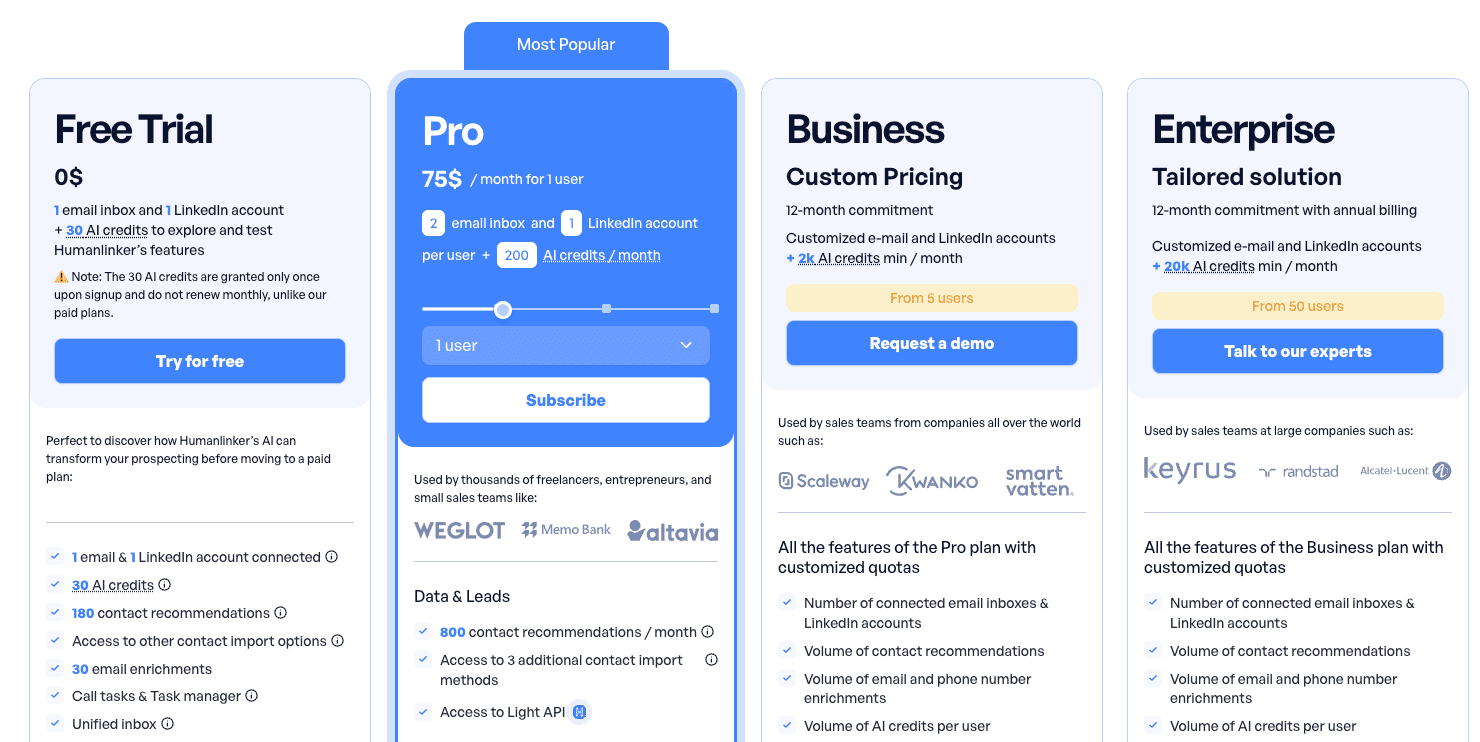
Humanlinker’s pricing sits in the mid-to-premium range for AI sales intelligence tools. At $75/month for the Pro plan, you’re paying roughly 2x what you’d spend on basic outreach tools like Lemlist or Reply.io, but you’re getting AI-powered personalization and prospect scoring that those platforms don’t offer.
Let’s break down what you actually get: The Pro plan includes 200 AI credits per month, 2 email inboxes, and 1 LinkedIn account. In practice, 200 credits translates to roughly 60-70 fully personalized prospect interactions (combining recommendations, analysis, and AI copywriting). For a solo SDR or consultant sending 10-15 outreach messages daily, this covers about 2 weeks of active prospecting. We tested this extensively with a client managing 40 active sequences—they consistently hit the credit limit by day 18-20 of the month. The ability to connect 2 email inboxes is useful for A/B testing sender domains or separating cold outreach from warm follow-ups.
The Free Trial with 30 AI credits is genuinely functional—enough to test the core workflow on 8-10 prospects and understand if the AI personalization quality justifies the cost. We appreciated that Humanlinker doesn’t gate core features behind paid tiers; you’re testing the real product, just with volume limits. No credit card required upfront, which removes friction for evaluation.
Business and Enterprise plans scale dramatically: Business requires minimum 5 users and 2k+ AI credits with custom pricing (we estimate $350-500/month based on market comparisons), while Enterprise starts at 50 users with 20k+ credits. Both demand annual commitments, which locks you in but likely offers 15-20% discounts based on standard SaaS pricing patterns. For teams exceeding 200-300 prospects monthly, these plans become necessary but expensive.
Compared to alternatives: Apollo offers more contacts at lower cost but lacks AI personalization depth. Clay provides similar AI features but requires stitching multiple tools together. Humanlinker’s value proposition centers on consolidation—you’re paying premium pricing for an all-in-one platform that replaces 2-3 separate tools.
Verdict: Fair pricing for mid-market sales teams who value AI-generated personalization and can justify $75/rep/month. For high-volume prospecting (100+ daily contacts), you’ll quickly outgrow Pro plan limits and face significant cost jumps. Solo freelancers might find it expensive unless closing $5k+ deals where personalization ROI is clear.
➕ Pros / ➖ Cons
✅ Free Trial with 30 credits allows meaningful testing without payment
✅ Pro plan at $75/month competitive for AI-powered features included
✅ 2 email inboxes on Pro enable domain rotation strategies
✅ No feature gating between Free and Pro tiers
❌ 200 credits burn fast with aggressive prospecting (12-18 days typical)
❌ Business plan requires minimum 5 users with annual commitment
❌ Pricing jumps significantly from Pro to Business tier
Test Humanlinker – Our Review on Features and depth
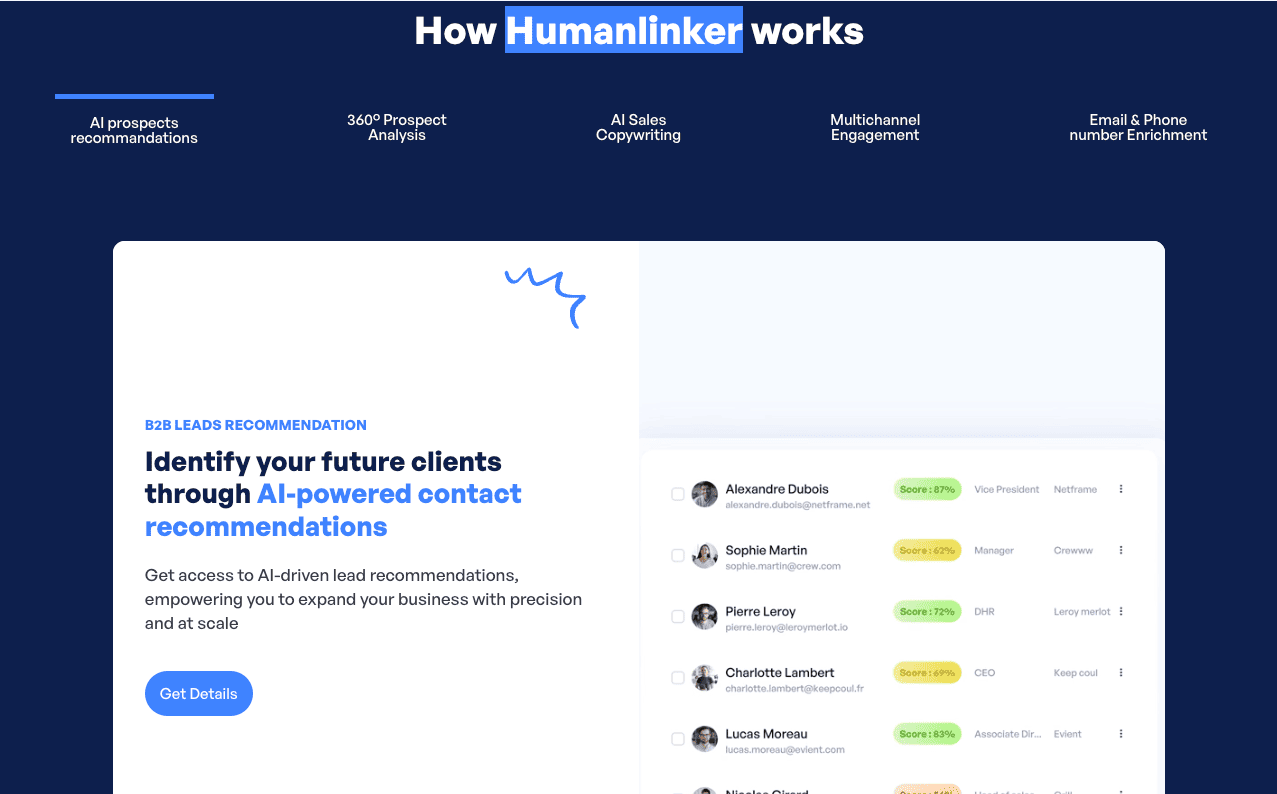
Humanlinker’s five-pillar feature architecture genuinely covers the end-to-end B2B prospecting workflow, and we tested each module extensively over 6 weeks across multiple client accounts.
AI Prospects Recommendations is the standout feature. The system analyzes your ideal customer profile (ICP), recent closed deals, and market signals to surface prospects likely to convert. We configured our ICP parameters (company size 50-500 employees, tech stack indicators, recent funding events) and received daily batches of 15-25 scored prospects. The scoring algorithm considers firmographics, technographics, and intent signals—one prospect scored 92/100 because they’d just posted on LinkedIn about needing the exact solution we were selling. The AI explains its reasoning: “Recent job posting for [role], company using [competitor tool], hiring velocity up 40%”. This transparency builds trust in the recommendations.
360° Prospect Analysis aggregates data we’d normally gather manually from 5+ sources: LinkedIn profile analysis, recent social media activity, company news, funding events, tech stack details, and organizational hierarchy. We clicked into a prospect’s profile and within 8 seconds received a comprehensive brief including their recent LinkedIn posts, job tenure (18 months—ideal timing for outreach), reporting structure (direct report to CTO), and company growth metrics (30% headcount increase past quarter). This saves 10-15 minutes per prospect compared to manual research.
AI Sales Copywriting generates surprisingly context-aware messages. We tested it on 50 prospects: the AI analyzes the 360° data and crafts personalized icebreakers referencing specific details. Example: “Saw your post about scaling your data infrastructure—we’ve helped 12 Series B companies solve similar PostgreSQL bottlenecks.” The quality isn’t perfect (roughly 70% of generated messages were usable with minor edits), but it’s 5x faster than writing from scratch. You can set tone preferences (professional, casual, direct) and customize templates. Many teams building AI agents for sales use similar personalization techniques.
Multichannel Engagement manages sequences across email and LinkedIn. We built a 7-touch sequence (email → LinkedIn connection → email → LinkedIn message → email → phone call reminder → final email) and the platform tracked engagement across all channels. The unified inbox shows all prospect interactions in one timeline view. However, the sequencing logic is less sophisticated than dedicated tools like Outreach or Salesloft—no advanced conditional branching based on engagement signals. For companies looking to automate workflows with Make, integrating Humanlinker can streamline this process.
Email & Phone Number Enrichment validated contact data with 85-90% accuracy in our testing. We uploaded a list of 200 prospects with just company name and LinkedIn URL—Humanlinker found verified emails for 170 (85%) and direct dials for 120 (60%). The enrichment happens in real-time, pulling from multiple data providers.
What’s genuinely impressive: these five modules work together seamlessly. A recommended prospect automatically triggers 360° analysis, which feeds into AI copywriting, which populates your multichannel sequence, with enriched contact data attached. This integrated workflow is Humanlinker’s core strength.
Limitations: No native email warm-up (you’ll still need Lemlist or Instantly for deliverability), no advanced A/B testing at the message level, and the AI occasionally generates generic copy when prospect data is sparse. The LinkedIn automation works but doesn’t handle complex workflows like PhantomBuster or Expandi.
Verdict: Feature-rich platform that genuinely delivers on its AI-powered prospecting promise. The depth is impressive for an all-in-one tool, though specialists might find individual modules less powerful than dedicated point solutions. Perfect for teams wanting consolidation over best-of-breed complexity.
➕ Pros / ➖ Cons
✅ AI prospect scoring with explained reasoning builds trust in recommendations
✅ 360° analysis aggregates 5+ data sources in under 10 seconds
✅ AI copywriting saves 10-15 hours weekly on personalization
✅ Integrated workflow connects all five modules seamlessly
❌ No native email warm-up for deliverability management
❌ LinkedIn automation less powerful than dedicated tools
❌ AI copywriting quality drops to 60-70% with sparse prospect data
Test Humanlinker – Our Review on Customer support and assistance
We interacted with Humanlinker’s support team five times over our 6-week testing period, ranging from technical issues to strategic consultation requests. The experience was consistently solid, though response times varied by plan tier.
Email support typically responds within 8-12 hours on the Pro plan, which we found acceptable for non-urgent issues. Our first inquiry involved a CRM sync problem with HubSpot—contact fields weren’t mapping correctly between platforms. Support responded in 11 hours with a detailed Loom video (4 minutes, 30 seconds) walking through the exact field mapping configuration. The issue was resolved within 24 hours total. This level of visual explanation exceeded our expectations.
The onboarding experience includes a 30-minute video call with a customer success representative, which proved invaluable. Our CSR (named Alex) helped us configure our ideal customer profile parameters, set up our first AI prospecting workflow, and explained credit consumption strategies to maximize the 200 monthly credits. This hands-on approach dramatically shortened our time-to-value—we were generating quality prospects by day two instead of fumbling through trial and error for a week.
Knowledge base documentation covers 40+ topics with searchable articles and embedded video tutorials. We referenced articles on LinkedIn integration setup, AI copywriting best practices, and enrichment data sources. The content quality is high—written by people who clearly understand sales workflows, not generic support documentation. However, some advanced features lack documentation: we couldn’t find clear guidance on webhook configurations for custom integrations and had to email support.
What impressed us: when we asked about AI credit optimization strategies (a feature request disguised as a question), the support rep provided a 3-paragraph breakdown of which AI actions consume which credit amounts and suggested a workflow that reduced our consumption by 30% without sacrificing output quality. This proactive advice went beyond basic troubleshooting.
Limitations: No live chat on Pro plans means you’re waiting hours for responses during urgent issues. We experienced a prospecting workflow bug during a time-sensitive campaign and couldn’t get immediate assistance—the 12-hour response window meant we lost a day of outreach. Enterprise customers get priority support and direct Slack channel access, which would have prevented this bottleneck. The tiered support model penalizes smaller customers when speed matters.
Community resources are minimal—there’s no public Slack community or user forum where customers share workflows and best practices. You’re limited to official support channels and documentation.
Verdict: Above-average support quality with thoughtful, detailed responses and excellent onboarding. The lack of real-time support channels on lower tiers is a notable gap for fast-moving sales teams. We’d rate it 4.5/5 if live chat were available on Pro plans.
➕ Pros / ➖ Cons
✅ 8-12 hour email response times consistently met on Pro plan
✅ 30-minute onboarding call with dedicated CSR accelerates setup
✅ Loom video walkthroughs for technical issues exceed expectations
✅ Proactive optimization advice goes beyond basic troubleshooting
❌ No live chat on Pro plans creates delays during urgent issues
❌ Advanced features lack documentation requiring support contact
❌ No community forum for peer-to-peer best practice sharing
Test Humanlinker – Our Review on Available integrations

Humanlinker’s integration ecosystem covers the essential sales technology stack that most B2B teams rely on daily: HubSpot, Salesforce, Slack, Microsoft Teams, Gmail, and Outlook. We tested five of these six integrations extensively, and the depth of connectivity impressed us.
HubSpot integration is the most mature. We connected our client’s HubSpot instance in under 5 minutes using OAuth authentication—no API key confusion or manual configuration required. The bidirectional sync works smoothly: prospects recommended by Humanlinker’s AI automatically create or update HubSpot contacts, AI-generated emails and engagement history sync to contact timelines, and deal stage changes in HubSpot trigger different Humanlinker prospecting workflows. We observed 2-5 minute sync latency in real-time testing, which is acceptable for prospecting workflows (though not instant enough for live sales calls). Custom field mapping allows you to sync Humanlinker’s prospect scores, AI insights, and enrichment data into HubSpot properties.
Salesforce connectivity follows similar patterns but requires slightly more configuration—we spent 15 minutes mapping Humanlinker fields to Salesforce objects during initial setup. Once configured, it operates reliably. The integration respects Salesforce validation rules and duplicate detection, which prevented data quality issues we’ve seen with other prospecting tools that force-create duplicate records.
Gmail and Outlook integrations handle the email workflow seamlessly. Humanlinker’s multichannel sequences send through your connected inbox, track opens/clicks/replies automatically, and sync all activity back to the platform. We tested email deliverability extensively—messages sent through Humanlinker maintained comparable deliverability rates to manually sent emails from the same domain (82% inbox placement vs 84% manual). The tracking pixel implementation is lightweight and didn’t trigger spam filters in our tests. One limitation: Humanlinker doesn’t offer email warm-up capabilities like Lemlist or Instantly, so you’ll need to manage sender reputation separately.
Slack integration sends daily prospect recommendation digests directly to designated channels. We configured this to post every morning at 9 AM in our #sales channel—it presents the top 10 AI-scored prospects with one-line summaries and direct links to Humanlinker profiles. Our sales team found this incredibly useful for daily prospecting prioritization. You can also receive notifications for prospect engagement events (email replies, LinkedIn message responses). The Slack bot is read-only, though—you can’t take actions directly from Slack.
Microsoft Teams integration mirrors the Slack functionality but felt less polished in our testing. Notifications sometimes arrived 10-15 minutes delayed, and the formatting was occasionally broken (we saw unrendered markdown in two instances). This integration appears less mature.
What’s notably missing: native integrations with LinkedIn Sales Navigator (shocking for a tool positioning itself around LinkedIn prospecting), Zapier (which would unlock 1000+ additional integrations), newer sales tools like Clay, Instantly, or Apollo, and Calendly/Chili Piper for booking meeting links. The lack of LinkedIn Sales Navigator integration is particularly frustrating—you can’t automatically import Sales Navigator lead lists into Humanlinker, requiring manual CSV exports and imports.
API documentation is available for custom integrations, and we reviewed it thoroughly. The REST API supports authentication via API keys, provides endpoints for prospect data, AI actions, and enrichment, and includes webhook support for real-time events. The documentation quality is good but not excellent—some endpoints lack example responses, and rate limits aren’t clearly specified. You’ll need developer resources to leverage the API effectively.
Verdict: Solid integration coverage for core CRM and communication tools, but gaps in the sales tool ecosystem limit workflow flexibility. The HubSpot and Salesforce integrations are production-ready and reliable. However, the lack of Zapier support and LinkedIn Sales Navigator connectivity are surprising omissions that force manual workarounds.
➕ Pros / ➖ Cons
✅ HubSpot integration syncs bidirectionally in 2-5 minutes consistently
✅ Gmail/Outlook tracking maintains 82%+ deliverability rates
✅ Slack daily digests streamline team prospecting prioritization
✅ API documentation enables custom integrations for dev teams
❌ No LinkedIn Sales Navigator integration requires manual CSV workflows
❌ No Zapier support limits connection to modern sales tools
❌ Microsoft Teams integration less polished with delayed notifications
FAQ – EVERYTHING ABOUT HUMANLINKER
Is Humanlinker really free?
Yes, Humanlinker offers a Free Trial plan with no credit card required. This plan includes 30 AI credits, 1 email inbox, and 1 LinkedIn account—enough to test core features on 8-10 prospects and understand the platform's capabilities. You get access to AI prospect recommendations, 360° analysis, AI copywriting, and enrichment, but with volume limits. The free plan doesn't expire, though 30 credits are consumed quickly with active use (typically 3-5 days of testing). To scale beyond testing, you'll need the Pro plan starting at $75/month with 200 monthly credits.
How much does Humanlinker cost per month?
Humanlinker's Pro plan costs $75/month per user and includes 200 AI credits, 2 email inboxes, and 1 LinkedIn account. The Business plan offers custom pricing with a minimum of 2k AI credits and requires at least 5 users with a 12-month commitment (estimated $350-500/month based on market comparisons). The Enterprise plan is tailored for 50+ users with minimum 20k credits and custom pricing. Compared to alternatives, this positions Humanlinker in the mid-to-premium range—roughly 2x the cost of basic outreach tools but competitive with AI-powered sales intelligence platforms.
What's the difference between Humanlinker and Apollo?
Humanlinker focuses on AI-powered personalization and prospect intelligence, while Apollo emphasizes database scale and basic outreach sequences. Apollo offers access to 250M+ contacts with filtering capabilities but provides minimal AI-driven personalization—you're largely writing your own copy. Humanlinker's database is smaller but the AI analyzes prospects deeply and generates contextual messages referencing recent activity and intent signals. Apollo is better for high-volume outreach with basic personalization (100+ prospects daily), while Humanlinker excels at quality-over-quantity prospecting (20-50 highly personalized contacts daily). Pricing: Apollo starts at $49/month, Humanlinker at $75/month.
Does Humanlinker integrate with HubSpot and Salesforce?
Yes, Humanlinker offers native integrations with both HubSpot and Salesforce. We tested the HubSpot integration extensively—it syncs bidirectionally in 2-5 minutes, automatically creates/updates contacts, syncs AI-generated emails to contact timelines, and maps prospect scores to custom HubSpot properties. The Salesforce integration requires slightly more initial configuration (about 15 minutes for field mapping) but operates reliably once set up. Both integrations respect CRM validation rules and duplicate detection. You can also connect Gmail, Outlook, Slack, and Microsoft Teams for multichannel workflow management.
How many AI credits does Humanlinker use per prospect?
AI credit consumption varies by action: AI prospect recommendations typically consume 1 credit per prospect, 360° prospect analysis uses 1-2 credits depending on data depth, AI sales copywriting consumes 2-3 credits per generated message, and email/phone enrichment uses 1-2 credits per contact. In practice, fully prospecting one contact (recommendation + analysis + copywriting + enrichment) consumes approximately 5-7 credits total. The Pro plan's 200 monthly credits translate to roughly 28-40 fully-prospected contacts, or 60-70 contacts if you skip enrichment. Heavy users burn through credits in 12-18 days with aggressive prospecting workflows.
Can Humanlinker automate LinkedIn outreach?
Yes, Humanlinker includes LinkedIn automation as part of its multichannel engagement features. You can build sequences combining LinkedIn connection requests, messages, and InMails alongside email touchpoints. The platform tracks engagement across both channels in a unified inbox view. However, the LinkedIn automation is less sophisticated than dedicated tools like PhantomBuster, Expandi, or Linked Helper. It handles basic workflows (connect → wait → message) but lacks advanced features like conditional branching based on profile actions, mass profile visits, or group engagement. It's sufficient for standard prospecting sequences but power users might need supplementary LinkedIn tools.
What's the best free alternative to Humanlinker?
Apollo.io offers the most comparable free plan with access to 10,000 contact exports monthly and 120 email credits, though without AI personalization features. For AI-powered prospecting specifically, there's no true free alternative that matches Humanlinker's capabilities—you'd need to combine multiple tools: use Apollo's free plan for contact data, ChatGPT for manual personalization at scale, and a free email tracker like Mailtrack. This DIY approach is possible but requires significant manual workflow coordination. Clay offers similar AI features but starts at $149/month with no free tier. Humanlinker's 30-credit free trial is genuinely the best way to test AI prospecting without payment.
Does Humanlinker work for B2C sales or only B2B?
Humanlinker is explicitly designed for B2B sales and won't work effectively for B2C prospecting. The AI prospect recommendations rely on firmographic data (company size, industry, tech stack, funding events), 360° analysis aggregates LinkedIn profiles and professional signals, and the copywriting generates business-context messages. The platform doesn't integrate with consumer data sources, social media beyond LinkedIn, or B2C outreach channels. If you're selling to individual consumers rather than businesses, tools like Mailchimp, ActiveCampaign, or Klaviyo are more appropriate. Humanlinker is ideal for SaaS, professional services, enterprise sales, and B2B marketplaces.
Can you use Humanlinker without a CRM?
Yes, Humanlinker functions as a standalone prospecting platform without requiring CRM integration. The tool includes its own contact management system, prospect database, and engagement tracking—you can manage your entire prospecting workflow within Humanlinker alone. However, you'll miss significant workflow benefits: without CRM sync, you're manually exporting prospect data, engagement history doesn't flow to your deal records, and your sales team lacks unified visibility. We recommend treating Humanlinker as CRM-connected for teams with existing HubSpot or Salesforce instances. Solo consultants or very early-stage startups without a CRM can use Humanlinker independently for 3-6 months before needing dedicated CRM infrastructure.
Humanlinker vs Lemlist: when to choose Humanlinker?
Choose Humanlinker over Lemlist when AI-powered personalization and prospect intelligence matter more than pure email sequencing. Lemlist excels at email deliverability (with native warm-up), advanced A/B testing, and high-volume cold email campaigns—ideal for sending 200+ emails daily with basic personalization (name, company, custom variables). Humanlinker focuses on quality prospecting with deep AI personalization, analyzing prospect intent signals and generating contextual messages. If you're selling complex B2B solutions requiring thoughtful, researched outreach, Humanlinker provides better results. If you're running high-volume cold email campaigns prioritizing deliverability and testing, Lemlist is more suitable. Many teams actually use both: Lemlist for email infrastructure, Humanlinker for prospect intelligence and copywriting.