
1SHOT API N8N INTEGRATION: AUTOMATE 1SHOT API WITH N8N
Looking to automate your blockchain operations with 1Shot API and n8n? You’re in the right place. The 1Shot API n8n integration opens up 22 powerful actions to manage smart contracts, wallets, and transactions directly from your automation workflows.
Whether you’re building decentralized applications, managing multiple wallets across chains, or executing complex smart contract operations, this integration lets you do it all without writing custom code. From creating and deleting wallets to encoding, simulating, and executing smart contracts in batch, every blockchain operation becomes a simple node in your n8n workflow.
In this guide, you’ll discover exactly how to connect 1Shot API to n8n and explore each available action in detail—so you can start automating your Web3 infrastructure today.


n8n 1Shot API Workflow: demonstration of an automation connecting 1Shot API to other applications via n8n. This video illustrates how 1Shot API actions integrate into an n8n workflow to automate your processes without code.
WHY AUTOMATE 1SHOT API WITH N8N?
The 1Shot API n8n integration gives you access to 22 actions covering the full spectrum of blockchain automation: wallet management, smart contract execution, transaction monitoring, and chain operations. This means you can orchestrate complex Web3 workflows that would otherwise require extensive custom development.
The benefits are substantial. Dramatic time savings: no more manual contract calls or wallet operations through separate interfaces. Set up workflows that execute smart contracts, check gas estimates, and manage wallets automatically. Improved reliability: programmatic execution eliminates human error in critical blockchain operations. Complete transparency: every transaction and operation is logged through your n8n workflow, creating an audit trail. Seamless ecosystem integration: connect 1Shot API to over 400 applications in n8n—trigger contract executions from Slack commands, log transactions to Google Sheets, or receive Telegram alerts for specific blockchain events.
Concrete examples? Automatically create wallets when new users sign up in your app. Execute batch smart contract operations based on scheduled triggers. Monitor transaction statuses and alert your team when something needs attention. Simulate contracts before execution to prevent costly mistakes. The possibilities extend as far as your blockchain use case requires.

HOW TO CONNECT 1SHOT API TO N8N?

Basic configuration:
- Access your 1Shot dashboard: Log into your 1Shot account and navigate to the API settings or credentials section to generate your API key.
- Open n8n credentials: In your n8n instance, go to Settings > Credentials and search for “1Shot” in the available credential types.
- Create new 1Shot credentials: Click “Create New” and enter your API key from the 1Shot dashboard. Give your credential a recognizable name if you manage multiple accounts.
- Test the connection: Save your credentials and add a 1Shot API node to a test workflow. Select your newly created credential and try a simple operation like “List chains” to verify everything works.
- Start building: Once authenticated, all 1Shot API actions become available in your n8n workflows.
💡 TIP: If you’re working across multiple blockchain environments (testnet vs mainnet), consider creating separate credentials for each. This prevents accidental mainnet transactions during development and keeps your workflows organized. Label them clearly—”1Shot Mainnet” and “1Shot Testnet”—to avoid costly mistakes.
NEED HELP AUTOMATING 1SHOT API WITH N8N?
We’ll get back to you in minutes ✔
1SHOT API ACTIONS AVAILABLE IN N8N
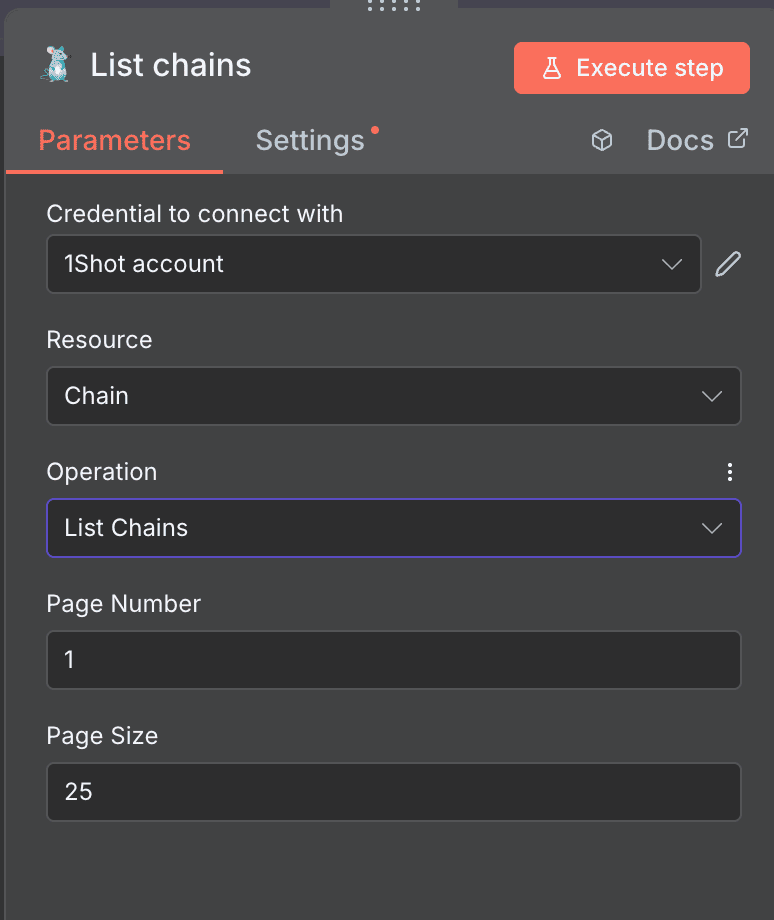
List chains
The “List chains” action retrieves all blockchain networks available in your 1Shot account. This is your starting point for any multi-chain workflow—knowing which chains are accessible before executing operations on them.
Key parameters: Credential to connect with: Select your 1Shot account credentials from the dropdown. Required. Resource: Set to “Chain” to indicate you’re working with blockchain networks. Required. Operation: Automatically set to “List Chains”. Page Number: Specify which page of results to retrieve. Accepts numeric input, defaults to page 1. Page Size: Define how many chains to return per page. Defaults to 25 results.
Use cases: Build a dynamic chain selector in your automation that adapts to newly supported networks. Audit which chains are configured in your account before deploying contracts. Create monitoring workflows that iterate through all available chains.
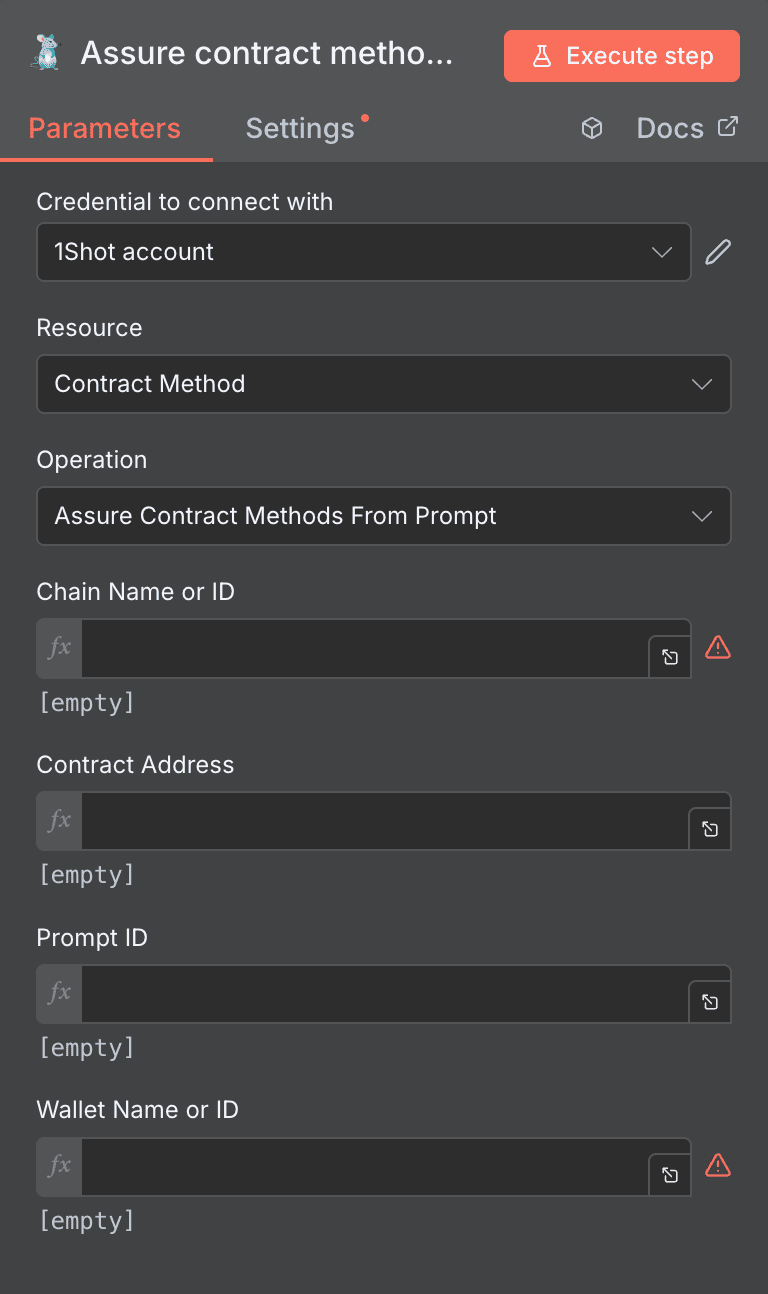
Assure Contract Methods From Prompt
This action ensures contract methods are available based on a prompt identifier—essential when you need to guarantee that specific contract interactions are ready before executing workflows that depend on them.
Key parameters: Credential to connect with: Your 1Shot authentication credentials. Required. Resource: Set to “Contract Method”. Required. Operation: “Assure Contract Methods From Prompt”. Chain Name or ID: Text input identifying which blockchain to use. Required. Contract Address: The smart contract’s address. Required. Prompt ID: Unique identifier for the prompt. Required. Wallet Name or ID: Identifier for the wallet involved in transactions. Required.
Use cases: Pre-flight checks before batch contract executions to ensure all methods are available. Automated setup workflows when deploying to new chains. Validation steps in CI/CD pipelines for smart contract deployments.
Encode a smart contract
The “Encode” action generates the encoded data for a smart contract method call. This is particularly useful when you need to prepare transaction data without immediately executing it—perfect for multisig workflows or transaction batching.
Key parameters: Credential to connect with: 1Shot account credentials. Required. Resource: Set to “Contract Method”. Required. Operation: “Encode”. Contract Method Name or ID: Specify which method to encode. Required. Parameters: Additional fields for method parameters. Add multiple fields as needed based on the contract method’s requirements.
Use cases: Prepare transactions for multisig approval workflows. Generate encoded calldata for meta-transaction systems. Build transaction queues where encoding and execution are separated.

Estimate the gas cost of a contract method
Before executing any transaction on-chain, knowing the gas cost prevents unexpected failures and budget overruns. This action returns gas estimates for specific contract method calls.
Key parameters: Credential to connect with: Your 1Shot credentials. Required. Resource: “Contract Method”. Required. Operation: “Estimate”. Contract Method Name or ID: The method you want to estimate gas for. Required. Parameters: Optional additional parameters for the contract method, typically in JSON format.
Use cases: Pre-check gas costs before batch operations to ensure wallet has sufficient funds. Build cost-aware automation that chooses optimal execution times. Alert workflows that notify when gas estimates exceed thresholds.

Execute a smart contract
This is the core action for blockchain automation—actually executing a smart contract method on-chain. The transaction is signed and broadcast through your configured wallet.
Key parameters: Credential to connect with: 1Shot credentials. Required. Resource: “Contract Method”. Required. Operation: “Execute”. Contract Method Name or ID: Which method to execute. Required. Parameters: Optional JSON-formatted parameters for the method. Additional Fields: Expandable section for extra configuration like gas limits or value transfers.
Use cases: Automate token transfers based on external triggers. Execute DAO governance actions programmatically. Trigger on-chain state changes from off-chain events.

Execute a smart contract as Delegator
Similar to standard execution, but specifically designed for delegated transactions where a separate delegator wallet handles the gas payment. This enables gasless experiences for end users.
Key parameters: Credential to connect with: 1Shot credentials. Required. Resource: “Contract Method”. Required. Operation: “Execute as Delegator”. Contract Method Name or ID: Method identifier. Required. Parameters: Optional method parameters as object format. Delegator Wallet Address: The wallet address that will pay for gas. Required. Additional Fields: Extra configuration options.
Use cases: Sponsor gas fees for users in your dApp. Build gasless NFT minting experiences. Enable meta-transactions in gaming applications.

Execute multiple smart contracts
The “Execute Batch” operation lets you execute multiple contract methods in a single workflow step—dramatically reducing complexity when you need to perform several on-chain operations together.
Key parameters: Credential to connect with: 1Shot credentials. Required. Resource: “Contract Method”. Required. Operation: “Execute Batch”. Contract Methods: Select specific contract methods to execute. Required. Wallet Name or ID: Optional specification of which wallet to use. Additional Fields: Expandable for extra parameters.
Use cases: Bundle multiple token approvals and swaps into single workflows. Execute complex DeFi strategies with multiple contract interactions. Batch update multiple on-chain records simultaneously.

Execute Batch as Delegator
Combines batch execution with delegation—execute multiple smart contracts while having a separate wallet cover all gas costs.
Key parameters: Credential to connect with: 1Shot credentials. Required. Resource: “Contract Method”. Required. Operation: “Execute Batch as Delegator”. Contract Methods: Select the methods to batch execute. Required. Wallet Name or ID: Specify the wallet. Required. Additional Fields: Extra configuration options.
Use cases: Onboard users with multiple initial transactions without requiring them to hold native tokens. Execute complex sponsored transactions for premium users. Build white-label services where your infrastructure handles gas.

Get a smart contract method
Retrieve detailed information about a specific contract method—useful for validation, documentation generation, or building dynamic interfaces based on contract capabilities.
Key parameters: Credential to connect with: 1Shot credentials. Required. Resource: “Contract Method”. Required. Operation: “Get”. Contract Method ID: Unique identifier for the method. Required.
Use cases: Validate contract methods exist before building workflows around them. Generate documentation dynamically from contract metadata. Build admin interfaces that display contract method details.

List all smart contract methods
Get a comprehensive list of all contract methods you have access to, with powerful filtering options to narrow down exactly what you need.
Key parameters: Credential to connect with: 1Shot credentials. Required. Resource: “Contract Method”. Required. Operation: “List”. Name: Optional filter by method name. Contract Address: Optional filter by contract. Prompt ID: Optional filter by prompt. Method Type: Dropdown to filter by type (default: None). Chain Name or ID: Optional blockchain filter. Page Number: Pagination control, defaults to 1. Page Size: Results per page, defaults to 25.
Use cases: Inventory all available contract methods in your account. Build method selectors for user-facing interfaces. Audit contract method access across your organization.

Simulate a smart contract
Test contract execution without actually sending a transaction on-chain. Simulation reveals potential errors, return values, and gas consumption before committing real resources.
Key parameters: Credential to connect with: 1Shot credentials. Required. Resource: “Contract Method”. Required. Operation: “Simulate”. Contract Method Name or ID: Which method to simulate. Required. Parameters: Optional JSON parameters for the simulation. Gas Limit: Optional numeric gas limit for the simulation.
Use cases: Pre-validate transactions before batch execution. Test contract interactions during development workflows. Build “dry run” features in dApp interfaces.

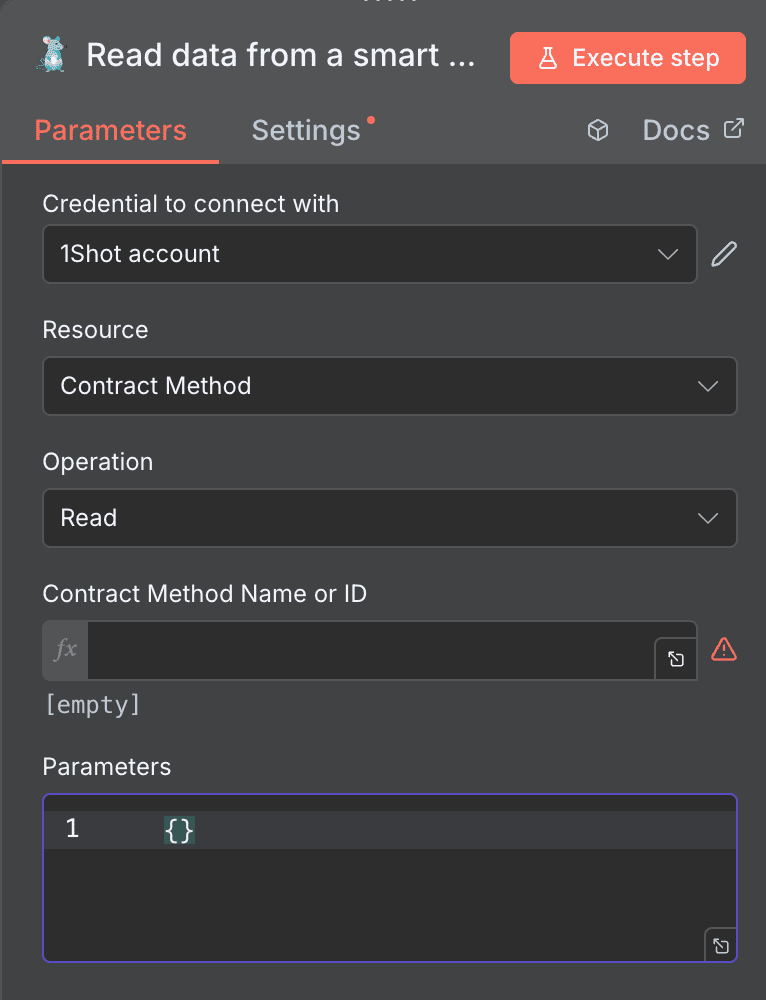
Read data from a smart contract
Query blockchain state without sending transactions. This read-only operation retrieves data from view/pure contract functions—perfect for monitoring and data collection.
Key parameters: Credential to connect with: 1Shot credentials. Required. Resource: “Contract Method”. Required. Operation: “Read”. Contract Method Name or ID: The view function to call. Required. Parameters: Optional JSON parameters for methods that require inputs.
Use cases: Monitor token balances across multiple addresses. Track on-chain metrics for dashboards and reporting. Validate state before triggering write operations.
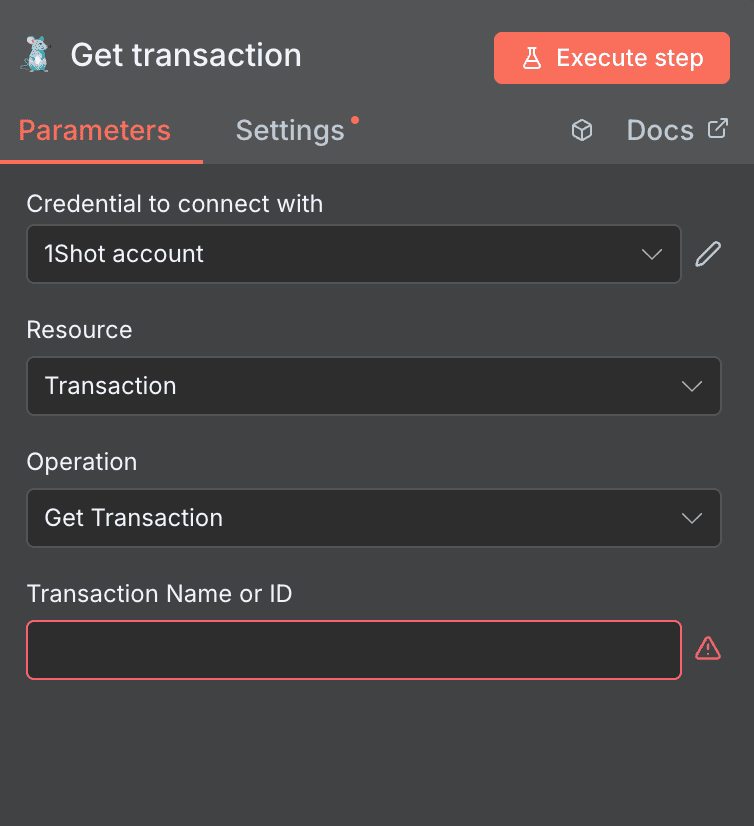
Get transaction
Retrieve details about a specific transaction by its name or ID—essential for tracking transaction status and building confirmation workflows.
Key parameters: Credential to connect with: 1Shot credentials. Required. Resource: “Transaction”. Required. Operation: “Get Transaction”. Transaction Name or ID: Unique identifier for the transaction. Required.
Use cases: Check transaction confirmation status in follow-up workflows. Build receipt generation after successful transactions. Debug failed transactions by retrieving full details.
List transactions
Get a filtered list of all transactions, with extensive options to narrow down by status, wallet, time range, and more.
Key parameters: Credential to connect with: 1Shot credentials. Required. Resource: “Transaction”. Required. Operation: “List Transactions”. Status: Optional dropdown filter by transaction status. Wallet ID: Optional filter by specific wallet. Contract Method ID: Optional filter by contract method. API Credential ID: Optional credential filter. User ID: Optional user filter. Memo: Optional text search in memos. After Time: Numeric timestamp filter (default: 0). Before Time: Numeric timestamp filter (default: 0). Page Number: Pagination control.
Use cases: Build transaction history pages in applications. Monitor pending transactions and alert on stuck operations. Generate accounting reports with filtered transaction data.

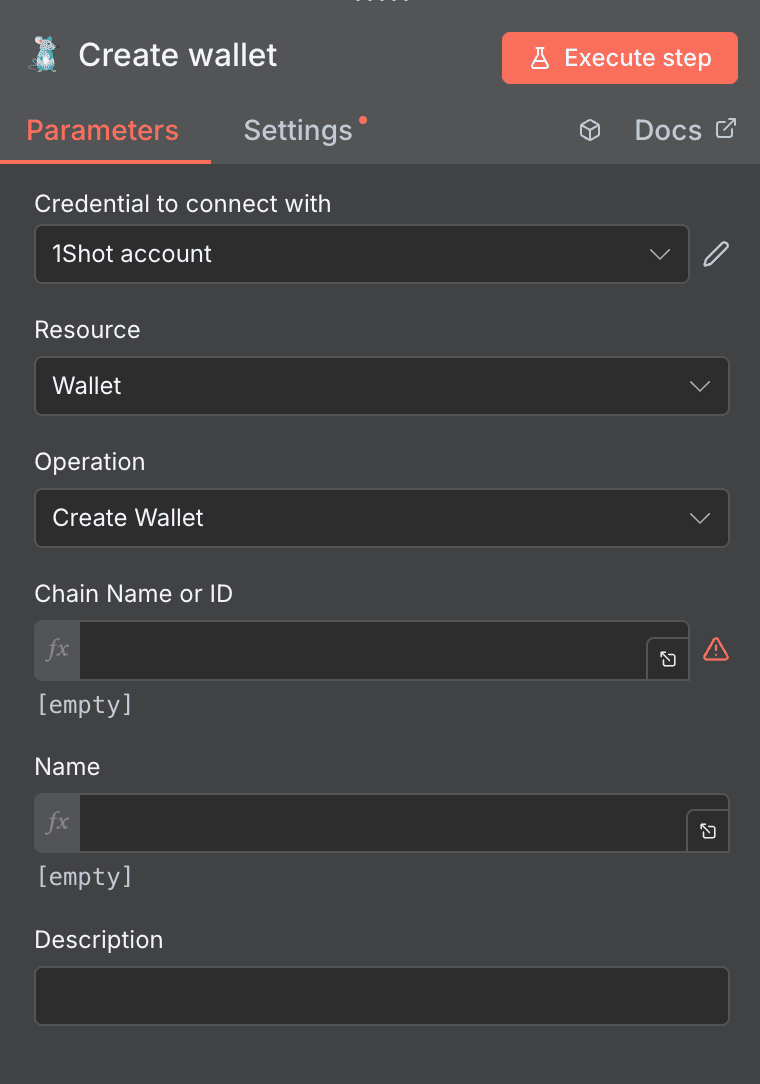
Create wallet
Programmatically create new wallets in your 1Shot account. Essential for user onboarding flows and multi-wallet architectures.
Key parameters: Credential to connect with: 1Shot credentials. Required. Resource: “Wallet”. Required. Operation: “Create Wallet”. Chain Name or ID: Specify the blockchain for this wallet. Required. Name: Give the wallet a recognizable name. Required. Description: Optional detailed description.
Use cases: Auto-create wallets when users sign up for your platform. Provision chain-specific wallets for multi-chain applications. Build treasury management systems with organized wallet structures.
Search prompts
Find specific prompts using search queries and chain filters. Prompts in 1Shot help define reusable contract interaction patterns.
Key parameters: Credential to connect with: 1Shot credentials. Required. Resource: “Prompt”. Required. Operation: “Search Prompts”. Query: Optional text search term. Chain Name or ID: Optional blockchain filter.
Use cases: Build prompt discovery features in your applications. Find specific prompts before assuring contract methods. Audit available prompts across different chains.

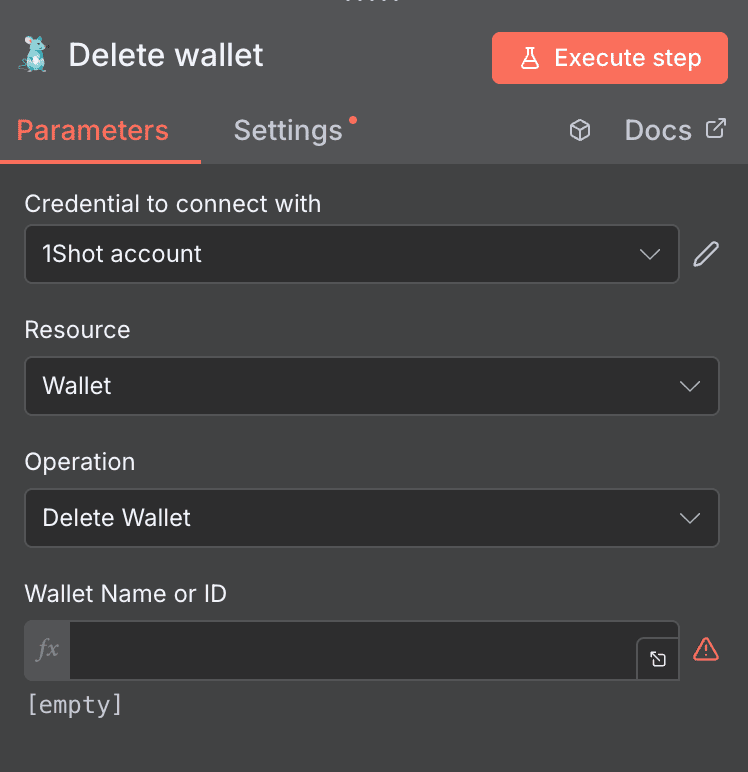
Delete wallet
Remove a wallet from your 1Shot account. Use carefully—this operation may be irreversible depending on your account configuration.
Key parameters: Credential to connect with: 1Shot credentials. Required. Resource: “Wallet”. Required. Operation: “Delete Wallet”. Wallet Name or ID: Specify which wallet to remove. Required.
Use cases: Clean up test wallets after development cycles. Remove deprecated wallets from decommissioned applications. Build account management workflows with wallet lifecycle control.
List wallets
Retrieve all wallets in your account with optional filters—the foundation for any wallet management workflow.
Key parameters: Credential to connect with: 1Shot credentials. Required. Resource: “Wallet”. Required. Operation: “List Wallets”. Chain Name or ID: Optional chain filter. Name: Optional search by wallet name. Page Number: Pagination control, defaults to 1. Page Size: Results per page, defaults to 25.
Use cases: Build wallet selection interfaces in your applications. Audit all wallets across your organization. Monitor wallet inventory and generate reports.

Get wallet
Retrieve detailed information about a specific wallet, including balances, configuration, and metadata.
Key parameters: Credential to connect with: 1Shot credentials. Required. Resource: “Wallet”. Required. Operation: “Get Wallet”. Wallet Name or ID: Specify the wallet to retrieve. Required.
Use cases: Check wallet details before initiating transactions. Build wallet detail pages in user interfaces. Validate wallet existence in pre-flight workflow checks.

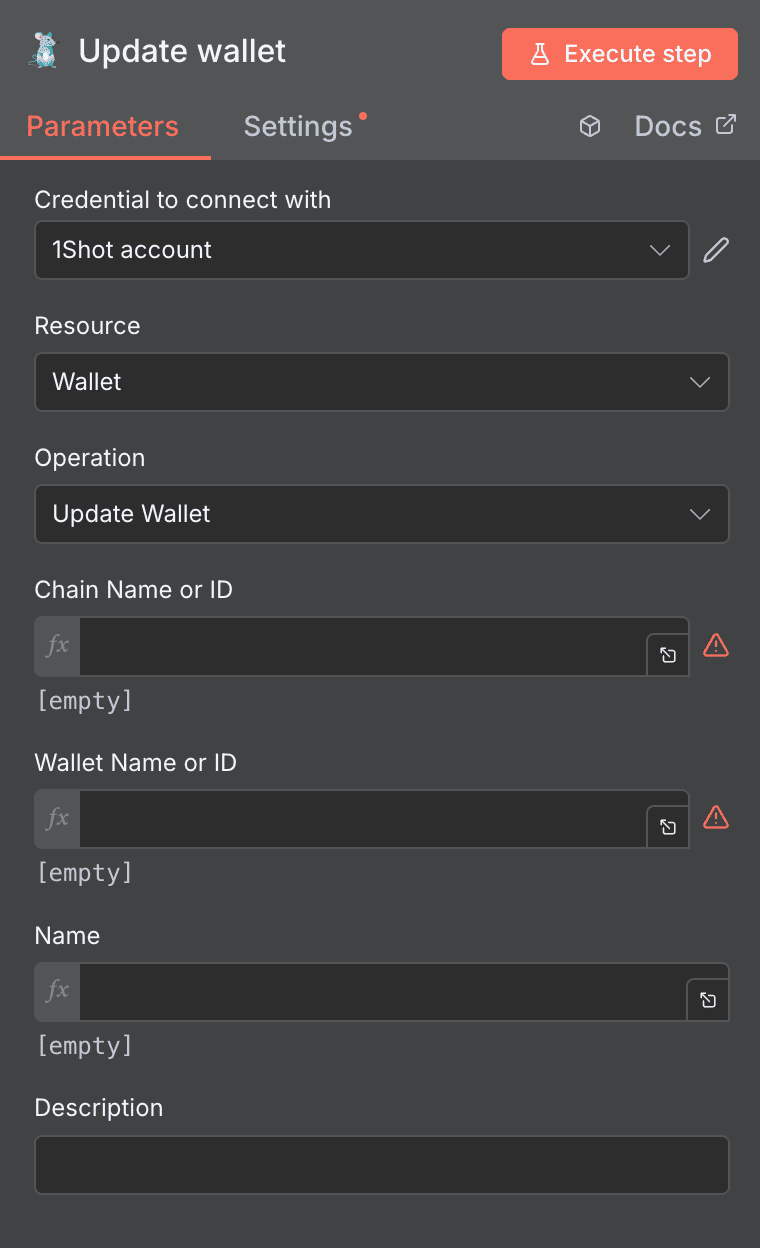
Update wallet
Modify wallet properties like name and description. Useful for keeping wallet metadata organized as your systems evolve.
Key parameters: Credential to connect with: 1Shot credentials. Required. Resource: “Wallet”. Required. Operation: “Update Wallet”. Chain Name or ID: Identify the chain context. Required. Wallet Name or ID: Specify which wallet to update. Required. Name: Optional new name for the wallet. Description: Optional new description.
Use cases: Rename wallets as project requirements change. Add descriptions to document wallet purposes. Build wallet management admin panels.
NEED HELP AUTOMATING 1SHOT API WITH N8N?
We’ll get back to you in minutes ✔
FREQUENTLY ASKED QUESTIONS ABOUT 1SHOT API N8N INTEGRATION
Is the 1Shot API n8n integration free to use?
The n8n integration itself is free—it's included with both n8n's open-source self-hosted version and n8n Cloud plans. However, you'll need a 1Shot API account with appropriate API access, which has its own pricing based on your usage tier. Keep in mind that blockchain operations through the integration will incur network gas fees on the respective chains. Check 1Shot's current pricing page for detailed API costs, and factor in estimated gas fees when budgeting for your automation workflows.
Can I execute smart contracts on multiple blockchain networks with this integration?
Absolutely. The 1Shot API n8n integration supports all blockchain networks available in your 1Shot account. Use the "List chains" action to see which networks are accessible, then specify the chain in actions like "Create wallet" or contract execution operations using the "Chain Name or ID" parameter. This makes it straightforward to build multi-chain workflows—for example, deploying the same contract across Ethereum, Polygon, and Arbitrum in a single n8n workflow.
How do I handle errors when a smart contract execution fails?
n8n provides robust error handling that works seamlessly with the 1Shot API integration. First, use the "Simulate" action before actual execution to catch potential errors early. For production workflows, enable n8n's error handling on the 1Shot nodes to catch failures and route them to notification systems (Slack, email) or retry logic. You can also use the "Get transaction" action in follow-up workflows to verify transaction status and trigger remediation steps if something goes wrong.