
CLEARBIT N8N INTEGRATION: AUTOMATE CLEARBIT WITH N8N
Looking to automate Clearbit with n8n? You’re in the right place. The Clearbit n8n integration gives you access to 3 powerful actions that let you enrich company and person data automatically, without writing a single line of code.
Clearbit is a leading data enrichment platform that transforms email addresses and domain names into complete business intelligence. When connected to n8n, you can automatically enrich leads as they enter your pipeline, autocomplete company information in real-time, and build comprehensive profiles of prospects and customers across your entire tech stack.
In this guide, you’ll discover exactly how to connect Clearbit to n8n, explore each available action in detail, and learn practical use cases to supercharge your sales and marketing workflows. Whether you’re enriching inbound leads, scoring prospects, or building targeted account lists, this integration will save you hours of manual research.


n8n Clearbit Workflow: demonstration of an automation connecting Clearbit to other applications via n8n. This video illustrates how Clearbit actions integrate into an n8n workflow to automate your processes without code.
WHY AUTOMATE CLEARBIT WITH N8N?
The Clearbit n8n integration gives you access to 3 actions that cover the core enrichment capabilities: enriching companies by domain, autocompleting company details from partial names, and enriching person data from email addresses. These three actions form the foundation of any serious data enrichment workflow.
The benefits of automating Clearbit are substantial. Significant time savings: No more manually looking up companies on LinkedIn or searching for contact information—set up smart rules that automatically enrich every new lead the moment they enter your CRM. Improved data quality: Instead of relying on incomplete form submissions, you get full company profiles including industry, employee count, revenue estimates, and technology stack. Zero lag in lead response: Enrich leads instantly as they convert, so your sales team can prioritize and personalize outreach within minutes, not hours.
Concrete use cases include: automatically enriching new HubSpot contacts with Clearbit person data, triggering lead scoring workflows based on enriched company size and industry, building targeted account lists by autocompleting company names from partial data, and syncing enriched data to Slack for instant sales notifications. Connect Clearbit to over 400 applications in n8n and build workflows that would otherwise require expensive point-to-point integrations.

HOW TO CONNECT CLEARBIT TO N8N?
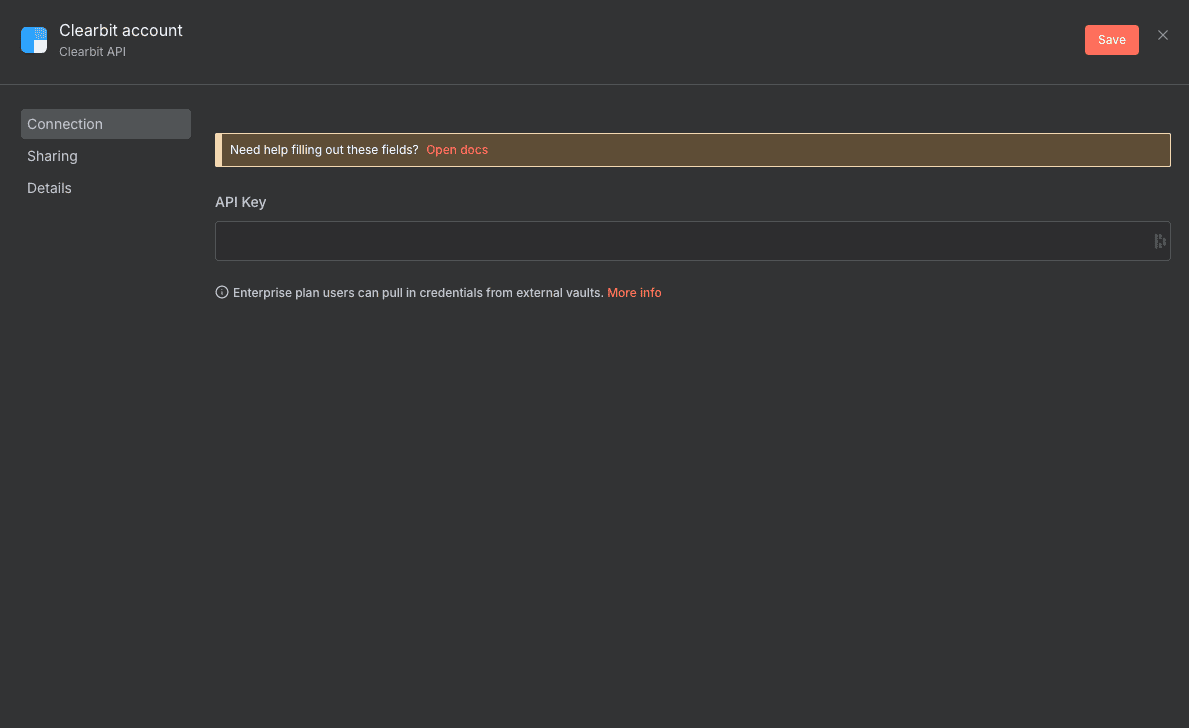
Basic configuration:
- Get your Clearbit API key: Log into your Clearbit dashboard, navigate to API settings, and copy your secret API key. Keep this key secure—it provides full access to your Clearbit account.
- Open n8n and add Clearbit: In your n8n workflow editor, add a new node and search for “Clearbit”. Select any Clearbit action to start.
- Create new credentials: Click on the “Credential to connect with” dropdown and select “Create New”. A configuration panel will open.
- Paste your API key: Enter your Clearbit API key in the designated field and give your credential a recognizable name (e.g., “Clearbit Production”).
- Test the connection: Save your credentials and run a test enrichment with a known domain or email to confirm everything is working correctly.
💡 TIP: Create separate Clearbit credentials for development and production workflows. This way, you can test new automations without impacting your API rate limits on production workflows, and you’ll have clearer visibility into which workflows are consuming your Clearbit credits.
NEED HELP AUTOMATING CLEARBIT WITH N8N?
We’ll get back to you in minutes ✔
CLEARBIT ACTIONS AVAILABLE IN N8N
Enrich a company
The “Enrich a company” action is your go-to tool for transforming a simple domain name into a comprehensive company profile. When you provide a company’s domain (like “stripe.com”), Clearbit returns detailed firmographic data including company name, industry, employee count, estimated revenue, location, technology stack, and social media profiles.
This action is essential for B2B workflows where you need to qualify leads quickly. Instead of spending 10 minutes researching each company manually, you get instant access to the data points that matter for lead scoring and routing.
Key parameters:
- Credential to connect with: Select your Clearbit account credentials from the dropdown. This is required for authentication.
- Resource: Set to “Company” to indicate you’re working with company data. This is a required dropdown selection.
- Operation: Set to “Enrich” to perform the enrichment lookup. This is required.
- Domain: Enter the company’s domain (e.g., “acme.com”) as text input. This is the required identifier Clearbit uses to find the company.
- Additional Fields: Optionally specify extra properties you want in the response. Click “Add Field” to include specific data points.
Typical use cases:
- Automatically enrich companies when new deals are created in your CRM, then update the deal record with industry and employee count
- Build a lead scoring system that assigns points based on company size, revenue, and tech stack
- Route enterprise leads (500+ employees) to senior account executives automatically
- Create Slack notifications with full company context when high-value prospects visit your pricing page
When to use it: Use this action whenever you have a company domain and need detailed firmographic data. It’s perfect for inbound lead enrichment, account-based marketing workflows, and any situation where company context improves decision-making.

Autocomplete a company
The “Autocomplete a company” action helps you find company information when you only have a partial or informal company name. Type “Salesforce” and Clearbit suggests the full company details including the correct domain. This is incredibly useful for cleaning messy data or building search-as-you-type interfaces.
Unlike the enrichment action that requires an exact domain, autocomplete works with fuzzy input—making it ideal for processing form submissions where users might type “SF” instead of “Salesforce” or “MSFT” instead of “Microsoft”.
Key parameters:
- Credential to connect with: Select your Clearbit credentials from the dropdown. This is required.
- Resource: Set to “Company” for company-related operations. This is required.
- Operation: Set to “Autocomplete” to perform the name completion. This is required.
- Name: Enter the company name or partial name you want to autocomplete. Accepts text input or dynamic expressions. This field is optional, allowing for flexible workflow designs.
Typical use cases:
- Clean up CRM data by standardizing company names entered manually by sales reps
- Build dynamic forms that suggest companies as users type, improving data quality at the source
- Match imported spreadsheet data to canonical company records before syncing to your database
- Validate company names in webhook payloads before triggering downstream enrichment
When to use it: Use autocomplete when your starting point is a company name (not a domain) or when you’re dealing with potentially messy, user-entered data. It’s the first step in many data cleaning pipelines.

Enrich a person
The “Enrich a person” action transforms an email address into a complete professional profile. Provide an email like “john@stripe.com” and receive the person’s full name, job title, seniority level, LinkedIn profile, company information, and more. This is the cornerstone of any lead enrichment strategy.
For sales and marketing teams, this action eliminates the guesswork in personalization. Instead of sending generic outreach, you can tailor messaging based on the prospect’s role, seniority, and company context—all automatically.
Key parameters:
- Credential to connect with: Select your Clearbit credentials. This is required for authentication.
- Resource: Set to “Person” to indicate you’re enriching individual data. This is required.
- Operation: Set to “Enrich” to perform the person lookup. This is required.
- Email: Enter the email address of the person to enrich. Accepts text input or expressions. This is required—it’s the unique identifier Clearbit uses.
- Additional Fields: Optionally add extra fields to customize the response. Use “Add Field” to specify particular data points you need.
Typical use cases:
- Enrich every new email subscriber instantly, then segment them by job title and seniority
- Automatically update CRM contacts with LinkedIn URLs and professional headshots
- Trigger different nurture sequences based on whether the lead is a C-level executive or individual contributor
- Score leads in real-time based on a combination of person seniority and company firmographics
When to use it: Use this action whenever you capture an email address and need to understand who that person is professionally. It’s essential for inbound marketing, sales development, and any workflow where personalization matters.

NEED HELP AUTOMATING CLEARBIT WITH N8N?
We’ll get back to you in minutes ✔
FREQUENTLY ASKED QUESTIONS ABOUT CLEARBIT N8N INTEGRATION
Is the Clearbit n8n integration free?
The n8n integration itself is free to use—n8n is open-source and the Clearbit node comes built-in. However, Clearbit operates on a credit-based pricing model, so you'll need an active Clearbit subscription to use the API. Each enrichment request consumes credits from your Clearbit plan. If you're just testing, Clearbit offers a limited free tier that lets you validate your workflows before committing to a paid plan. Keep in mind that n8n Cloud (the hosted version) has its own pricing separate from Clearbit.
What data can I retrieve from Clearbit through n8n?
Through the n8n integration, you can retrieve extensive company and person data. For companies, this includes: company name, domain, industry, sector, employee count ranges, estimated annual revenue, location (city, state, country), technology stack, social media profiles, and company description. For people, you get: full name, job title, seniority level, department, LinkedIn profile URL, Twitter handle, location, and the associated company data. The exact fields returned depend on Clearbit's data availability for each specific domain or email.
How long does it take to set up the Clearbit n8n integration?
You can have your first Clearbit workflow running in under 10 minutes. The setup involves three simple steps: copying your API key from Clearbit's dashboard (2 minutes), pasting it into n8n's credential manager (1 minute), and building your first workflow with a Clearbit action (5-7 minutes). The node interface is intuitive—just select your resource type (Company or Person), choose your operation, and provide the domain or email. Test with a known contact to verify everything works, and you're ready to connect Clearbit to the rest of your automation stack.