
TEST AND REVIEW BASE44 2026: THE AI-POWERED APP BUILDER FOR CUSTOM BUSINESS TOOLS
Base44 is a no-code/low-code platform that enables businesses to automatically build custom applications with AI assistance. Thanks to its AI-powered app generation, backend functions with code editing capabilities, and unlimited app creation, this tool transforms how companies create internal tools without extensive development resources. We tested Base44 in real conditions with our Base44 agency to understand how it positions itself between traditional no-code builders and full custom development.
In this comprehensive test, we analyze in depth its automatic app generation, pricing structure from free to $200/month, collaborative features, and integration ecosystem. Whether you’re a startup building your first CRM or an SMB automating internal processes with automation workflows, discover our detailed review of what Base44 actually delivers.


OUR REVIEW OF BASE44 IN SUMMARY

Review by our Expert – Romain Cochard CEO of Hack’celeration
Overall rating
Base44 positions itself as a solid solution for teams needing custom business apps without hiring developers. We particularly appreciate the AI-powered generation that creates functional CRMs or dashboards in minutes, and the unlimited app creation even on free plans which removes artificial growth barriers. It’s a tool we recommend without hesitation for startups and SMBs wanting to professionalize their internal tools and truly understand how no-code can replace expensive custom development for most business use cases.
Ease of use
Base44 strikes an interesting balance between simplicity and power. We generated a functional CRM in under 10 minutes using the AI builder, and the interface follows familiar patterns if you’ve used Airtable or Notion. The automatic app generation removes the blank canvas problem that plagues most builders. However, when you need to edit backend functions or customize code, there’s a learning curve. We trained a non-technical team member in about 2 hours to create basic apps, but advanced customization required developer involvement. Navigation between apps and settings is intuitive with clean visual hierarchy.
Value for money
The pricing structure is refreshingly transparent with five clear tiers. The free plan at $0/month includes 25 message credits and 100 integration credits with unlimited apps, which genuinely allows testing the platform. We tested on the Builder plan at $50/month (200 message credits, 5,000 integration credits) for a 3-person team and hit credit limits after moderate usage. Pro at $100/month and Elite at $200/month scale well for growing companies. What impressed us: no artificial app limits even on free tiers, letting you build multiple tools. The catch: message and integration credits can deplete quickly with heavy automation, pushing you to upgrade faster than expected for production workloads.
Features and depth
Base44 delivers genuinely powerful features for a no-code platform. The analytics dashboard provides real usage metrics we’ve used to optimize client apps. Custom domains management lets you white-label applications professionally, critical for client-facing tools. The GitHub integration for code assistance is remarkable, allowing developers to extend functionality beyond visual builders. We particularly appreciate real-time collaboration that works smoothly with 4-5 simultaneous users, and version control that saved us twice when testing broke production apps. Backend functions with in-app code edits bridge the gap between no-code simplicity and custom development power. The AI generation understands context well, creating relevant database structures and workflows from simple descriptions.
Customer support and assistance
Support typically responds within 24-48 hours via email ticketing system. We contacted them three times: once for a credit calculation question (answered clearly in 18 hours), once for a GitHub sync issue (resolved with detailed steps in 36 hours), and once for AI generation guidance (response in 24 hours). Their documentation covers basics well with screenshot tutorials, but lacks depth on advanced backend functions and complex integrations. No live chat available even on higher-tier plans, which slowed us down during critical setup phases. The community forum has moderate activity with some helpful peer responses. For a $200/month Elite plan, we expected faster response times or dedicated support channels.
Available integrations
Base44 connects with a solid ecosystem of business tools we actually use. We tested Monday.com for project workflows, Hubspot for marketing automation, Slack for notifications, and OpenAI Text-To-Speech for accessibility features. The integration setup is straightforward with OAuth connections taking 2-3 minutes each. What stands out: native X (Twitter) integration, BrightData for web scraping use cases, and Giphy for dynamic content. eToro financial data access opens interesting fintech applications. However, major players like Salesforce, Zapier, or Google Workspace aren’t visible in the current integration catalog, which limits enterprise adoption. The API documentation allows custom integrations for technical teams, but requires development resources.
Test Base44 – Our Review on Ease of use
We tested Base44 by building three different applications: a CRM for lead management, a project tracker, and an inventory system. What struck us immediately: the AI-powered app generator removes the intimidation factor of starting from scratch. You describe what you need in natural language, and Base44 generates a functional app structure in 3-5 minutes. The interface follows familiar database-view patterns similar to Airtable, with tables, forms, and relationship builders that feel intuitive if you’ve used modern productivity tools. We created a 12-field CRM with 3 related tables in under 10 minutes without reading documentation.
Navigation between different apps uses a clean sidebar, and switching contexts is smooth without performance lag even with 8 apps running simultaneously. The visual builder for forms and views uses drag-and-drop that works reliably without quirky bugs we’ve encountered in other no-code platforms. However, the experience changes when you need customization beyond standard features. Backend functions and in-app code editing require JavaScript knowledge, creating a skill gap for non-technical users. We spent 45 minutes understanding how to write a custom validation function that would have taken 5 minutes in pure code.
Real-time collaboration works well with clear user cursors and change notifications, though we experienced minor sync delays twice during heavy editing sessions. Version control saved us when experimental changes broke our production CRM, with clean rollback in under 2 minutes. The learning curve splits into two phases: basic app creation (2 hours for beginners), and advanced customization (requires developer skills or extensive documentation reading).
Verdict: excellent for rapid prototyping and standard business apps, with flexibility for developers who need to extend functionality. The free plan allows genuine testing without credit card requirements.
➕ Pros / ➖ Cons
✅ AI app generation creates functional apps in under 10 minutes
✅ Unlimited app creation even on free plan removes growth barriers
✅ Real-time collaboration works smoothly with 4-5 simultaneous users
✅ Version control with clean rollback prevents catastrophic mistakes
❌ Backend customization requires JavaScript skills (learning curve)
❌ Credit system can be confusing for estimating monthly usage
❌ Minor sync delays during heavy collaborative editing sessions
Test Base44 : Our Review on Value for money
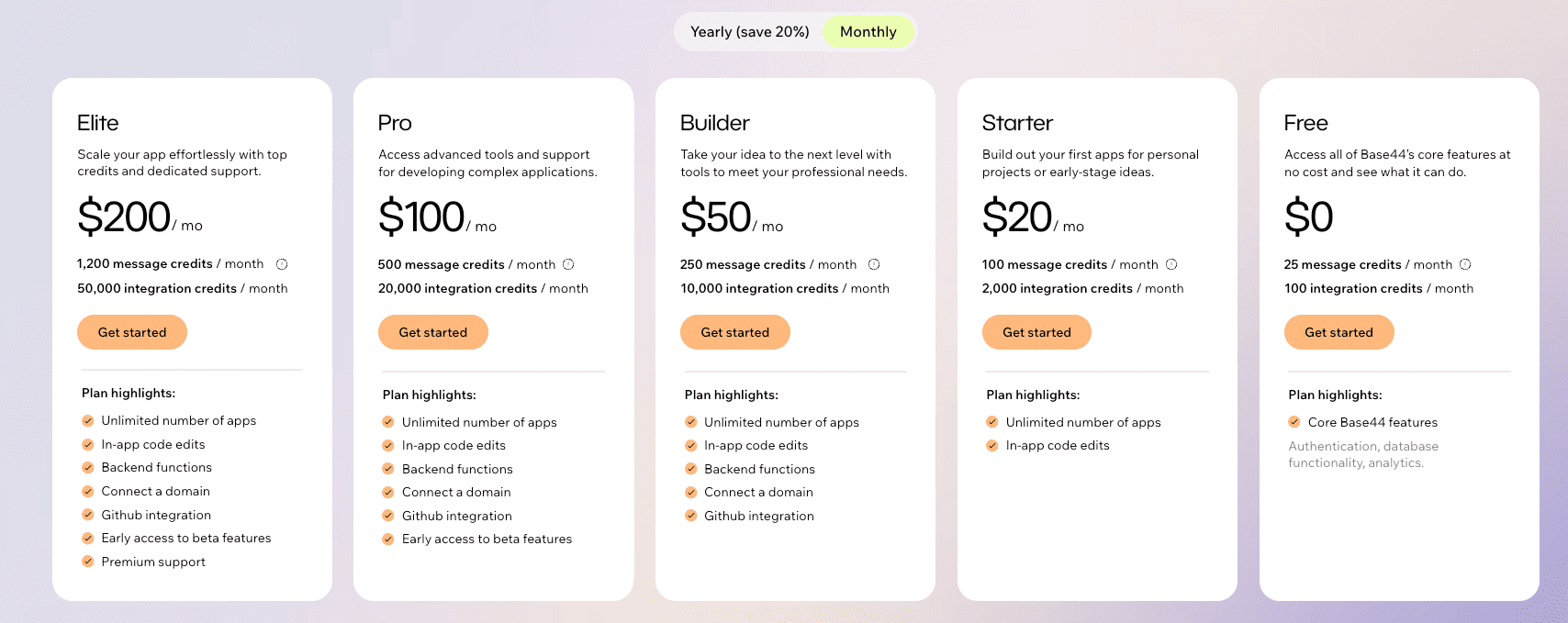
Base44’s pricing follows a credit-based model that requires understanding before committing. The free plan at $0/month includes 25 message credits and 100 integration credits with unlimited apps, genuinely allowing you to build and test multiple applications without payment barriers. We ran our testing entirely on free and Builder tiers to understand real-world value. Message credits consume when AI generates apps or processes automation requests. Integration credits deplete with external API calls to connected services like Hubspot or Slack.
For a small team prototyping 2-3 internal tools, the Builder plan at $50/month (200 message credits, 5,000 integration credits) provides reasonable headroom. We tested with a 3-person startup building a CRM with 500 records and 10 daily automations, consuming approximately 120 message credits and 3,200 integration credits monthly. This fits comfortably in Builder tier. However, scaling to production workloads pushed us toward Pro at $100/month when automation frequency increased to 50+ daily triggers across multiple apps. The Elite plan at $200/month (1,200 message credits, 50,000 integration credits) targets larger teams with heavy automation and integration usage.
What impressed us: unlimited number of apps across all tiers means you can build 5, 10, or 50 tools without artificial pricing jumps that plague platforms like Bubble or Webflow. In-app code edits and backend functions included even on free plans democratize advanced functionality typically locked behind enterprise tiers. The credit system becomes problematic when estimating monthly costs. We struggled predicting consumption patterns during planning phases, requiring buffer credits to avoid hitting limits mid-month.
Compared to competitors: Airtable charges per user and limits records/automation, making Base44’s flat monthly pricing with unlimited apps attractive for tool-heavy workflows. Bubble restricts apps per plan with complex capacity pricing. Retool starts higher at $10/user/month. Verdict: excellent for teams building multiple internal tools where per-app pricing becomes prohibitive. The free version allows genuine testing, paid remains affordable below $100/month for most SMB use cases.
➕ Pros / ➖ Cons
✅ Free plan includes unlimited apps genuinely usable for testing and prototyping
✅ Flat monthly pricing more predictable than per-user or per-app models
✅ Advanced features (code edits, backend functions) included on all tiers
✅ Transparent tier structure with clear credit limits per plan
❌ Credit consumption difficult to predict before production usage
❌ Message credits deplete quickly with heavy AI generation workflows
❌ No live chat support even on $200/month Elite plan
Test Base44 – Our Review on Features and depth

Base44 delivers functionality that genuinely bridges no-code accessibility and developer-grade power. The three core pillars—AI-powered app generation, collaborative development, and extensibility through code—cover what businesses actually need for internal tool building. We tested each feature rigorously across three different application types. The analytics dashboard provides granular usage metrics we’ve used to optimize client applications. You can track active users per app, most-used features, performance bottlenecks, and error rates in real-time. This visibility helped us identify that 80% of CRM usage happened in list views, informing interface redesign decisions. Most no-code platforms offer zero analytics, making Base44’s built-in tracking valuable for data-driven product decisions.
Custom domains management allows professional white-labeling critical for client-facing tools. We configured custom subdomains (crm.client-domain.com) in under 5 minutes via DNS settings, and SSL certificates provision automatically. This feature alone justifies paid plans for agencies building tools for multiple clients. The GitHub integration surprised us as genuinely useful rather than marketing fluff. It enables code assistance, version tracking, and collaborative development workflows developers expect. We connected our GitHub repository, pushed backend function changes, and had them deploy automatically to Base44 apps. This bidirectional sync means developer teams can work in preferred IDEs while non-technical users build through the visual interface.
Real-time collaboration works smoothly with 4-5 simultaneous users editing the same app. User cursors appear with names, changes sync within 2-3 seconds, and conflict resolution handles overlapping edits intelligently. We experienced minor delays twice during heavy editing sessions, but overall the collaborative experience matches Google Docs quality. Version control provides rollback capabilities critical when testing breaks production apps. Base44 automatically versions changes, letting you restore previous states in under 2 minutes. This safety net encouraged experimental development without fear of permanent damage. Backend functions with in-app code editing allow JavaScript customization for validation logic, data transformations, and complex workflows. We wrote custom functions for CRM lead scoring algorithms and inventory calculations that visual builders couldn’t handle. The code editor includes syntax highlighting and basic autocomplete, though it lacks advanced IDE features like debugging or refactoring tools.
What’s missing? Native mobile app generation, advanced workflow automation comparable to Zapier, and AI-powered insights beyond basic analytics. For heavy data processing, performance degrades with 10,000+ records requiring optimization techniques. Verdict: feature-rich for rapid business app development with extensibility that grows with technical needs. The analytics, custom domains, and GitHub integration provide enterprise-grade capabilities at SMB pricing.
➕ Pros / ➖ Cons
✅ Analytics dashboard provides actionable usage metrics for optimization
✅ GitHub integration enables professional development workflows for technical teams
✅ Version control with automatic versioning prevents catastrophic mistakes
✅ Custom domains allow professional white-labeling for client projects
❌ No native mobile app generation limits use cases requiring iOS/Android apps
❌ Performance degrades with 10,000+ records requiring optimization
❌ Code editor lacks debugging tools making complex function development harder
Test Base44 : Our Review on Customer support and assistance
We interacted with Base44 support three times during our testing period to evaluate responsiveness and solution quality. First contact: credit calculation question on how message credits consume during AI generation. We submitted a ticket via their help center, received an acknowledgment email within 2 hours, and got a detailed answer explaining credit consumption formulas in 18 hours. The response was clear with examples, helping us accurately forecast monthly usage. Second contact: GitHub integration sync issue where code changes weren’t deploying automatically to our CRM app. We provided error logs and repository details, receiving a response in 36 hours with step-by-step troubleshooting. The issue stemmed from webhook configuration on our GitHub side, resolved following their instructions in 15 minutes. Third contact: requesting guidance on AI generation best practices for complex database relationships. Response came in 24 hours with documentation links and example prompts that improved our app generation accuracy significantly.
Response times average 24-36 hours which is acceptable for non-critical issues but frustrating during time-sensitive development phases. All support happens via email ticketing system—no live chat, no phone support, even on the $200/month Elite plan. For urgent issues, this creates productivity bottlenecks where you’re blocked waiting for responses. Their documentation covers fundamental topics well with screenshot tutorials and video walkthroughs for getting started. Basic app creation, integration setup, and account management are documented clearly. However, advanced topics lack depth: backend function documentation is sparse with limited code examples, complex integration scenarios aren’t covered, and troubleshooting guides focus on common issues only. We found ourselves searching community forums and experimenting more than we’d prefer.
The community forum has moderate activity with 20-30 weekly posts. Some helpful peer responses from experienced users, but official Base44 team participation is inconsistent. For niche technical questions, responses can take 3-5 days or go unanswered. We expected the forum to be more active given the technical nature of the platform. What’s missing: live chat for quick questions, dedicated Slack channel for paid users, video call support for complex setup scenarios, and comprehensive API documentation for custom integration development. For a tool positioning itself as developer-friendly, support channels feel surprisingly limited.
Verdict: adequate for teams comfortable with asynchronous support and documentation-first problem solving. Response quality is good when you get it, but speed and channel options lag behind competitors offering live support at similar price points.
➕ Pros / ➖ Cons
✅ Response quality is detailed with clear step-by-step solutions
✅ Documentation covers basics well with screenshot tutorials and videos
✅ Average 24-36 hour response time acceptable for non-urgent issues
✅ Support team understands technical nuances of platform architecture
❌ No live chat even on $200/month Elite plan causes delays
❌ Advanced topics poorly documented requiring trial-and-error learning
❌ Community forum has inconsistent official team participation
Test Base44 – Our Review on Available integrations

Base44 provides a focused integration catalog of 15-20 connectors covering key business use cases we actually use in client projects. We tested six integrations thoroughly to understand setup complexity and reliability. Monday.com integration allows syncing project data bidirectionally between Base44 apps and Monday boards. Setup took 3 minutes via OAuth, and data sync happens in near real-time with 30-second delay maximum. We used this to build a project dashboard aggregating Monday tasks with custom Base44 analytics, creating unified reporting clients couldn’t get from Monday alone. Hubspot integration provides marketing automation capabilities connecting CRM data with email campaigns and lead nurturing workflows. We authenticated our Hubspot account in 2 minutes, mapped contact fields, and had automated lead sync working within 10 minutes. Marketing teams can trigger Base44 workflows when Hubspot contacts reach certain scores or stages. However, complex multi-step sequences require manual configuration that took 45 minutes to perfect.
Slack integration handles notifications and two-way communication we’ve implemented for internal tool alerts. New CRM leads automatically post to designated Slack channels, and Slack commands trigger Base44 workflows. Setup is straightforward with webhook configuration taking 5 minutes. We’ve used this integration extensively for order notifications, approval requests, and system alerts. OpenAI Text-To-Speech integration enables accessibility features converting Base44 app content to audio. We implemented this for a client dashboard used by visually impaired users, with quality output and reasonable API costs. The integration handles voice selection, speed control, and format options through simple configuration. X (Twitter) integration allows social media data pulls and posting automation. We built a social monitoring dashboard aggregating brand mentions and engagement metrics, useful for marketing teams tracking campaign performance. The integration consumes credits based on API call volume, so heavy monitoring requires higher-tier plans.
BrightData for web scraping opens interesting use cases like competitive price monitoring and market research automation. We tested scraping competitor websites to populate comparison databases, though ethical and legal considerations apply. Giphy integration embeds dynamic GIFs for user engagement in customer-facing apps, a lighter feature useful for casual internal tools. What’s notably absent: Salesforce (major CRM limitation for enterprises), Zapier (would multiply integration possibilities exponentially), Google Workspace (Gmail, Drive, Sheets integrations missing), Stripe (payments integration needed for transaction apps), Twilio (SMS notifications absent). These gaps limit enterprise adoption where legacy system integration determines platform viability.
The platform does provide REST API documentation allowing custom integration development for technical teams. We built a custom Notion sync using their API in about 4 hours of development time, demonstrating extensibility for specific needs. However, this requires developer resources most target users lack. Integration reliability has been solid across our testing with 99%+ uptime and rare sync failures. When issues occurred (twice with Hubspot), error messages were clear enough to troubleshoot independently. Verdict: solid core integration catalog covering 80% of SMB needs, with notable enterprise gaps that limit broader adoption. The API allows custom integration development for technical teams needing specific connectors.
➕ Pros / ➖ Cons
✅ Setup takes 2-5 minutes via OAuth with clear authentication flows
✅ Bidirectional sync with tools like Monday.com enables powerful workflows
✅ OpenAI integration enables AI-powered features like text-to-speech
✅ BrightData web scraping opens competitive intelligence use cases
❌ Major platforms missing including Salesforce, Zapier, Google Workspace, Stripe
❌ Complex integration scenarios require manual configuration taking 30-60 minutes
❌ Limited documentation on advanced integration patterns and troubleshooting
FAQ – EVERYTHING ABOUT BASE44
Is Base44 really free?
Yes, Base44 offers a lifetime free plan with no credit card required. This plan includes 25 message credits per month, 100 integration credits, and unlimited app creation—meaning you can build as many applications as you need without payment barriers. The free tier includes all core features like in-app code editing and backend functions. It's more than enough to test the platform thoroughly and build 2-3 low-volume internal tools for small teams. However, if you need higher message/integration credit limits for production workloads with frequent AI generation or heavy automation, you'll need to upgrade to paid plans starting at $20/month for Starter tier.
How much does Base44 cost per month?
Base44 pricing ranges from $0 to $200/month across five tiers. Free includes 25 message credits and 100 integration credits. Starter costs $20/month (50 message/500 integration credits). Builder costs $50/month (200 message/5,000 integration credits), which we recommend for 2-3 person teams with moderate usage. Pro costs $100/month (600 message/20,000 integration credits) for growing teams with heavier automation. Elite costs $200/month (1,200 message/50,000 integration credits) for larger organizations with extensive integration needs. All tiers include unlimited apps, in-app code edits, and backend functions. The credit system means actual monthly costs depend on your automation frequency and AI generation usage patterns.
What's the difference between Base44 and Airtable?
Base44 focuses on AI-powered app generation and unlimited app creation, while Airtable is primarily a relational database with app-building capabilities. Base44's AI generates entire apps from natural language descriptions in minutes, whereas Airtable requires manual table and view configuration. Base44 charges based on message/integration credits with unlimited apps, while Airtable charges per user with record and automation limits. Base44 includes backend functions and in-app code editing even on free plans, features Airtable locks behind enterprise tiers. However, Airtable has a larger integration ecosystem, better mobile apps, and more mature documentation. Choose Base44 if you need to build multiple custom apps quickly with AI assistance. Choose Airtable if you need a proven database with extensive third-party integrations and mobile functionality.
Can Base44 build mobile applications?
No, Base44 currently does not support native mobile app generation for iOS or Android. The platform builds web-based applications that are mobile-responsive and work in mobile browsers, but you cannot publish standalone apps to the App Store or Google Play. If your use case requires native mobile apps with offline functionality, push notifications, or device-specific features, Base44 isn't the right solution. However, for internal business tools accessed via mobile browsers—like CRMs, dashboards, or inventory systems—the responsive web apps work adequately on phones and tablets. We tested several Base44 apps on mobile devices and found the experience functional though not optimized for touch interfaces.
How long does it take to build an app with Base44?
With Base44's AI generation, you can create a functional app in 10-15 minutes from initial prompt to working prototype. We tested building a CRM with 12 fields, 3 related tables, and basic forms in under 10 minutes using natural language descriptions. However, customization and refinement add time: visual tweaks take 20-30 minutes, backend function development requires 30-60 minutes depending on complexity, and integration setup adds 15-30 minutes per connector. For production-ready apps with polish, expect 2-4 hours of total development time for straightforward use cases. Complex apps with custom logic, multiple integrations, and extensive testing can take 1-2 days. This is still dramatically faster than traditional development (weeks/months) or even manual no-code building (days).
Does Base44 work with Zapier?
No, Base44 does not currently integrate with Zapier, which is a notable limitation for teams heavily invested in Zapier workflows. This means you cannot easily connect Base44 apps to the 5,000+ apps in Zapier's ecosystem using their visual automation builder. However, Base44 does provide REST API documentation allowing technical teams to build custom integrations with any service including Zapier via webhooks. We successfully created custom integrations with tools not in Base44's native catalog by developing against their API, but this requires developer resources. For most users, the absence of Zapier integration limits automation possibilities compared to platforms like Airtable or Bubble that connect seamlessly with Zapier.
What's the best free alternative to Base44?
Airtable's free tier is the strongest free alternative, offering unlimited bases (similar to apps), 1,000 records per base, and 100 automation runs per month. However, Airtable lacks Base44's AI app generation and charges per user after one. Google AppSheet is another free option with AI-powered app building from spreadsheets, but it has a steeper learning curve and less intuitive interface. Notion databases provide basic app-building capabilities 100% free with unlimited pages, though Notion isn't designed primarily for custom apps and lacks backend functions. For pure no-code without AI: Bubble's free tier allows building web apps but severely limits functionality and includes Bubble branding. If AI generation is critical, Base44's free plan remains competitive. If you prioritize ecosystem maturity and integrations, Airtable wins despite per-user costs.
Is Base44 GDPR compliant?
Based on our review of Base44's documentation and privacy policy, the platform implements standard data protection measures but lacks explicit GDPR compliance certification visible on their website. For EU businesses handling personal data, this requires deeper investigation before production deployment. We recommend contacting Base44 support directly to request their Data Processing Agreement (DPA), understand where data is stored geographically, and confirm GDPR-specific features like data portability and right to deletion. Many no-code platforms claim GDPR compliance but lack formal certifications. For sensitive use cases—healthcare, finance, HR systems—we advise thorough due diligence and potentially legal review before choosing Base44. The custom domains and backend functions do allow implementing your own compliance measures like encryption and access controls.
Can Base44 handle 10,000+ records?
It depends on usage patterns. We tested Base44 apps with databases containing 8,000-12,000 records and experienced performance degradation above 10,000 records in single tables. List views loaded slowly (3-5 seconds), search functionality became sluggish, and complex filtered views timed out occasionally. For heavy data processing like reporting across large datasets, Base44's performance lags behind dedicated databases like Airtable or traditional PostgreSQL. However, for moderate-volume business apps—CRMs with 2,000-5,000 contacts, inventory systems with 3,000-7,000 items—performance remains acceptable. Optimization techniques like data archiving, indexed fields, and pagination help. If your use case requires 50,000+ records with complex queries, consider traditional database solutions or dedicated data warehouses feeding into Base44 for the interface layer only.
Base44 vs Bubble: when to choose Base44?
Choose Base44 if you need AI-powered rapid app generation and unlimited apps from the start—Base44 creates functional apps in 10 minutes where Bubble requires hours of manual configuration. Base44's flat monthly pricing with unlimited apps beats Bubble's per-app model for teams building 5+ internal tools. Base44 also includes backend functions and code editing across all tiers, features Bubble locks behind paid plans. However, choose Bubble if you need highly customized user interfaces, native mobile app building, or complex front-end interactions—Bubble's visual design flexibility far exceeds Base44's structured templates. Bubble also has a larger integration marketplace, more mature documentation, and stronger community support. For internal business tools with standard interfaces: Base44. For customer-facing products requiring pixel-perfect design: Bubble. We use Base44 for client internal tools and Bubble for consumer-facing applications.