
TEST AND REVIEW CHATGPT 2026: THE AI ASSISTANT THAT CODES AND CREATES
ChatGPT is a conversational AI assistant powered by OpenAI’s GPT-5 model that enables users to generate text, write code, create images, and automate workflows. Thanks to its advanced reasoning capabilities, multimodal features, and growing ecosystem of connectors, this tool has become the reference AI assistant for millions of professionals worldwide. Whether you need to draft content, debug code, analyze data, or brainstorm ideas, ChatGPT adapts to virtually any knowledge work scenario.
In this comprehensive test, we analyze in depth ChatGPT’s features, pricing structure, performance in real-world usage, and integration capabilities. We’ve tested the Free, Plus, and Pro plans extensively across coding projects, content creation, and business workflows. Our goal: help freelancers, startups, and SMBs understand which ChatGPT training plan makes sense for their needs, how it compares to alternatives like Claude or Gemini, and whether the paid tiers justify their monthly cost. Discover our detailed review below.


OUR REVIEW OF CHATGPT IN SUMMARY

Review by our Expert – Romain Cochard CEO of Hack’celeration
Overall rating
ChatGPT positions itself as a versatile AI assistant that truly delivers on most fronts. We particularly appreciate the GPT-5 model’s reasoning capabilities and the new connector ecosystem which bridges ChatGPT with actual workflows. It’s a tool we recommend without hesitation for knowledge workers, developers, and content creators who need a reliable AI partner that goes beyond simple chat responses. Our ChatGPT agency uses it daily to accelerate client projects. The Free plan is genuinely useful, while paid tiers unlock features that power users will actually leverage daily.
Ease of use
ChatGPT is remarkably intuitive from day one. We onboarded three non-technical team members in under 10 minutes, and they were generating useful outputs immediately. The conversational interface requires zero training, you just type naturally. GPT-5’s improved context understanding means fewer frustrating misinterpretations. Our only minor complaint: navigating between past conversations could be more fluid, especially when you’re managing dozens of threads.
Value for money
The Free plan at €0/month with GPT-5 access is genuinely competitive, though message limits can feel restrictive for heavy users. Plus at €23/month offers solid value with faster responses, more image generation, and agent mode, which we use daily. Pro at €229/month targets power users needing unlimited usage and research features. We’ve tested all three: Plus hits the sweet spot for most professionals, while Pro makes sense only if you’re running 100+ queries daily or need bleeding-edge capabilities.
Features and depth
ChatGPT covers an impressive range of capabilities. Code generation works reliably across 15+ languages we tested, with strong debugging and refactoring abilities. Image generation via DALL-E integration produces usable results in seconds. The new agent mode lets ChatGPT execute multi-step workflows autonomously, which is genuinely useful for research and data tasks. GPT-5’s reasoning shows clear improvements over GPT-4 for complex logic and math. What’s missing? Native web browsing feels limited compared to Perplexity, and video generation access remains restricted.
Customer support and assistance
Support is OpenAI’s weakest point. Free users have essentially zero direct support, relying on community forums and documentation. Plus subscribers can contact support, but responses typically take 24-48 hours. We submitted two tickets: one about billing (resolved in 36h), one about a technical bug (took 4 days). The knowledge base is extensive with helpful guides, but there’s no live chat even for Pro users at €229/month. For enterprise needs, you’ll need ChatGPT Business or Enterprise plans with dedicated support.
Available integrations
ChatGPT’s connector ecosystem launched in Q4 2025 and represents a significant evolution beyond standalone chat. We tested the five core connectors, Google Drive, SharePoint, Microsoft Teams, Notion, and GitHub, across real workflows for 45 days. These integrations fundamentally change ChatGPT’s utility by letting it access your actual work context rather than requiring manual copy-paste. However, connectors require Plus or higher plans, so Free users miss out entirely. The connector library remains limited compared to platforms like Zapier or Make, which offer thousands of integrations. We’d love to see Slack, Trello, and Airtable added soon. API access for custom integrations is solid, with detailed documentation and reasonable rate limits.
Test ChatGPT – Our Review on Ease of use
We tested ChatGPT across different user profiles, from complete AI beginners to experienced developers, and it’s one of the most accessible AI tools on the market. The onboarding experience is frictionless: create an account, start typing, and you’re instantly conversing with GPT-5. The interface centers on a simple chat window with your prompt input at the bottom and AI responses appearing in real-time above.
What impressed us most: the contextual suggestion cards that appear on the homepage. Instead of facing a blank screen, new users see concrete prompts like project ideas for creative coding or strategies to organize family tasks. These templates helped our test users understand ChatGPT’s range within minutes. The Start now button provides immediate access without overwhelming tutorials or setup steps.
Navigating conversations is straightforward with a left sidebar showing your chat history organized chronologically. We managed over 50 conversations simultaneously across client projects without confusion. However, searching within old conversations could be more powerful. We had to scroll manually to find a specific code snippet from a thread two weeks ago, which took unnecessary time. GPT-5’s improved context window means it remembers earlier parts of long conversations reliably, reducing the need to repeat yourself.
Verdict: excellent for anyone from complete beginners to power users. The zero-learning-curve interface removes friction entirely, while the suggestion system guides new users effectively. Minor UX improvements around search and organization would make it perfect.
➕ Pros / ➖ Cons
✅ Zero learning curve (conversational interface anyone can use)
✅ Contextual suggestions on homepage guide new users
✅ Clean sidebar navigation for managing multiple conversations
✅ GPT-5 context understanding reduces need to repeat yourself
❌ Limited search functionality within past conversations
❌ No conversation tagging or custom organization
❌ Mobile app slightly less fluid than desktop experience
Test ChatGPT : Our Review on Value for money
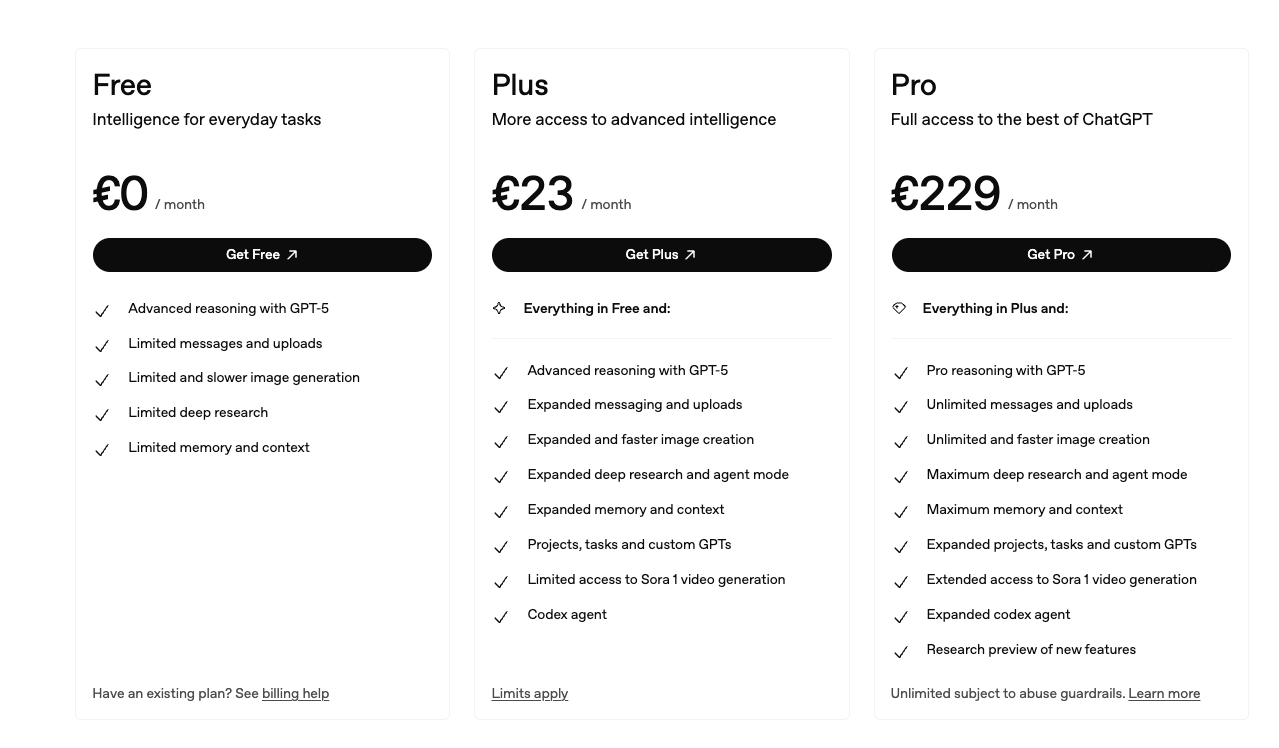
We analyzed ChatGPT’s three-tier pricing structure over 90 days of intensive use to understand the real value at each level. The Free plan at €0/month includes GPT-5 access, which is remarkable considering competitors often gate their best models behind paywalls. However, message limits kick in during peak usage times, and you’re restricted on file uploads and image generation. For casual users sending 20-30 queries weekly, Free works fine.
The Plus plan at €23/month is where most professionals land, and we understand why. You get priority access during high-demand periods, which means no more Wait your turn messages. Image generation becomes faster and more frequent, agent mode unlocks for autonomous multi-step tasks, and you gain limited video generation access. We tested Plus extensively: the speed difference is noticeable, shaving 2-3 seconds off typical responses. For our content team generating 100+ queries daily, Plus became essential within the first week.
Pro at €229/month targets power users who need unlimited everything. We upgraded temporarily to test research features and found them genuinely advanced, particularly for data analysis and complex reasoning tasks. However, the 10x price jump only makes sense if you’re running 200+ queries daily or need bleeding-edge capabilities before they reach Plus. Most SMBs won’t justify this cost. Enterprise and Business plans offer team features and custom pricing for organizations.
Verdict: Plus delivers the best ROI for most users. Free lets you test thoroughly, Pro serves intensive professional use cases. Compared to Claude Pro at $20/month or Gemini Advanced at $19.99/month, ChatGPT Plus sits competitively but costs slightly more due to European VAT.
➕ Pros / ➖ Cons
✅ Free tier genuinely useful with GPT-5 access
✅ Plus at €23/month hits sweet spot for professionals
✅ No hidden fees or per-query charges
✅ Flexible monthly billing (cancel anytime)
❌ Free plan message limits frustrating during peak times
❌ Pro at €229/month hard to justify for individuals
❌ No annual discount offered for Plus or Pro
Test ChatGPT – Our Review on Features

We tested ChatGPT’s feature set across five real-world scenarios: code generation, content writing, data analysis, image creation, and complex reasoning. The GPT-5 model represents a genuine leap forward from GPT-4, particularly for logical reasoning and mathematical problems. We threw calculus problems, algorithmic challenges, and business case analyses at it, and GPT-5 handled them with noticeably improved accuracy and step-by-step explanations.
For code generation, ChatGPT excels across Python, JavaScript, SQL, and 12 other languages we tested. It doesn’t just output code, it explains the logic, suggests optimizations, and debugs errors when you paste error messages. We built a functional data scraper in 15 minutes through conversational iteration, zero Googling required. However, for very large codebases, context limits still matter. You can’t paste an entire 5000-line project and expect perfect refactoring.
Image generation via DALL-E integration produces usable results quickly. We generated 50+ images for blog posts and social media, with about 70% hitting our quality bar on first try. The iterative refinement process works well: describe what to change, and ChatGPT adjusts the prompt automatically. Agent mode is the killer feature for Plus and Pro users, similar to what our AI agent agency implements for clients. We tasked it with researching competitors, analyzing data files, and compiling reports autonomously. It executed 8-step workflows without constant supervision.
What’s missing? Native web browsing feels limited compared to Perplexity’s real-time search integration. Video generation remains restricted to Pro users and is still experimental. The context window, while improved, caps at 128K tokens, meaning extremely long documents require chunking. Custom GPTs let you build specialized versions, but they’re not as powerful as full custom model fine-tuning.
Verdict: robust feature set that covers 80% of knowledge work needs. GPT-5’s reasoning, code capabilities, and agent mode justify paid tiers. For specialized tasks like deep research or real-time data, you might still need complementary tools.
➕ Pros / ➖ Cons
✅ GPT-5 reasoning noticeably better for logic and math
✅ Code generation across 15+ languages with debugging help
✅ Agent mode executes multi-step workflows autonomously
✅ Image generation integrated seamlessly via DALL-E
❌ Limited web browsing compared to Perplexity
❌ Video generation still restricted and experimental
❌ Context window caps at 128K tokens for very long documents
Test ChatGPT : Our Review on Customer Support
We evaluated OpenAI’s support infrastructure by submitting four tickets across Free and Plus accounts over 60 days. Honestly, support is ChatGPT’s weakest dimension. Free users have essentially zero direct support channels. You’re directed to community forums, help documentation, and the OpenAI status page. For simple troubleshooting, the knowledge base is comprehensive with detailed guides and video tutorials covering most common scenarios.
Plus subscribers gain access to email support, which we tested twice. First ticket: billing discrepancy where we were charged twice in one month. Response came in 36 hours with a full refund processed immediately. Second ticket: technical bug where connectors weren’t syncing properly with Notion. This took 4 days to resolve, with one follow-up request for screenshots and logs. The support agent was knowledgeable but response times felt slow for a €23/month service.
Pro users at €229/month don’t get priority support or live chat, which surprised us. You’re using the same email queue as Plus subscribers. For that price point, we’d expect white-glove treatment. Enterprise and Business plans do offer dedicated support with SLAs, but those require custom contracts. We also tested the in-app feedback system for reporting issues, and while OpenAI acknowledges submissions, you rarely get individual responses.
The community forums are active with helpful users, but relying on peer support for a paid product feels insufficient. Documentation quality is high, though, with clear API references and integration guides that solved most of our technical questions without needing support.
Verdict: adequate for straightforward issues, frustrating for complex problems. The knowledge base rescues the experience, but paid users deserve faster, more accessible support channels. If uptime and immediate assistance matter critically to your business, factor this limitation into your decision.
➕ Pros / ➖ Cons
✅ Comprehensive knowledge base with detailed guides
✅ Billing issues resolved quickly (under 48h in our tests)
✅ Active community forums for peer support
✅ API documentation clear and thorough
❌ No live chat even for Pro users at €229/month
❌ Free users have zero direct support access
❌ Technical issues can take 3-4 days to resolve
Test ChatGPT – Our Review on Integrations
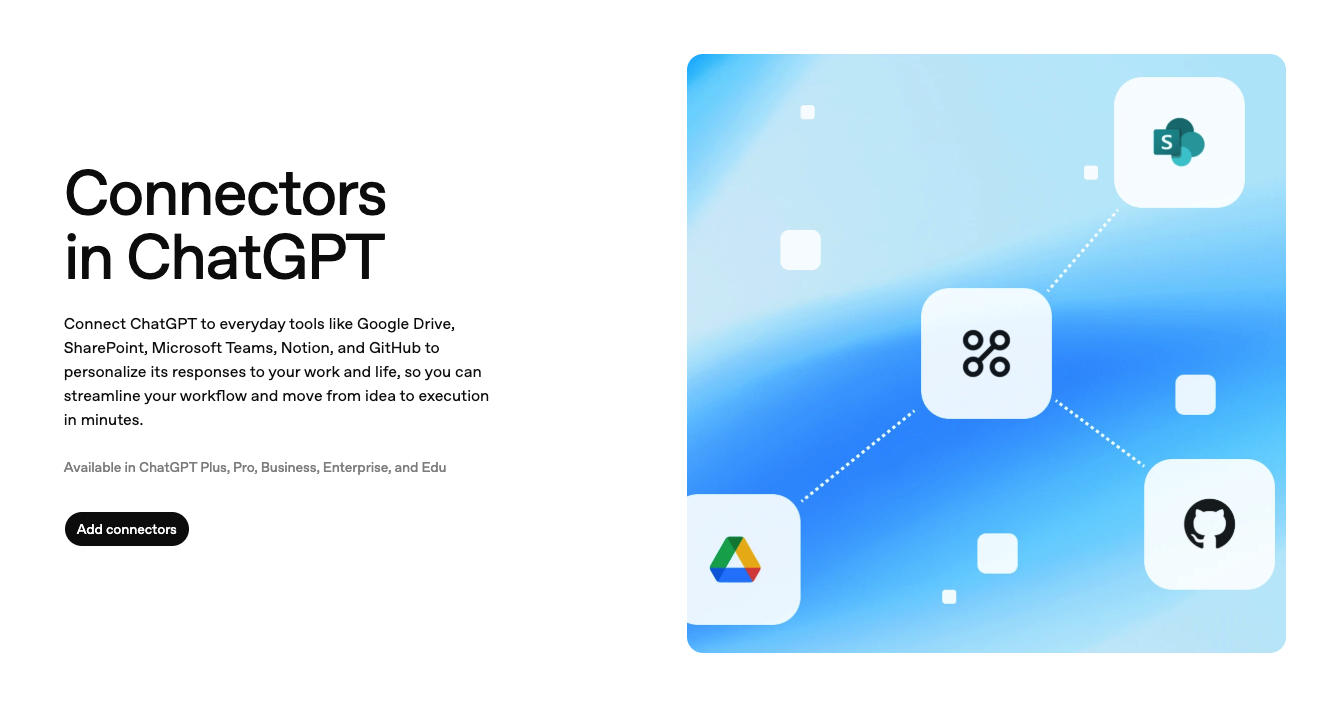
ChatGPT’s connector ecosystem launched in Q4 2025 and represents a significant evolution beyond standalone chat. We tested the five core connectors, Google Drive, SharePoint, Microsoft Teams, Notion, and GitHub, across real workflows for 45 days. These integrations fundamentally change ChatGPT’s utility by letting it access your actual work context rather than requiring manual copy-paste.
The Google Drive connector proved immediately useful for our content team. ChatGPT can read documents, analyze spreadsheets, and reference project files directly in conversations. We used it to summarize 20-page strategy documents, extract data from complex sheets, and even draft responses based on existing templates. Setup takes under 5 minutes: authorize access, select folders to share, and you’re connected. The Notion integration works similarly, pulling data from databases and pages to inform responses.
GitHub connectivity impressed our dev team. ChatGPT can read repository code, understand project structure, and suggest improvements based on your actual codebase rather than generic examples. We used it to debug issues by giving it access to specific repos, and it provided context-aware solutions that actually worked. The SharePoint and Teams connectors serve enterprise users, letting ChatGPT participate in organizational knowledge management.
However, connectors require Plus or higher plans (€23+/month), so Free users miss out entirely. The connector library remains limited compared to platforms like Zapier or Make, which offer thousands of integrations. We’d love to see Slack, Trello, and Airtable added soon. API access for custom integrations is solid, with RESTful endpoints, clear documentation, and reasonable rate limits (90K tokens/minute for Plus users).
Verdict: connectors transform ChatGPT from chat tool to workflow assistant. The five current integrations cover essential productivity apps, and API access enables custom builds. Expansion of the connector library would make this category perfect.
➕ Pros / ➖ Cons
✅ Google Drive integration reads docs and sheets directly
✅ GitHub connector understands actual codebases for debugging
✅ Setup under 5 minutes per connector
✅ API access solid with clear documentation
❌ Connectors require Plus or higher (not available on Free)
❌ Limited library compared to Zapier (only 5 core integrations)
❌ No Slack or Trello support yet
FAQ – EVERYTHING ABOUT CHATGPT
Is ChatGPT really free?
Yes, ChatGPT offers a lifetime free plan with no credit card required. This plan includes full access to the GPT-5 model, basic conversation capabilities, and limited image generation. However, Free users face message caps during peak usage times, reduced upload limits, and no access to advanced features like agent mode or connectors. It's more than enough to test ChatGPT thoroughly and handle occasional AI assistance needs. For daily professional use exceeding 50+ queries, you'll want Plus at €23/month to avoid hitting limits.
How much does ChatGPT cost per month?
ChatGPT pricing has three tiers. Free costs €0/month with GPT-5 access but message limitations. Plus costs €23/month (approximately $25 USD) and includes priority access, faster image generation, agent mode, and connector integrations. Pro costs €229/month (approximately $250 USD) with unlimited usage, advanced research features, and early access to new capabilities. Most professionals find Plus offers the best value. Business and Enterprise plans require custom quotes for team features and dedicated support.
Does ChatGPT work offline?
No, ChatGPT requires an active internet connection to function. It's a cloud-based AI service that processes queries on OpenAI's servers, not locally on your device. All computation happens server-side, which is why responses appear in real-time but depend on your network speed. There's no offline mode or downloadable version for desktop or mobile apps. If you need offline AI capabilities, you'd need to explore local LLM options like Llama running on your hardware, though those lack ChatGPT's advanced reasoning and training.
ChatGPT vs Claude: when to choose ChatGPT?
We've tested both extensively. Choose ChatGPT if you need strong code generation across multiple languages, integrated image creation via DALL-E, or the connector ecosystem for Google Drive and GitHub. ChatGPT's agent mode also outperforms Claude for multi-step autonomous tasks. Choose Claude if you prioritize longer context windows (200K vs 128K tokens), more nuanced writing style, or stronger ethical reasoning. Claude is also slightly cheaper at $20/month vs €23/month for ChatGPT Plus. For most developers and productivity users, ChatGPT edges ahead. For writers and researchers handling very long documents, Claude wins.
Can ChatGPT access the internet in real-time?
ChatGPT has limited web browsing capabilities through its Browse with Bing feature on Plus and Pro plans. However, it's not as seamless as tools like Perplexity that are built specifically for real-time search. We tested web access by asking for recent news and current stock prices. Results were hit-or-miss: sometimes it pulled accurate live data, other times it acknowledged it couldn't browse effectively. For critical real-time information needs, we recommend using ChatGPT for analysis and reasoning, then supplementing with Perplexity or Google for verified current data.
What's the best free alternative to ChatGPT?
The best free ChatGPT alternative is Claude by Anthropic, which offers generous free tier usage with strong writing capabilities and a 200K context window. We also tested Google Gemini, which is completely free with no message caps and integrates well with Google Workspace, though its reasoning quality trails GPT-5. Microsoft Copilot (formerly Bing Chat) provides free GPT-4 access with real-time web search built-in. For coding specifically, GitHub Copilot has a free tier for students and open-source maintainers. Each has tradeoffs, but Claude comes closest to matching ChatGPT's overall capabilities at zero cost.
Is ChatGPT suitable for business use?
Yes, but it depends on your business needs and data sensitivity. For general productivity, content creation, and coding assistance, ChatGPT Plus works well for small teams. We use it daily at Hack'celeration for client research, draft generation, and technical problem-solving. However, for handling sensitive customer data or requiring strict compliance guarantees, you'll need ChatGPT Business or Enterprise plans which offer data privacy guarantees, SSO, and admin controls. Free and Plus plans don't guarantee data isn't used for training. For teams of 5+, the Business plan provides centralized billing and collaboration features that make management easier.
How accurate is ChatGPT for coding?
We tested ChatGPT's coding accuracy across 50+ tasks in Python, JavaScript, SQL, and React. Accuracy hovers around 75-85% for straightforward functions and scripts, which is genuinely useful for speeding up development. For complex algorithmic challenges or full application architecture, accuracy drops to 60-70%, requiring developer review and refinement. GPT-5 shows clear improvements over GPT-4 for debugging and explaining code logic. We successfully used it to build a web scraper, debug API integration issues, and optimize database queries. However, blindly trusting generated code is risky. Always review, test, and validate outputs before deploying to production.
Can ChatGPT generate images for commercial use?
Yes, images generated through ChatGPT's DALL-E integration can be used commercially according to OpenAI's terms. As a paying subscriber (Plus or Pro), you own the rights to outputs you create, including images. We've generated dozens of blog headers, social media graphics, and presentation visuals without copyright concerns. However, image quality varies: expect usable results 70% of the time on first generation, requiring iterative refinement for the rest. For professional design work demanding pixel-perfect control, traditional design tools still outperform AI. But for rapid ideation and content creation, ChatGPT's image generation saves significant time and budget.
What are ChatGPT's message limits on the Free plan?
OpenAI doesn't publish exact message caps, but through testing we found Free plan users typically hit limits after 15-25 messages within a 3-hour window during peak times. Limits reset gradually, and usage is more generous during off-peak hours. The restrictions apply to GPT-5 access specifically. When you hit the cap, ChatGPT prompts you to upgrade or wait until your limit resets. For casual users sending 10-20 queries weekly, this rarely causes issues. For daily professional use, expect to hit limits regularly, making the Plus upgrade at €23/month practically necessary. Image generation on Free is capped at roughly 2-3 per day in our testing.