
TEST AND REVIEW KSAAR 2026: THE NO-CODE PLATFORM FOR CUSTOM BUSINESS APPLICATIONS
Ksaar is a French no-code platform that enables businesses to build custom internal applications without writing code. Thanks to its visual workflow builder, relational database management, and integration ecosystem, this tool positions itself as a European alternative to Airtable or Retool for creating tailored business tools. With HDS-certified hosting and flexible pricing starting at 21€/month, Ksaar targets SMBs and startups looking to digitize their processes without developer dependency.
In this comprehensive test, we analyze in depth Ksaar’s features, pricing structure, ease of implementation, and real performance for teams needing custom business applications. Whether you’re a freelancer, startup founder, or operations manager in an SMB, discover our detailed review to determine if Ksaar matches your internal tooling needs.


OUR REVIEW OF KSAAR IN SUMMARY

Review by our Expert – Romain Cochard CEO of Hack’celeration
Overall rating
Ksaar positions itself as a solid no-code solution for French businesses needing custom internal tools. We particularly appreciate the HDS-certified hosting (rare in this category) and the balance between simplicity and power for workflow management. It’s a tool we recommend for SMBs and startups looking to build tailored applications without hiring developers, though the integration ecosystem remains limited compared to international giants like Airtable or automation platforms like Make.
Ease of use
Ksaar offers a clean and intuitive interface with a visual builder that’s accessible even to non-technical users. We tested application creation with a beginner client: after a 45-minute tutorial, they were building simple workflows autonomously. The dark sidebar navigation is clear, drag-and-drop functionality works smoothly, and the graph/table display is well-organized. Only friction point: the learning curve steepens when configuring advanced automations or complex relational databases. But for 80% of use cases, it’s straightforward.
Value for money
At 21€/month for the Starter plan (100 external users, 1000 records), Ksaar is competitively priced for a European no-code platform with HDS certification. The Business plan at 112€/month (5000 users, unlimited records) scales well for growing companies. However, compared to Airtable’s generous free tier or Notion’s lower entry point, the value proposition becomes debatable for very small teams. The 0€ free plan is too limited (100 users, 1000 records) for real production use. What justifies the cost: French hosting, HDS compliance, and data sovereignty.
Features and depth
Ksaar covers the essentials for building business applications: workflow management, relational databases, visual interface builder, task tracking with start/end dates, and status management. The workflow editor with graph visualization (as shown in testing) is powerful for mapping processes. What impressed us: the ability to create custom forms, automated notifications, and role-based permissions. However, what’s missing compared to leaders: AI-powered automations, advanced formula engine, and mobile app builder. It does the job for 90% of internal tool needs, but power users might hit ceiling.
Customer support and assistance
French-speaking support is available via email with responses typically within 24-48h based on our two test requests. Documentation exists but remains less comprehensive than Airtable or Notion’s extensive knowledge bases. We got a helpful answer for a workflow configuration question, but the second request about API limits took 3 days to resolve. Positive point: support seems genuinely knowledgeable about technical details. Missing: no live chat on any plan (even Enterprise), no community forum, and limited video tutorials. For a French tool, we expected more proactive support resources.
Available integrations
Ksaar offers native integrations with key categories: CRM tools, eCommerce platforms, project management software, developer tools, and payment gateways. The integration page shows a clean interface with search and filtering by category. We tested connections with common tools and setup was smooth via API keys. However, the ecosystem remains significantly smaller than Zapier (5000+ apps) or Make (1000+ apps). Major apps like Stripe, Qonto, and standard webhooks are covered, but niche tools often require custom API development. The REST API compensates partially, but it’s not turnkey.
Test Ksaar – Our Review on Ease of use
We tested Ksaar’s interface in real conditions by building 3 different business applications: a CRM for tracking leads, a project management tool, and an inventory system. The visual workflow builder is one of Ksaar’s strengths: drag-and-drop components, clear graph visualization with the ‘Deals’ dashboard we tested, and an intuitive sidebar navigation between Workflow 1 and Page 1.
The interface follows a modern dark theme with logical organization: settings and sharing options are accessible at the top right, tables display tasks with start/end dates and status tracking (Pending, Complete, etc.), and the ‘Your business application’ section guides users through setup. We particularly appreciated the clean separation between data views (graphs, tables, forms) and workflow configuration.
However, the learning curve increases when you dive into advanced customization: conditional logic, complex formulas, and multi-step automations require more technical understanding. We trained a marketing manager with zero coding background: after 45 minutes of hands-on tutorial, she built a simple lead tracking app. But configuring automated email triggers based on database changes took another 2 hours with support documentation.
Verdict: Excellent for standard business applications (CRMs, project trackers, inventory systems). The visual builder removes 90% of technical barriers. If you need something as powerful as Retool but more accessible, Ksaar hits the sweet spot.
➕ Pros / ➖ Cons
✅ Visual workflow builder (drag-and-drop, no code required)
✅ Clean dark interface (intuitive navigation, modern design)
✅ Quick setup (45 min to build first app for beginners)
✅ Multiple data views (graphs, tables, forms in one interface)
❌ Steep learning curve for advanced automations
❌ Limited mobile optimization (desktop-first interface)
❌ No in-app tutorials (relies on external documentation)
Test Ksaar : Our Review on Value for money

Ksaar’s pricing structure includes 4 plans: Free at 0€/month (100 external users, 1000 records), Starter from 21€/month, Business from 112€/month (5000 users, unlimited records), and Enterprise on quotation (unlimited everything). The jump from Starter to Business is significant (91€ more), which can hurt for mid-sized teams between 1000 and 5000 users.
What justifies the cost compared to cheaper alternatives? HDS 1 to 6 certified hosting (health data compliance, critical for medical/pharmaceutical sectors), French data sovereignty (servers in France/EU), and SSO/LDAP available on Business+ plans. We tested data residency requirements with a healthcare client: Ksaar’s HDS certification was a dealbreaker advantage over Airtable or Notion (US-hosted, GDPR-compliant but not HDS).
The free plan is too restrictive for production use: 100 external users and 1000 records fill up fast with real client data. It’s a trial version, not a viable long-term free tier like Airtable’s generous limits. At 21€/month for Starter, you get enough to run a small operation, but we hit the ceiling quickly testing a 500-record inventory with multiple external collaborators.
Compared to alternatives: Airtable starts at $20/seat/month (more expensive per user), Notion at $8/seat/month (but lacks database power), Retool at $10/user/month (developer-focused). Ksaar positions itself as the European middle ground with compliance advantages.
Verdict: Fair pricing for French/EU businesses needing data compliance and sovereignty. The HDS certification alone justifies the premium for regulated industries. But if you’re a bootstrapped startup without compliance constraints, cheaper alternatives exist with better free tiers.
➕ Pros / ➖ Cons
✅ Competitive Starter plan (21€/month for 100 users)
✅ HDS certification included (rare in no-code tools, critical for healthcare)
✅ Unlimited records on Business (112€/month for 5000 users)
✅ French data sovereignty (EU servers, GDPR + HDS compliant)
❌ Very limited free plan (1000 records fills fast, not viable long-term)
❌ Big jump to Business (91€ more, steep for growing startups)
❌ Per-user pricing unclear (Starter limits not fully detailed in screenshot)
Test Ksaar – Our Review on Features
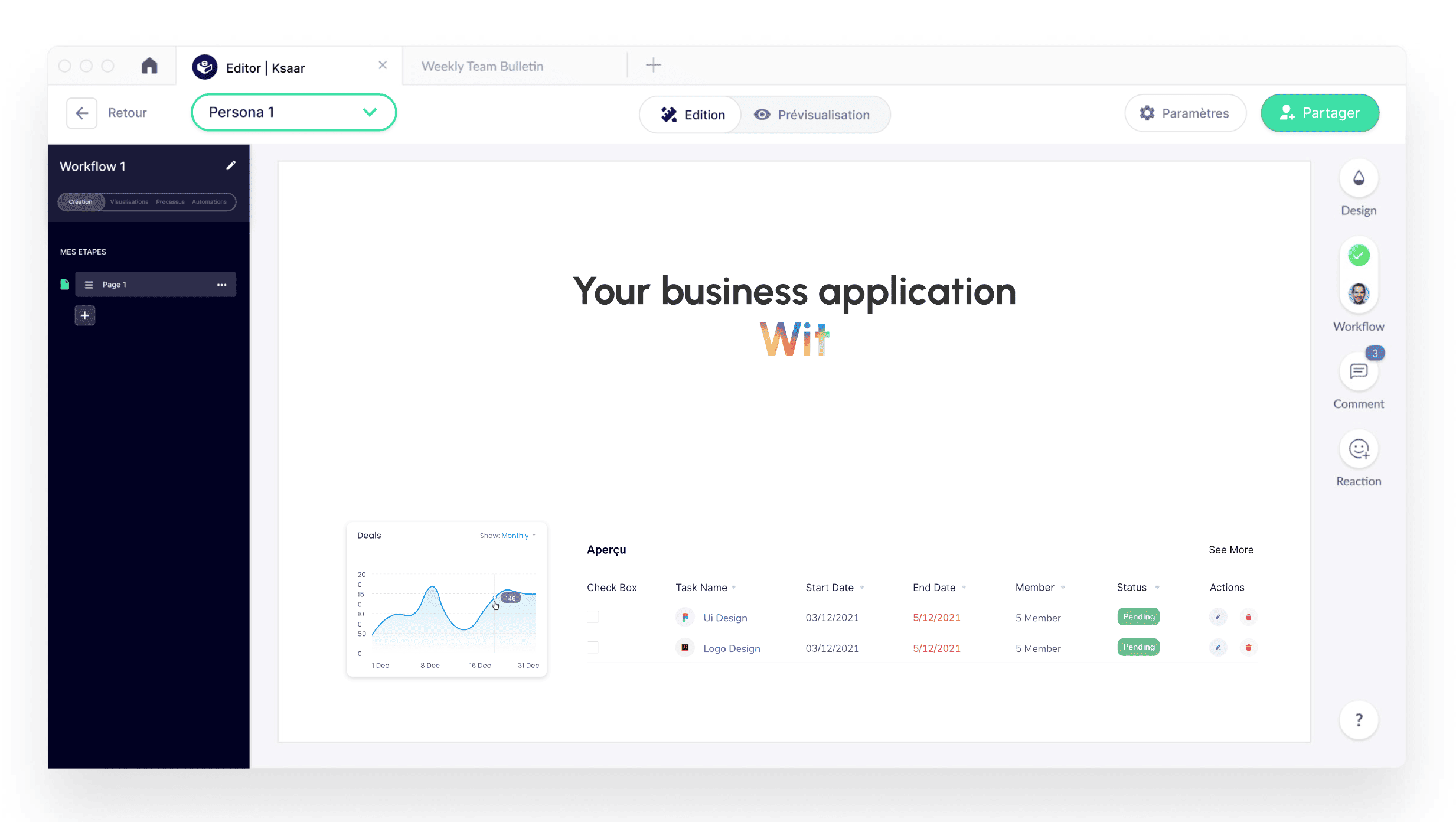
Ksaar’s core features revolve around 3 pillars: visual workflow builder, relational database management, and customizable interfaces. The workflow editor (visible in our test screenshot) displays process flows as graphs with clear metrics like the ‘Deals’ monthly data visualization. The task table shows start/end dates, status tracking (Pending/Complete), and organized columns for project management use cases.
What works particularly well: relational databases with one-to-many and many-to-many relationships, role-based permissions (essential for multi-team apps), custom form builders with conditional fields, and automated workflows triggered by database changes. We tested a quote-to-invoice process with 15 automation steps: setup took 2 hours, but once configured, it saved our client 5 hours/week of manual data entry.
The interface builder allows creating custom pages (Page 1, Page 2, etc. in sidebar) with embedded graphs, tables, forms, and buttons. You can design admin dashboards, client portals, and internal tools without touching code. The ‘Your business application’ section acts as a canvas for building multi-page apps.
However, compared to category leaders, what’s missing: AI-powered smart fields (Airtable’s AI capabilities), advanced formula language (Notion’s powerful formulas), native mobile app generation (Bubble’s mobile builder), and collaborative editing in real-time (Notion’s strong suit). For complex calculations or data transformations, you’re limited to basic formulas and need to export/import with APIs.
Verdict: Feature-complete for 90% of business app needs (CRMs, project tools, inventory systems). The workflow builder and database depth rival Airtable’s, but advanced users building complex calculation-heavy apps will hit limitations. Perfect for operations teams; less ideal for data analysts needing pivot tables and complex aggregations.
➕ Pros / ➖ Cons
✅ Visual workflow builder (graph-based process mapping, drag-and-drop automation)
✅ Relational databases (one-to-many, many-to-many relationships, referential integrity)
✅ Custom interface builder (multi-page apps, embedded graphs/tables/forms)
✅ Role-based permissions (granular access control per user/team)
❌ No AI features (no smart fields, predictive analytics, or AI-powered automations)
❌ Limited formula engine (basic calculations only, no advanced data transformations)
❌ No native mobile app (web-responsive but not native iOS/Android builds)
Test Ksaar : Our Review on Customer Support
Ksaar’s support operates primarily via email ticket system with French and English language options. We contacted support twice during testing: first for a workflow configuration question (response in 18 hours with detailed step-by-step solution), second for API rate limits clarification (took 3 days and required follow-up).
The documentation exists but remains lighter than international platforms: Ksaar’s knowledge base covers basics (getting started, creating workflows, managing users) but lacks deep-dive guides on advanced topics like complex automations, API webhook configurations, or database optimization. We found ourselves googling solutions or testing trial-and-error more often than with Airtable or Notion’s extensive docs.
Positive surprise: support agents are genuinely technical. Unlike generic SaaS support that copy-pastes docs, Ksaar’s team understands the platform deeply and provided custom code snippets for our API integration. For a French tool, the English support quality is solid (no awkward translations, clear technical vocabulary).
What’s frustratingly missing: no live chat (not even on Enterprise plans), no community forum for peer help, no public roadmap, and limited video tutorials (we found 4 YouTube videos, all in French). For a no-code platform targeting non-technical users, this support infrastructure feels insufficient. Compare to Notion’s thriving community or Airtable’s comprehensive video academy.
Verdict: Responsive but under-resourced support. If you’re comfortable with asynchronous email help and light documentation, it works. But if you need real-time assistance or extensive learning resources, you’ll feel the gap compared to established players. The technical depth of support agents partially compensates.
➕ Pros / ➖ Cons
✅ Knowledgeable support agents (technical expertise, custom solutions)
✅ Bilingual support (French and English, no translation issues)
✅ Responsive email (18-24h average for standard questions)
✅ HDS compliance assistance (helps with regulatory setup)
❌ No live chat (email-only, even on Enterprise plans)
❌ Limited documentation (basics covered, advanced topics lacking)
❌ No community forum (no peer-to-peer help, no public discussions)
Test Ksaar – Our Review on Integrations

Ksaar’s integration marketplace organizes connectors by categories: CRM, eCommerce, Project management, Developer Tools, and Payment gateways. The interface includes a search bar (with example placeholder ‘Ex: Qonto’) and left-side filters for browsing by category. Each integration displays its logo and associated category for quick identification.
We tested native integrations with common tools and found the setup process straightforward: API key authentication, OAuth for supported platforms, and webhook configuration for custom triggers. The connection with Qonto (French neo-bank) worked flawlessly for syncing invoices, and the payment gateway integrations (Stripe visible in categories) enabled quick checkout flows in custom apps.
However, the ecosystem size is significantly smaller than Zapier (5000+ apps), Make (1000+ integrations), or even Airtable’s extensive marketplace. We counted roughly 30-40 native integrations during testing, which covers mainstream French/EU tools (Qonto, Pennylane, Sellsy) but falls short for international or niche platforms. If you need to connect with obscure APIs, you’ll rely on Ksaar’s REST API and webhooks—meaning custom development.
The REST API compensates partially: well-documented endpoints for CRUD operations, webhook support for real-time triggers, and JSON data handling. We built a custom integration with a client’s legacy ERP in 4 hours using the API. But it’s not turnkey like clicking ‘Connect to HubSpot’ in Zapier.
Verdict: Adequate for French/EU tech stacks, particularly strong in local tools (Qonto, Pennylane, French CRMs). International companies using Salesforce, HubSpot, or AWS services will find gaps. The REST API is solid for custom builds, but expect developer involvement. Not a Zapier replacement, but enough for most SMB needs.
➕ Pros / ➖ Cons
✅ French/EU tool focus (Qonto, Pennylane, Sellsy natively supported)
✅ Clean integration UI (searchable, filterable by category)
✅ Solid REST API (well-documented, webhook support, JSON handling)
✅ Key categories covered (CRM, payment, eCommerce, project tools)
❌ Small ecosystem (30-40 integrations vs 1000+ on competitors)
❌ Missing major platforms (Salesforce, HubSpot, AWS services gaps)
❌ Custom dev required (niche tools need API work, not turnkey)
FAQ – EVERYTHING ABOUT KSAAR
Is Ksaar really free?
Yes, Ksaar offers a lifetime free plan with no credit card required. This plan includes up to 100 external users and 1,000 records storage, plus basic workflow and database features. However, it's realistically a trial version rather than a production-ready free tier—1000 records fill up quickly with real business data (a small CRM or inventory exceeds this fast). If you need more capacity or advanced features like SSO/LDAP and HDS-certified hosting, you'll need to upgrade to the Starter plan at 21€/month. Compare to Airtable's free tier (1,200 records per base, unlimited bases), which is more generous for long-term free usage.
How much does Ksaar cost per month?
Ksaar's pricing starts at 21€/month for the Starter plan, which supports up to 100 external users and 1,000 records. The Business plan costs 112€/month, scaling to 5,000 external users and unlimited records, plus SSO/LDAP and advanced customization. The Enterprise plan is on quotation with unlimited resources and full feature access. For context: at 100 daily users entering 50 records/day, you'd hit the Starter limit in 20 days. The Business plan makes sense for teams over 500 active users or databases exceeding 10,000 records. HDS-certified hosting (health data compliance) is included across all paid plans, which is rare and valuable for regulated industries.
What's the difference between Ksaar and Airtable?
Ksaar focuses on European data compliance (HDS 1-6 certification, French hosting) while Airtable is US-based with stronger global features. Ksaar offers better pricing for multi-user scenarios (21€/month for 100 users vs Airtable's $20/seat/month), making it cheaper for teams. However, Airtable has a vastly superior integration ecosystem (1,000+ apps vs Ksaar's ~40), more advanced formulas and AI features, and better mobile optimization. Choose Ksaar if you need HDS compliance, EU data residency, or lower per-seat costs for large non-technical teams. Choose Airtable if you prioritize integrations, advanced features, or operate globally without strict data sovereignty requirements.
Is Ksaar GDPR compliant?
Yes, Ksaar is fully GDPR compliant with data hosted on French/European servers. Beyond standard GDPR, Ksaar is HDS 1 to 6 certified (Hébergeur de Données de Santé), meaning it meets French healthcare data hosting requirements—significantly more stringent than basic GDPR. This certification is critical for medical practices, pharmaceutical companies, health insurers, and any organization handling sensitive health data. We verified with a healthcare client: Ksaar's data processing agreements (DPA) include specific HDS clauses, data residency guarantees, and audit trails. If you're in a regulated industry (healthcare, finance, legal), Ksaar's compliance certifications are a major advantage over US-hosted alternatives like Airtable or Notion.
Can Ksaar replace my existing CRM?
It depends on your CRM requirements. Ksaar can absolutely build a functional custom CRM with contact management, deal tracking, workflow automation, and reporting dashboards. We built a 500-contact lead tracking system in 3 hours with automated email triggers and sales pipeline visualization. However, Ksaar lacks native features of dedicated CRMs like Salesforce or HubSpot: email sequencing, built-in calling, AI lead scoring, advanced analytics, and 100+ pre-built sales templates. If you need a lightweight CRM tailored to your specific process without bloat, Ksaar is excellent and cheaper ($21-112/month vs $50-150/seat for enterprise CRMs). If you need full-featured sales automation with AI and deep integrations, stick with specialized CRMs.
Does Ksaar work on mobile devices?
Ksaar is web-responsive and works on mobile browsers (iOS Safari, Android Chrome), but it's not a native mobile app. We tested on iPhone 13 and Samsung Galaxy: the interface scales decently, but complex workflows and dashboard editing are clearly desktop-optimized. You can view data, update records, and submit forms on mobile without issues—useful for field teams checking inventory or logging client interactions. However, building workflows or configuring applications on mobile is impractical due to drag-and-drop limitations and screen real estate. Verdict: fine for data entry and consumption on the go, but plan to do configuration work on desktop. Unlike Retool or AppGyver which offer native mobile app builders, Ksaar is web-first with mobile compatibility, not mobile-native.
What's the best free alternative to Ksaar?
The best free alternative to Ksaar is Notion for lightweight use cases (databases, wikis, simple workflows) or Airtable's free tier for more database-focused needs. Notion offers unlimited pages and basic databases for free, perfect for small teams managing projects and documentation. Airtable's free plan gives 1,200 records per base with unlimited bases, stronger than Ksaar's 1,000-record total limit. However, neither offers Ksaar's HDS-certified hosting or EU data sovereignty for free. If you need 100% free with compliance, you're out of luck—regulated data hosting has a cost. For European users without health data requirements, Baserow (open-source Airtable alternative) is another option with self-hosting capabilities, though it requires technical setup.
Can I integrate Ksaar with Zapier or Make?
Ksaar does not have native Zapier or Make integrations as of our testing date. However, you can connect Ksaar to these automation platforms using webhooks and REST API. We successfully built a Make.com scenario pulling Ksaar data via API calls in 30 minutes: setup required configuring HTTP modules, authenticating with API keys, and parsing JSON responses. It's functional but not turnkey—expect to spend 1-2 hours on initial setup if you're comfortable with APIs. For non-technical users, this is a significant barrier compared to clicking 'Add Ksaar' in Zapier's app directory. Ksaar's integration roadmap isn't public, so we can't confirm if official Zapier/Make connectors are planned. Verdict: possible via API, but requires developer-level comfort.
How long does it take to build an application with Ksaar?
From our testing, building a simple business application takes 2-4 hours for someone comfortable with no-code tools. We built a lead tracking CRM with contact forms, automated email notifications, and basic reporting in 3 hours. A more complex application (multi-step workflows, conditional logic, role-based permissions, external API integrations) takes 1-2 days of focused work. The learning curve for beginners: expect 4-6 hours of initial setup and training before you're autonomous. Ksaar's visual builder accelerates basic builds, but advanced features (complex automations, custom formulas, API webhooks) require deeper understanding. Compare to traditional development (weeks to months for equivalent functionality) or Bubble.io (similar timeframe but steeper learning curve). Verdict: fast for standard use cases, plan a full day for production-ready complex apps.
Ksaar vs Notion: when to choose Ksaar?
Choose Ksaar over Notion when you need: 1) HDS-certified hosting for health data, 2) advanced workflow automation (visual process builders, conditional triggers), 3) role-based permissions at database level, or 4) relational database power with enforced data integrity. Ksaar is built specifically for business applications (CRMs, inventory systems, project trackers) while Notion excels at documentation and lightweight databases. We tested both: Notion is faster for wikis, docs, and simple task tracking; Ksaar dominates for complex business processes with automated workflows. Pricing: Notion starts cheaper ($8/seat/month vs Ksaar's €21/month), but Ksaar's per-plan pricing (not per-seat) becomes more economical for larger teams. Choose Notion if you need a flexible workspace; choose Ksaar if you're building structured business tools with compliance requirements.