AI Agent to Automatically Analyze a Resume Against a Job Description (with n8n)
Want to instantly know if a resume matches a job offer without spending hours reviewing profiles? This n8n automation helps you pre-qualify every candidate with an AI agent.
The full automation, in your inbox
AI Agent to Automatically Analyze a Resume Against a Job Description (with n8n)

Analyze a Resume with an AI Agent and Match It to a Job Offer (Free n8n Workflow + Video Guide + Tutorial + Download)
Prerequisite: Start with Resume Data Extraction (First Part of the Workflow)
! You'll needPrerequisite: Start with Resume Data Extraction (First Part of the Workflow)
- A self-hosted n8n instance with terminal access.
- API credentials for the services used in this workflow.
The full automation, in your inbox
n8n workflow breakdown.
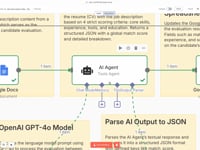
01 Step 01Fetch the Job Offer from a Google Docs.
This first step connects your workflow to a Google Docs document containing a job offer. The job description will be used by the AI agent to automatically assess compatibility with each resume received.
The Google Docs module makes it easy to extract the job posting text directly from a document, without manual copy-paste. This makes your automation fully dynamic and reusable.
You can use a different URL for each execution, depending on the job you're hiring for. That makes the AI matching adaptable to any recruitment process.
Parameters to configure- Operation: Get (read existing document)
- Document URL: paste the URL of the Google Docs containing the job offer
- Authentication: select your Google Docs account (OAuth2)
02 Step 02Analyze the Resume Against the Job Description.
This step activates an AI Agent integrated into n8n that automatically compares a resume to a job description. Both the job listing and the resume content are processed in a structured prompt to generate an accurate compatibility score.
By default, the analysis uses 4 weighted criteria out of a total of 100 points:
- Key Skills (40 points): checks how well the candidate's skills match the requirements
- Relevant Experience (30 points): compares past experience with the job responsibilities
- Tools & Methodologies (20 points): verifies familiarity with the tools or processes mentioned in the job offer
- Education (10 points): assesses how the degree level and specialization align with the job requirements
The result is a structured JSON output containing individual scores for each criterion, plus a global matching score that can be reused throughout the workflow.
Note: This scoring system is fully customizable. You can adjust the analysis criteria, change the weights, or add new ones like location, spoken languages, availability, and more.
This lets you tailor the AI Agent to your unique evaluation standards or specific recruitment workflows.
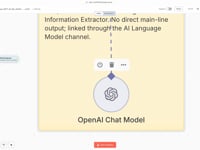
03 Step 03Connect the AI Model (GPT-4o).
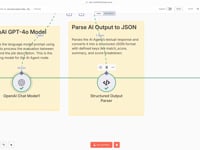
This step connects the workflow to an advanced language model used to analyze both the resume and the job description. By default, it uses OpenAI’s GPT-4o, a powerful and reliable model known for its accuracy and performance.
The model is called through the LangChain Chat Model node, allowing the AI Agent to handle semantic matching and scoring logic, returning a clean and structured JSON response.
Good to know: you can replace GPT-4o with another compatible model. For example, use GPT-3.5 to reduce costs, or switch to a self-hosted model to keep your data private.
Everything is customizable at this step: model selection, generation settings, temperature, token limits, and more. The n8n automation is built to stay fully flexible and adaptable to your tech stack and privacy constraints.
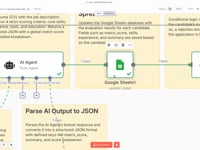
04 Step 04Parse the AI Agent Results (Structured Output).
Once the AI Agent has compared the resume and the job offer, it returns a structured response including the total score, a breakdown by category, and a summary.
This step uses the Structured Output Parser module to convert the AI response into clean JSON data. You’ll be able to retrieve key fields such as:
- match_score: overall matching score (out of 100)
- criteria.skills, criteria.experience, etc.: individual sub-scores
- summary: a human-readable summary of the evaluation
The main benefit is getting a well-structured and usable JSON output that can be pushed to Google Sheets, Notion, Airtable, or used to trigger other workflow actions like automated emails or internal alerts.
Bonus: everything is already formatted, so you can directly plug these values into the next steps of your n8n automation — no extra processing needed.
05 Step 05Automatically Update a Row in Google Sheets.
Once the resume analysis is complete, this step lets you centralize all data in Google Sheets. Each row represents a candidate, identified by their email address.
The Google Sheets node is set to “Update” mode to modify an existing row based on the candidate’s email. This avoids duplicates and keeps your table always up to date.
Automatically updated fields:
- match_score: overall score calculated by the AI
- skills, experience, tools, education: individual scores by category
- summary: analysis summary
- job_title: analyzed job position
All values come from the structured parser in the previous step. Thanks to this integration, you can visualize results in a clear spreadsheet, filter or sort them, or link them to other workflows (e.g., alerts, follow-up emails, CRM updates...)
Pro tip: you can fully customize which columns get updated, how matching is done (e.g., with a unique ID), and even add more fields to improve your candidate tracking system.
06 Step 06Filter Applications with a Low Matching Score.
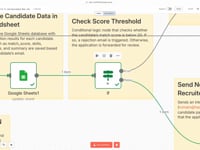
Thanks to the “If” node, you can automate the first decision: should this application be processed further?
In this example, we’ve set a threshold of 20 points (out of 100). If the candidate’s overall
match_scoreis below that threshold, the workflow can:- Send an automated rejection message
- Completely skip the candidate in the next steps
- Store the candidate separately in a dedicated tab or database
This step helps filter out candidates who don’t match the job requirements before triggering more advanced actions (CRM updates, notifications, etc.).
Of course, you can fully customize this logic: change the score threshold, combine it with additional filters (e.g., missing tool experience), or create multiple conditional paths for different evaluation levels.
07 Step 07Automatically Send a Rejection Email if the Score Is Too Low.
In this scenario, if the candidate’s score is too low (below 20 in our example), you can automatically send a rejection email using Gmail.
The message is dynamically personalized with the job title, adding just enough context for a professional and respectful message:
Subject: Your Application – {{ $json.job_title }}

Hi,

Thank you for your interest in the {{ $json.job_title }} position. After reviewing your application, we’ve carefully assessed the match between your profile and the key requirements for this role.

At this time, we believe there is not enough alignment to proceed with the next steps of the process.

We appreciate the time and effort you put into your application and wish you all the best in your job search and future professional endeavors.

Warm regards,
Romain
CEO
This step clearly demonstrates what can be automated once the AI analysis is complete.
But nothing is mandatory: you could choose to send a Slack notification, store the candidate for manual review, or create a follow-up task in your CRM. Everything is fully customizable.
Here, the automated email simply illustrates how far you can take the logic of pre-qualification — all the way to action.
08 Step 08Automatically Notify the Recruiter When a Strong Profile Is Detected.
If a candidate reaches a sufficient score, the workflow can automatically send an email to a recruiter or decision-maker. The goal is to streamline the review process and only notify when a profile matches the position.
Here’s an example of an internal automated email:
Subject: Potential Candidate – {{ $json.job_title }} Application

Hi Romain,

A new application for the {{ $json.job_title }} position has been processed.

The candidate shows a strong match with the job requirements and may be worth reviewing in more detail.

Let me know if you’d like to receive their profile or schedule a follow-up.

Best,
This is, of course, just one example.
You can replace this action with whatever suits your workflow best:
- Create a new record in a Notion or Airtable database
- Send a notification via Slack, Discord, or Teams
- Reach out to the candidate directly (with a Calendly link)
- Add a follow-up task in your CRM (HubSpot, Pipedrive…)
Every part of this logic is 100% customizable based on your tools, team, and hiring process.


Get the ready-to-import n8n JSON plus the install guide
Drop your email and we'll send you the complete scenario.
- n8n JSON ready to import
- Written setup guide
- Video tutorial included
Why Automatically Analyzing a Resume and Matching It with a Job Offer Will Transform Your Hiring Process
Managing candidate applications or profiles in your CRM or ATS is essential to automate your recruitment process and make faster, smarter decisions. Reading a PDF resume is no longer enough — you need to analyze it in context, against a specific job offer, to instantly know whether a candidate is worth moving forward. Challenges with manual resume evaluation: Partial or biased reading of resumes depending on the role or candidate profile. Time wasted manually comparing resumes to job requirements. Lack of consistent and objective scoring across candidates. High risk of missing great profiles due to unclear evaluation. Benefits of automatic resume-to-job scoring: Instant and objective evaluation of every application. Customizable scoring based on key job criteria (skills, tools, education, etc.). Faster decisions and better prioritization of top profiles. Seamless automation with Google Sheets, Notion, Airtable, or your CRM. By connecting an AI agent to your recruitment process via n8n, you can not only extract data from a resume, but also intelligently match it against a specific job offer. The result: fast, reliable, automated pre-qualification — fully tailored to your scoring system. Learn more about building AI agents in n8n.
The full automation, in your inbox.
n8n JSON, written guide and video tutorial, everything to ship this in under 15 minutes.
- Complete n8n scenario JSON
- Step-by-step setup documentation
- Full video walkthrough