AI Agent n8n: Analyze Startup Pitch Decks
Let’s be honest—manual pitch deck review is a bottleneck that’s costing you deals. While you’re spending 30-45 minutes analyzing one deck, three more land in your inbox. The backlog grows. Promising startups slip through the cracks. And your evaluation criteria? They drift depending on whether you’re reviewing at 9 AM or 9 PM.
The full automation, in your inbox
AI Agent n8n: Analyze Startup Pitch Decks

AI Agent n8n: Analyze Startup Pitch Decks Automatically with GPT-4 (Free n8n Workflow + Video + Tutorial + Download)
Requirements: n8n instance & API keys.
! You'll needRequirements: n8n instance & API keys.
- A self-hosted n8n instance with terminal access.
- API credentials for the services used in this workflow.
The full automation, in your inbox
n8n workflow breakdown.
01 Step 01List Pitch Deck Files from Google Drive.
The workflow begins by connecting to your Google Drive and retrieving all pitch deck files from a specific folder. This node acts as the trigger point, scanning your designated folder and creating a list of PDF files that need to be analyzed. Think of it as your automated inbox scanner—it finds every deck waiting for review.
This search operation is configured to return all files at once, meaning you won't miss any decks regardless of how many are in the folder. The workflow will then process each one systematically.
💡 Tip: Create a dedicated folder in Google Drive for incoming pitch decks. This keeps your workflow organized and prevents accidental analysis of unrelated PDFs.
 Parameters
- Credential to connect with: Select your Google Drive credential configured in n8n
- Resource:
File/Folder - Operation:
Search - Search Method:
Search File/Folder Name - Search Query: Leave empty to return all files, or enter a pattern like "pitch" to filter
- Return All: Toggle ON (enabled) — ensures all matching files are returned
- Filter - Folder: By ID →
[YOUR_FOLDER_ID]— copy this from your Google Drive folder URL
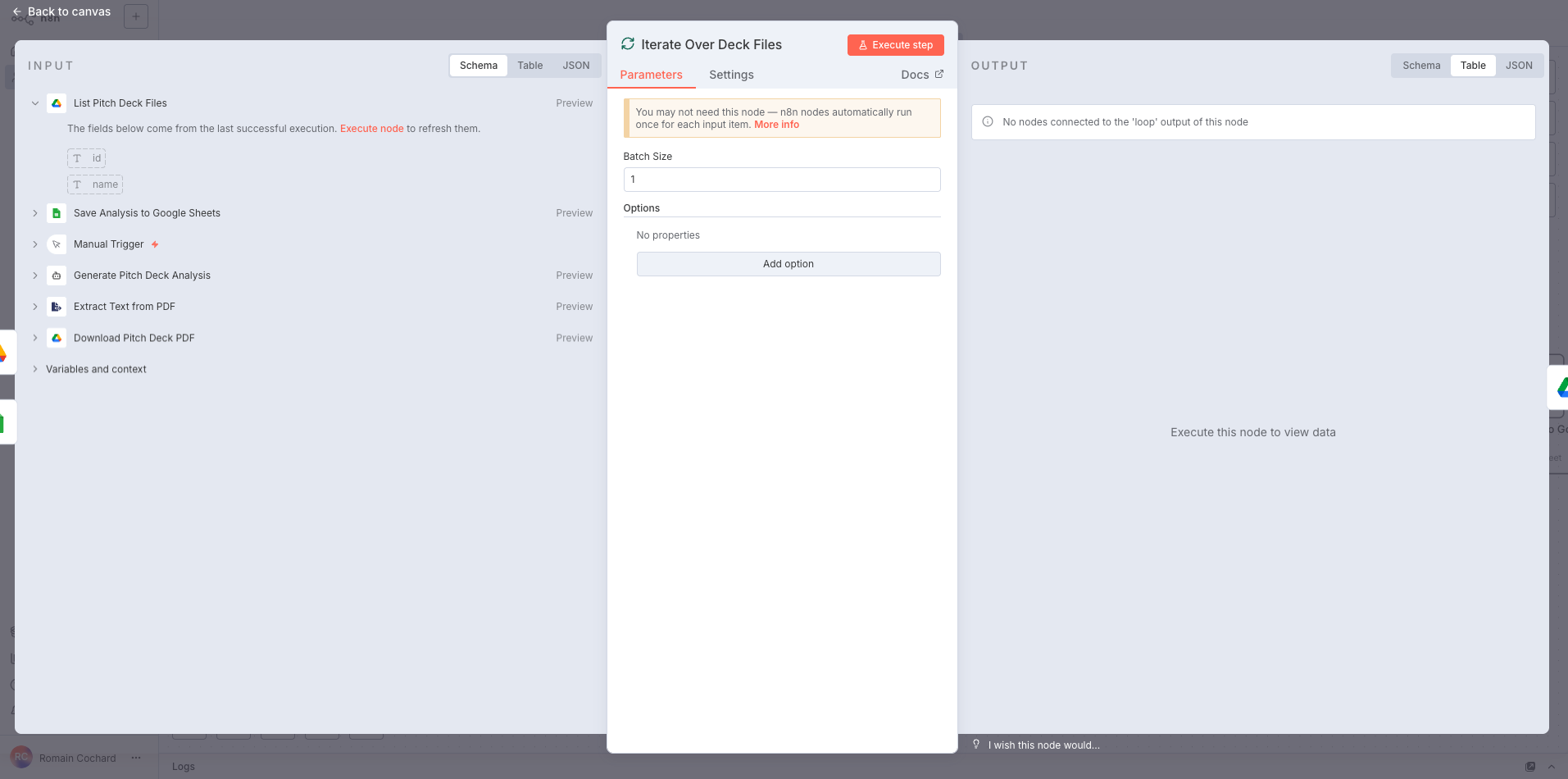
02 Step 02Iterate Over Deck Files One by One.
This Loop node controls how the workflow processes multiple pitch decks. Rather than attempting to analyze all files simultaneously (which could overwhelm API rate limits and cause failures), it feeds them through one at a time. This ensures reliable, consistent processing regardless of whether you have 5 or 500 decks in your folder.
The batch size of 1 means each pitch deck gets full attention before moving to the next. This is crucial for AI analysis workflows where you want complete, uninterrupted processing of each document.
💡 Tip: If you're processing a large backlog and want faster throughput, you can increase the batch size to 2-3. However, keep in mind your OpenAI API rate limits—running too many parallel requests can trigger throttling.
 Parameters
- Batch Size:
1— processes one pitch deck at a time for reliable execution - Options: No additional properties configured
- Batch Size:
03 Step 03Download Pitch Deck PDF.
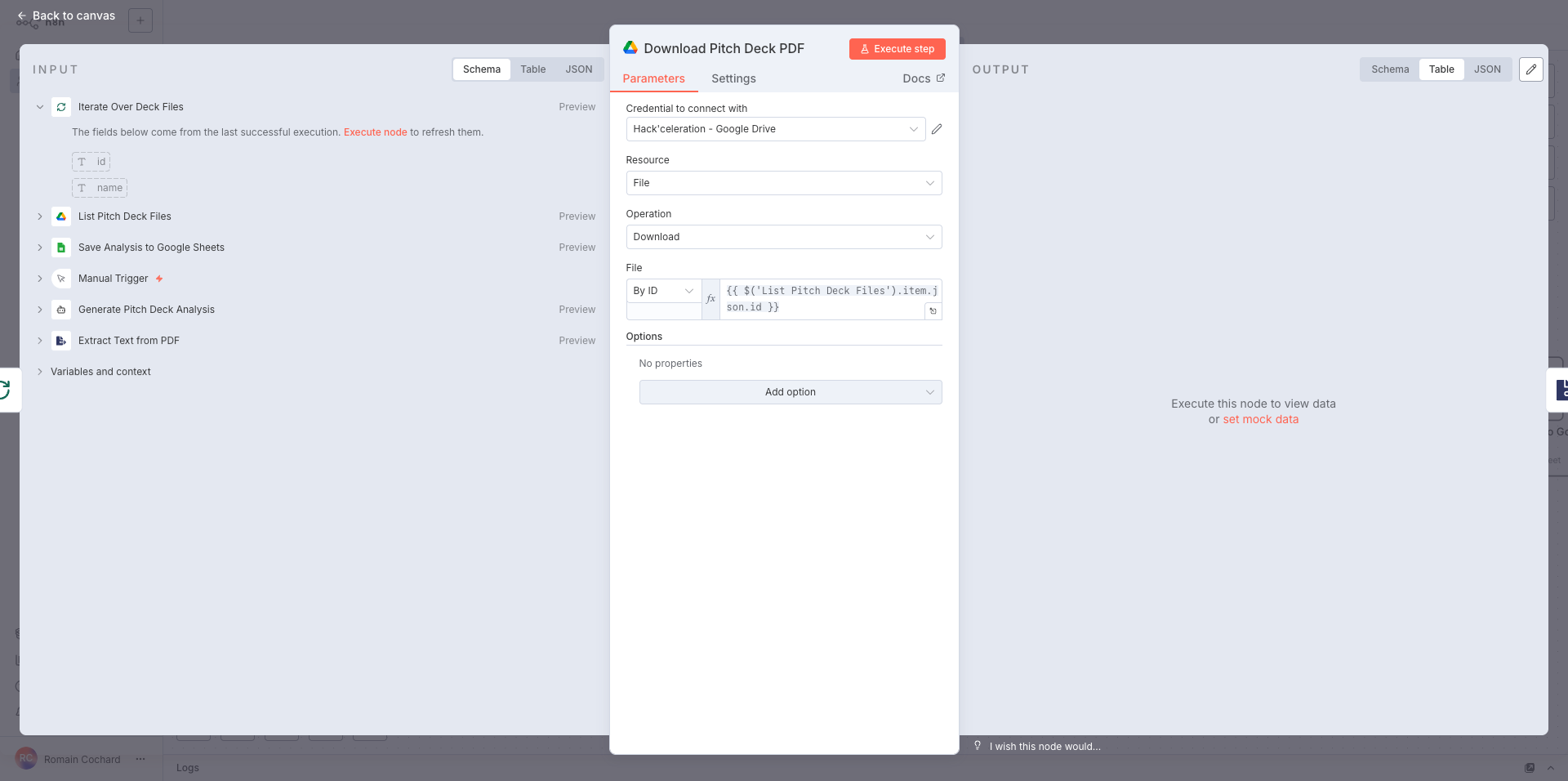
Now we fetch the actual PDF file from Google Drive. This node takes the file ID from the previous search results and downloads the complete binary file. The expression syntax dynamically references whichever file is currently being processed in the loop, ensuring each deck gets downloaded in sequence.
This step transforms a simple file reference into actual content we can work with. The downloaded PDF is stored in n8n's binary data format, ready for text extraction in the next step.
💡 Tip: Make sure your pitch decks are actual PDFs with searchable text, not scanned images. The text extraction works best with native PDF documents. If you're dealing with scanned decks, you'll need to add an OCR step.
 Parameters
- Credential to connect with: Select your Google Drive credential configured in n8n
- Resource:
File - Operation:
Download - File: By ID
- File ID:
{{ $('List Pitch Deck Files').item.json.id }}— this expression dynamically pulls the file ID from the search results
04 Step 04Extract Text from PDF.
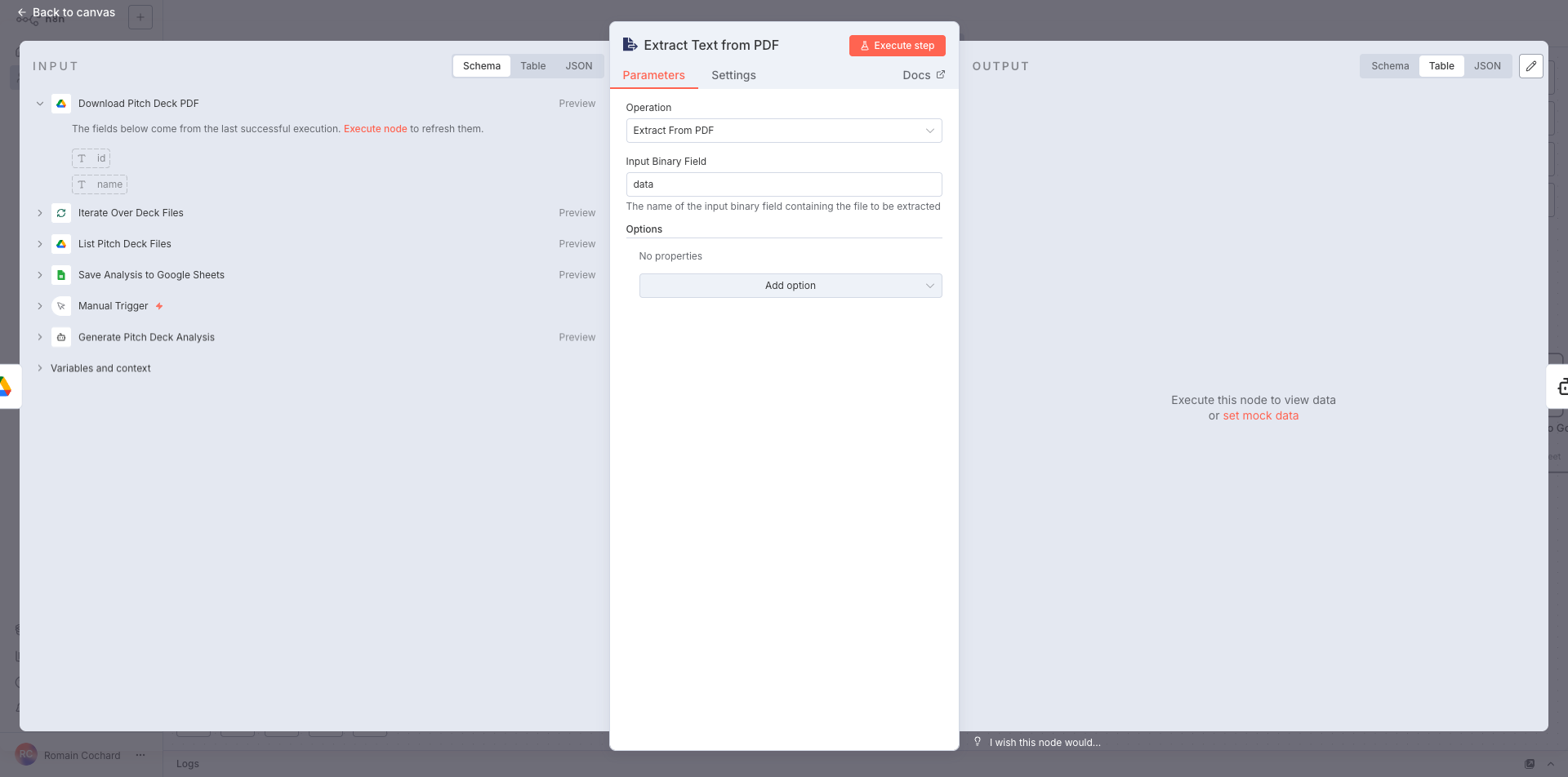
This node converts the downloaded PDF binary file into raw text that the AI can analyze. It's the critical bridge between a file sitting in Google Drive and actionable text data that GPT-4 can process. Without this step, the AI would have no content to analyze.
The extraction pulls all text content from every page of the pitch deck, preserving the information while stripping away formatting, images, and design elements. What you get is pure textual content—executive summaries, market data, team bios, financial projections, and everything else founders include in their decks.
💡 Tip: The quality of your AI analysis depends heavily on text extraction quality. If you notice missing information in the final output, check the extracted text to see if the source PDF has complex layouts, embedded images with text, or unusual formatting that might cause extraction issues.
 Parameters
- Operation:
Extract From PDF - Input Binary Field:
data— this is the default field name where the downloaded PDF binary is stored
- Operation:
05 Step 05Generate Pitch Deck Analysis with AI Agent.
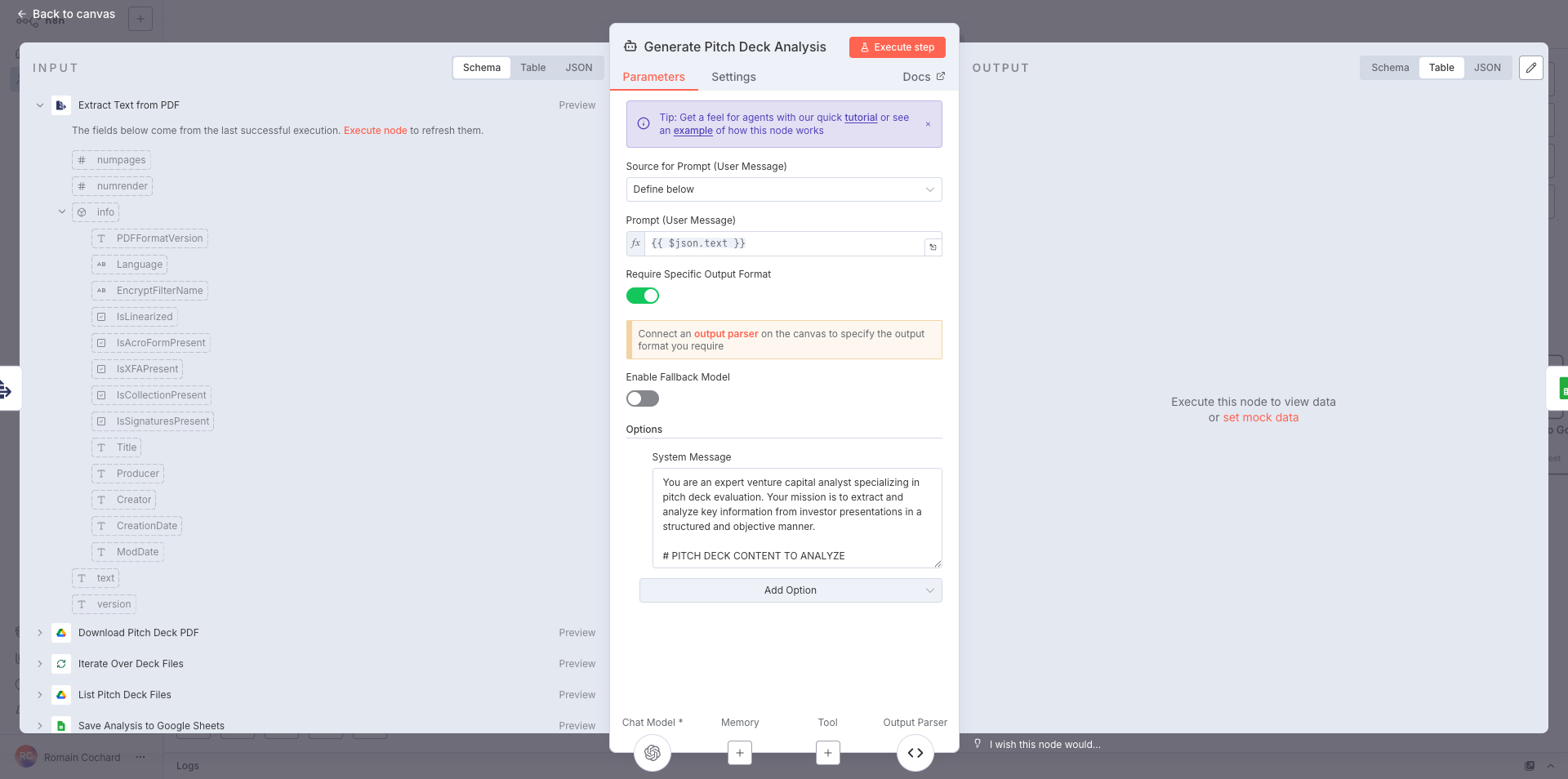
This is where the magic happens. The AI Agent node sends the extracted pitch deck text to GPT-4 with a carefully crafted system prompt that transforms it into an expert VC analyst. The AI doesn't just summarize—it extracts structured data, evaluates the opportunity across multiple dimensions, identifies red flags, and generates actionable recommendations.
The system prompt is the secret sauce here. It instructs the AI to think like a seasoned investor, extracting everything from basic startup info to nuanced qualitative assessments. The output parser ensures the response comes back in a structured JSON format that can be directly mapped to your Google Sheets columns.
💡 Tip: The system prompt included in this workflow has been refined through hundreds of deck analyses. However, you can customize it to match your specific investment thesis—add criteria for specific industries, adjust scoring weights, or include questions relevant to your due diligence process.
 Parameters
- Source for Prompt (User Message):
Define below - Prompt (User Message):
{{ $json.text }}— passes the extracted PDF text directly to the AI - Require Specific Output Format: Toggle ON (enabled) — ensures the AI returns structured data matching your output parser schema
- Enable Fallback Model: Toggle OFF (disabled) — you can enable this to use a backup model if the primary fails
- System Message: Expert VC analyst prompt with detailed instructions for extraction and scoring
- Chat Model: OpenAI GPT-4 (connect your OpenAI credential)
- Output Parser: Connect a Structured Output Parser node to define the expected JSON schema with all 50+ fields
- Source for Prompt (User Message):
06 Step 06Save Analysis to Google Sheets.
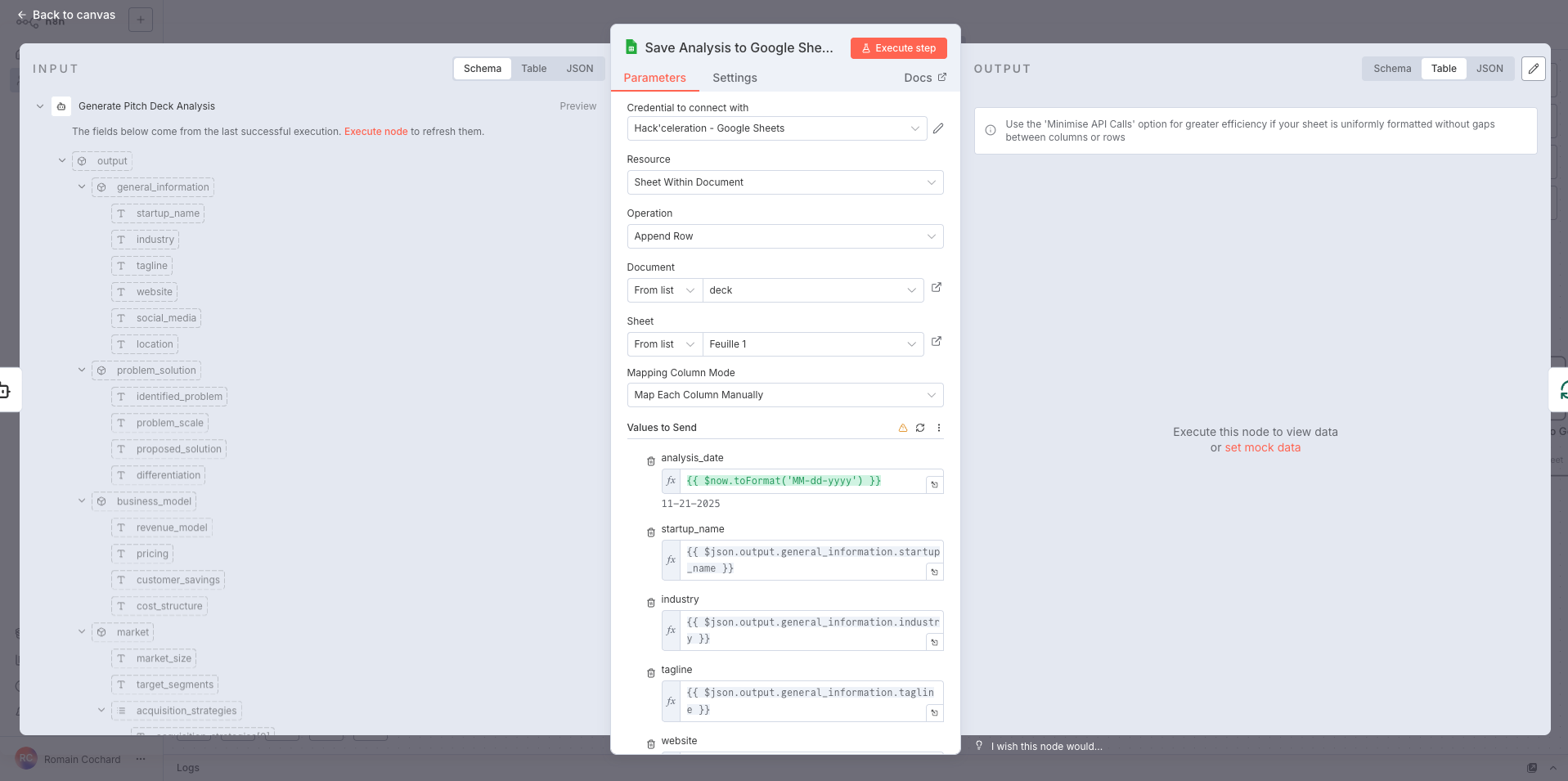
The final step exports all the AI-generated analysis into a structured Google Sheets spreadsheet. Each pitch deck becomes a row, with 50+ columns capturing everything from basic startup info to detailed scores and recommendations. This creates your comprehensive dealflow database that you can filter, sort, and share with your investment committee.
The column mapping is configured manually to ensure each piece of extracted data lands in exactly the right place. Dynamic expressions pull data from the nested JSON structure returned by the AI agent, transforming complex analysis into organized spreadsheet columns.
💡 Tip: Before running the workflow, create your Google Sheet with column headers matching your expected output fields. This makes the mapping process much smoother. You can download our template spreadsheet with all 50+ columns pre-configured.
Parameters- Credential to connect with: Select your Google Sheets credential configured in n8n
- Resource:
Sheet Within Document - Operation:
Append Row - Document: From list → Select your destination Google Sheets file (e.g., "Pitch Deck Analysis Database")
- Sheet: From list → Select the specific sheet tab (e.g., "Sheet1" or "Dealflow")
- Mapping Column Mode:
Map Each Column Manually - Values to Send (key expression mappings):
- analysis_date:
{{ $now.toFormat('MM-dd-yyyy') }}— automatically timestamps each analysis - startup_name:
{{ $json.output.general_information.startup_name }} - industry:
{{ $json.output.general_information.industry }} - tagline:
{{ $json.output.general_information.tagline }} - website:
{{ $json.output.general_information.website }} - (Continue mapping all 50+ fields from the AI output to your spreadsheet columns)
- analysis_date:
Get the ready-to-import n8n JSON plus the install guide
Drop your email and we'll send you the complete scenario.
- n8n JSON ready to import
- Written setup guide
- Video tutorial included
Why Automating Pitch Deck Analysis is a Game-Changer for Investors
In the high-velocity world of startup investing, the ability to quickly identify promising opportunities separates successful investors from those who miss the next unicorn. Yet the reality of pitch deck review is anything but efficient. The problems with manual deck review: Time drain: A thorough pitch deck analysis takes 30-45 minutes minimum. Multiply that by 20-50 decks per week, and you've lost days of productive time Inconsistent evaluation: Your criteria shift based on fatigue, mood, and time pressure. The deck you review at 5 PM Friday doesn't get the same attention as the one at 9 AM Monday Information scattered everywhere: Notes in different documents, half-remembered details, no single source of truth for comparing opportunities Missed opportunities: While you're stuck reviewing, competitors with faster processes are already scheduling founder meetings Scaling challenges: As deal flow increases, quality decreases. You can't hire analysts fast enough to keep up The benefits of AI-powered automation: Consistent 50+ point analysis: Every single deck receives the same thorough evaluation against the same criteria—no exceptions Minutes instead of hours: What took 45 minutes now takes under 2 minutes, including structured output generation Centralized dealflow database: All analysis in one searchable, sortable Google Sheet. Compare startups side-by-side instantly 24/7 processing: Drop decks in the folder any time. Wake up to complete analysis ready for review Scalable without additional headcount: Process 10 or 1,000 decks with the same workflow. Your capacity is limited only by API costs, not human bandwidth Focus on high-value activities: Spend your time meeting promising founders and closing deals, not reading slides This workflow transforms pitch deck analysis from a bottleneck into a competitive advantage. You'll see more opportunities, evaluate them more consistently, and move faster on the ones that matter. For similar AI-powered document extraction workflows, explore our other downloadable automations.
The full automation, in your inbox.
n8n JSON, written guide and video tutorial, everything to ship this in under 15 minutes.
- Complete n8n scenario JSON
- Step-by-step setup documentation
- Full video walkthrough