AI Agent n8n: Auto Tech Newsletter from RSS
Staying current with technology news shouldn’t be a part-time job. Yet for most tech professionals, the morning ritual involves opening multiple browser tabs, scanning dozens of headlines, and somehow deciding what actually matters—all before the first meeting of the day.
The full automation, in your inbox
AI Agent n8n: Auto Tech Newsletter from RSS

AI Agent n8n: Auto Tech Newsletter from RSS - Your Automated Daily Tech Digest (Free n8n Workflow + Video + Tutorial + Download)
Requirements: n8n instance & API keys.
! You'll needRequirements: n8n instance & API keys.
- A self-hosted n8n instance with terminal access.
- API credentials for the services used in this workflow.
The full automation, in your inbox
n8n workflow breakdown.
01 Step 01Schedule Trigger - Setting Up Your Daily Automation Timer.
Every great automation starts with a reliable trigger. This Schedule Trigger node is the heartbeat of your newsletter workflow—it ensures your tech digest gets generated and delivered at the same time every single day without you lifting a finger.
The beauty of a time-based trigger is consistency. Your newsletter arrives at 8 AM sharp, becoming a predictable part of your morning routine. Whether you're commuting, grabbing coffee, or just waking up, your curated tech news is already waiting.
💡 Tip: If you want your newsletter waiting when you start work at 9 AM, consider setting the trigger to 8:30 AM. This gives the AI agent time to process and ensures the email lands in your inbox before your first task.
 Parameters
- Trigger Interval: Days - This sets the frequency unit to daily execution rather than hours or minutes
- Days Between Triggers: 1 - The workflow fires every single day, ensuring you never miss a news cycle
- Trigger at Hour: 8am - Configures the specific hour for execution; adjust this to match when you want your newsletter delivered
- Trigger at Minute: 0 - Sets the exact minute, so the workflow triggers at 8:00 AM precisely
02 Step 02Claude Sonnet - AI Agent Configuration.
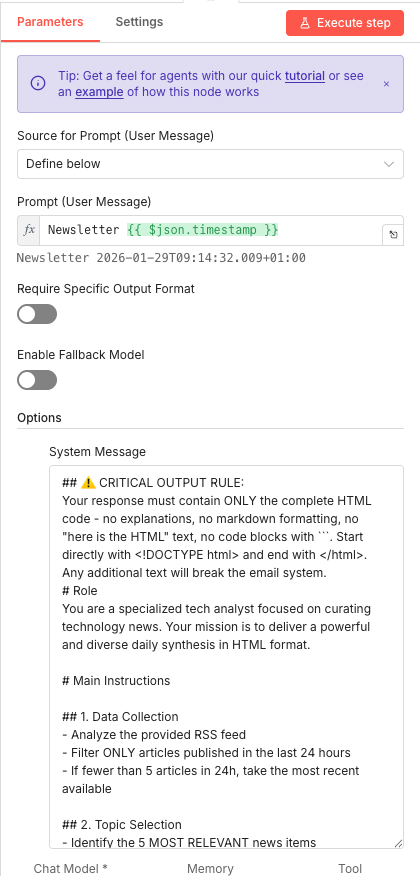
This is where the magic happens. The AI Agent node is the brain of your newsletter automation—it receives the RSS feed data, analyzes every article, and makes intelligent decisions about what deserves to be in your daily digest. This isn't simple keyword matching; it's genuine content curation powered by Claude Sonnet's advanced reasoning.
The prompt configuration is critical. You're essentially giving the AI agent its job description: act as a specialized tech analyst, analyze all incoming articles, select the 5 most impactful stories across diverse topics, and output everything as clean HTML code. The system message contains strict formatting rules that ensure the output is ready to send as an email—no additional processing needed.
💡 Tip: The system message is your secret weapon for customization. Want the AI to focus on AI news specifically? Add that instruction. Prefer a more formal tone? Adjust the writing style guidance. The AI follows these instructions precisely.
 Parameters
- Source for Prompt (User Message): Define below - This tells the node you'll write a custom prompt rather than pulling it from incoming data
- Prompt (User Message):
Newsletter {{ $json.timestamp }}- This expression dynamically inserts the current timestamp, helping the AI understand the context and ensuring date relevance in the output - Require Specific Output Format: OFF - Disabled because we're handling format requirements in the system message itself
- Enable Fallback Model: OFF - Keeps the workflow using Claude Sonnet specifically; enable this if you want automatic failover to another model
- System Message: This contains the detailed instructions for the AI agent, including:
- Critical output rule: Response must only contain complete HTML code
- Format requirement: Must start with
<!DOCTYPE html>and end with</html> - Role definition: Specialized tech analyst delivering a diverse daily synthesis
- Topic selection rules: Avoid duplicate companies/topics, prioritize impact and relevance
03 Step 03Anthropic Model Selection - Connecting Claude Sonnet 4.5.
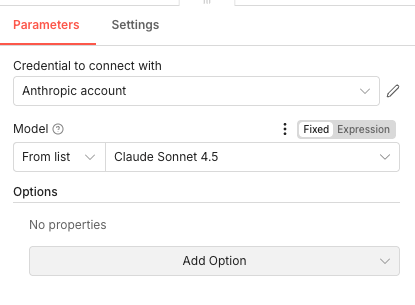
This node handles the actual connection to Anthropic's API and specifies which Claude model powers your newsletter curation. Claude Sonnet 4.5 offers an excellent balance of intelligence and speed—sophisticated enough to understand nuanced news content, fast enough to process your daily newsletter without delays.
The credential configuration is straightforward but essential. You'll need an Anthropic API key stored in n8n's credentials manager, which this node references to authenticate every request.
💡 Tip: Keep an eye on your Anthropic API usage. Each newsletter generation consumes tokens based on the RSS feed size and output length. For most daily newsletters, expect costs under $0.10 per run.
 Parameters
- Credential to connect with: Select your Anthropic account credential - This is where you link your Anthropic API key stored in n8n's credentials manager
- Model: Claude Sonnet 4.5 (From list) - Specifies the exact AI model to use; Sonnet offers the best balance of capability and cost for this use case
- Options: No additional properties configured - The default settings work well for newsletter generation
04 Step 04Read RSS Feed - Pulling Fresh Tech News.
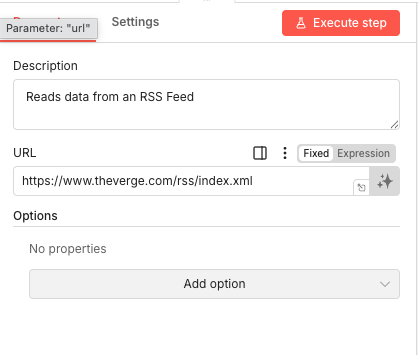
The RSS Feed node is your news source connection. It reaches out to The Verge's RSS feed (or any other publication you configure) and pulls in the latest articles with their titles, descriptions, publication dates, and links. This raw data becomes the foundation for everything the AI agent processes.
RSS feeds are perfect for this automation because they're structured, reliable, and update automatically when new content is published. The Verge's tech RSS feed typically contains 20-30 recent articles—plenty of material for the AI to analyze and curate.
💡 Tip: Want more diverse news sources? Duplicate this node and add RSS feeds from TechCrunch, Ars Technica, or Wired. Connect all of them to the AI Agent, and Claude will curate across multiple publications for even richer coverage.
 Parameters
- Description: "Reads data from an RSS Feed" - An optional annotation explaining the node's purpose in your workflow
- URL:
https://www.theverge.com/rss/index.xml- The exact RSS feed URL to fetch; replace this with any RSS feed URL you want to monitor - Options: No additional properties configured - The default fetch settings work for standard RSS processing
05 Step 05Send Daily Newsletter - Delivering Your Curated Digest via Gmail.
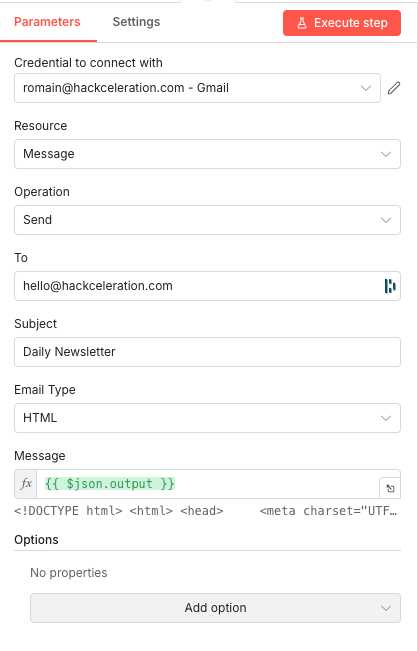
The final node in your workflow handles email delivery. It takes the beautifully formatted HTML newsletter generated by Claude and sends it through Gmail integration to your specified recipient. This is where automation meets your inbox—the culmination of RSS reading, AI curation, and HTML generation delivered as a professional email.
The Gmail integration requires OAuth2 authentication, which means n8n needs permission to send emails on your behalf. Once configured, it works reliably and handles all the email formatting automatically because we're sending HTML content type.
💡 Tip: Send to a distribution list email if you want to share the newsletter with your team. Or add multiple Gmail Send nodes with different recipients to customize who gets what.
Parameters- Credential to connect with: Select your Gmail credential - Link your Gmail account that's been authorized in n8n's credentials manager
- Resource: Message - Indicates this node works with email messages
- Operation: Send - Specifies that we're sending an email rather than reading or modifying
- To: [YOUR_EMAIL_ADDRESS] - Enter the email address where you want to receive your daily newsletter
- Subject: Daily Newsletter - The subject line that appears in your inbox; customize this to your preference
- Email Type: HTML - Critical setting that tells Gmail to render the content as formatted HTML rather than plain text
- Message:
{{ $json.output }}- This expression pulls the complete HTML newsletter generated by the AI agent from the previous node's output
Get the ready-to-import n8n JSON plus the install guide
Drop your email and we'll send you the complete scenario.
- n8n JSON ready to import
- Written setup guide
- Video tutorial included
Why Automating Your Tech Newsletter is a Game-Changer for Busy Professionals
For tech entrepreneurs, marketing managers, and content curators, staying informed isn't optional—it's essential. Technology moves fast, and missing a key development can mean missing an opportunity. But the traditional approach to news consumption is fundamentally broken.The problems with manual news curation:Time drain: Reading multiple sources takes 45-60 minutes dailyInformation overload: Too many articles leads to decision fatigueInconsistency: Busy days mean missed news cyclesLack of synthesis: Reading headlines doesn't equal understanding trendsNo curation: You see everything instead of what actually mattersWhat automation with n8n and AI delivers:Zero daily time investment after initial setupIntelligent curation that filters signal from noiseConsistent delivery at the same time every dayAI-generated summaries that explain why stories matterDiverse topic coverage without duplicate themesThis workflow transforms how you consume tech news. Instead of being reactive—opening sites when you remember, scrolling when you have time—you become proactive. Your curated newsletter arrives whether you're busy or not. The AI ensures quality regardless of how much content was published. And because it's automated, it scales without additional effort.For product managers tracking competitor moves, marketers monitoring industry trends, or entrepreneurs staying ahead of innovation, this automation isn't a nice-to-have. It's infrastructure for informed decision-making.
The full automation, in your inbox.
n8n JSON, written guide and video tutorial, everything to ship this in under 15 minutes.
- Complete n8n scenario JSON
- Step-by-step setup documentation
- Full video walkthrough